
Home › Forums › General Questions › Can we save position / rotation in Verge published file
- This topic has 9 replies, 3 voices, and was last updated 5 months, 2 weeks ago by
 Alexander Kovelenov.
-
AuthorPosts
-
2026-04-01 at 6:46 am #86816
 visualizerParticipant
Hi
I am wondering if there is any feature in puzzle such as save user changes made to geometries like position or rotation by using drag / rotate facility?Example – A simple scene with cube drag / rotate. If I drag move or rotate the cube then can it be saved by using puzzles or any means? So next time scene opens it reads from certain file or remain in memory the last session parameters?
-
This topic was modified 5 months, 2 weeks ago by
 visualizer.
2026-04-01 at 7:33 am #86818 Alexander KovelenovStaff
Hi,
This is actually a very good question! There are different methods of preserving state of Verge3D-based applications:
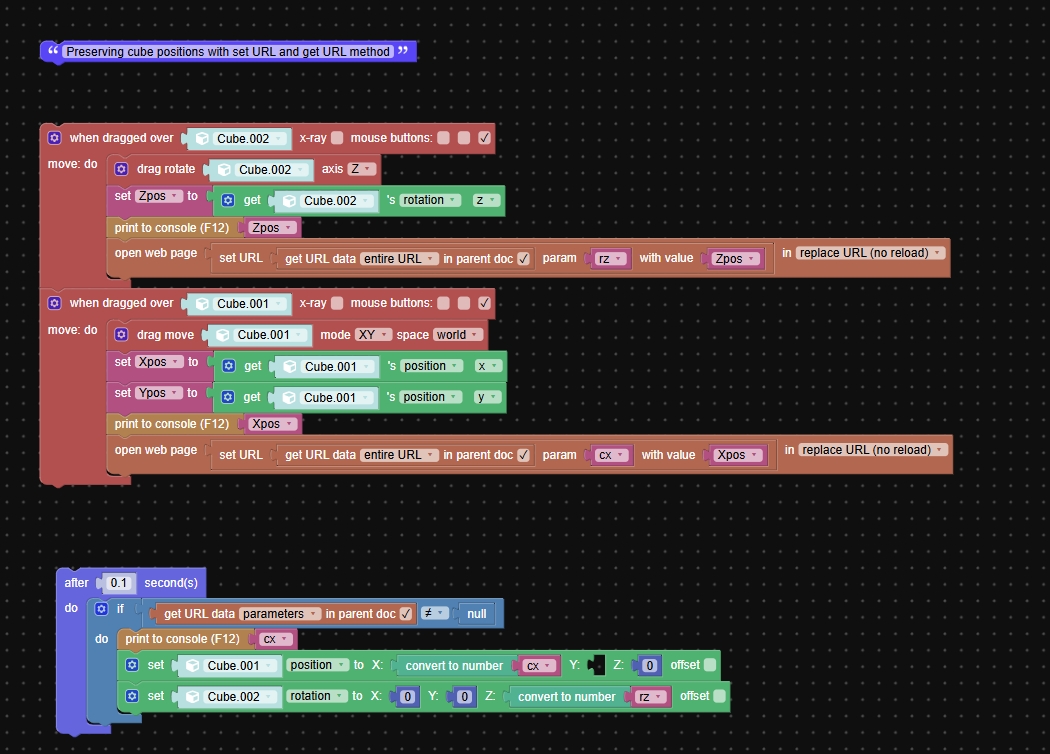
1) Storing data in URL params. Data is saved by the open web page puzzle with replace URL (no reload) option, which in turn gets a URL generated by the set url param puzzle. To retrieve the data use the get URL data puzzle with parameters option.
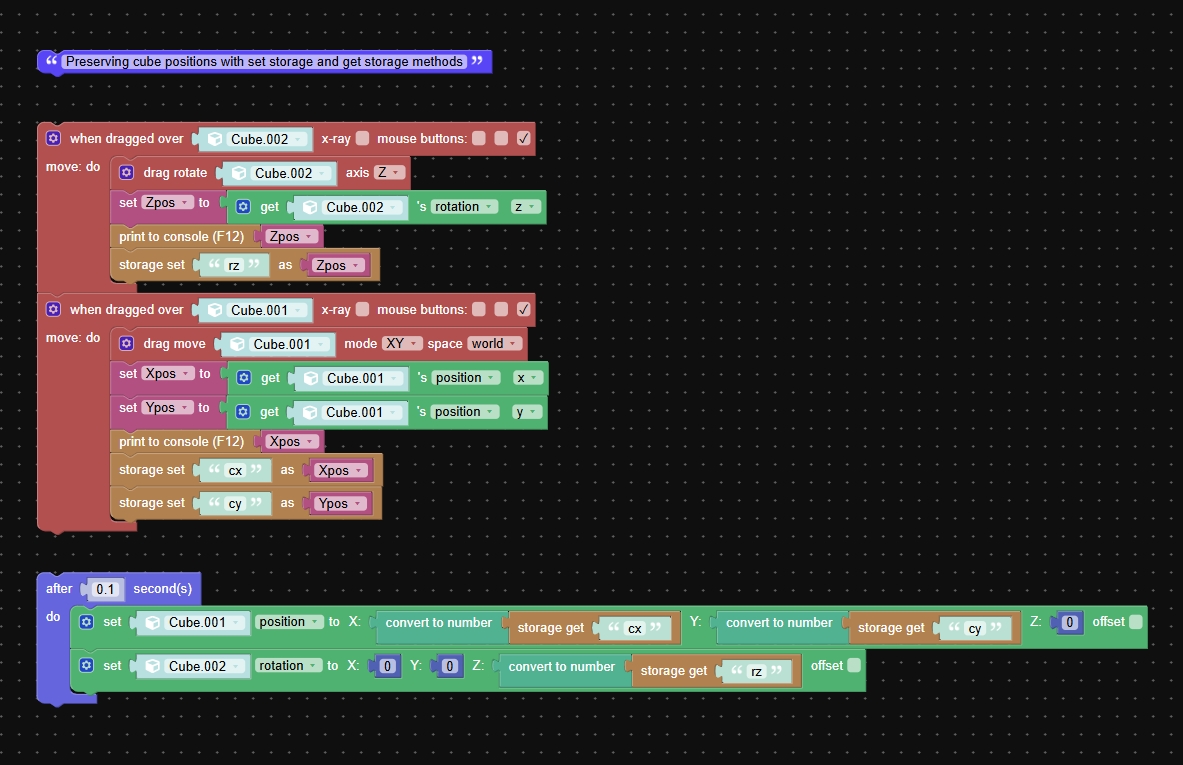
2) Storing data in browser local storage. See the storage set / storage get puzzles.
3) Storing data on web server. This would require authenticating your users. The easiest way to achieve that would be using cloud-based backends such as Firebase. In fact, Verge3D 4.12 is made fully compatible with such solutions. We’re preparing a how-to guide explaining how to integrate Verge3D with Firebase, so stay tuned!
Which one to chose depends on your situation. Methods 1 and 2 are very easy to implement, but 3 is the standard approach.
2026-04-01 at 9:23 am #86820visualizerParticipantExcellent to know that our most loved Verge is getting more robust and futuristic.
Interesting.
I will check the references.
Thank you very much for guidance points !2026-04-01 at 9:42 am #86821
saurav
ParticipantIs there any method to save the changed colour or texture of an object in Verge3D?
2026-04-01 at 9:45 am #86822Alexander KovelenovStaffIs there any method to save the changed colour or texture of an object in Verge3D?
Sure, the same methods I mentioned earlier should work just fine. For the texture there is an additional method based on the file storage capabilities of Verge3D for WordPress plugin. See the Custom Image example in the Asset Store.
2026-04-01 at 12:20 pm #86824ParticipantI tried to implement puzzles with set URL and get URL method as well as set storage and get storage, but it is not working, what could be the issue?
Attachments:
2026-04-01 at 3:22 pm #86830Alexander KovelenovStaffI tried to implement puzzles with set URL and get URL method as well as set storage and get storage, but it is not working, what could be the issue?
For URL params there should be key-value pairs where key is the name of the value to store. Once you get “parameters” you should extract individual keys with dict get key. Also, the 0.1s timer appears to be useless. You should extract parameters explicitly, e.g. during the app load or by pressing to some button, etc.
For the storage set/get example you should explicitly define what you store and what you extract. Again, timer appears to be useless.
In any case try to debug your snippet.
2026-04-04 at 7:12 am #86862ParticipantThank you for guidance. It worked fine now!
-
This reply was modified 5 months, 2 weeks ago by
saurav.
2026-04-04 at 10:35 am #86864ParticipantThe scene works fine as long as the tab is open but when we close the tab and reopen the file, the original positions get reset. What shall be done to save the change permanently?
Do we have to create an external file where the data will be saved and read from?2026-04-04 at 2:47 pm #86868Alexander KovelenovStaffThe scene works fine as long as the tab is open but when we close the tab and reopen the file, the original positions get reset. What shall be done to save the change permanently?
If it’s about saving data in the URL, you should specify full path, not just HTML to make the app work.
Do we have to create an external file where the data will be saved and read from?
It’s possible for sure, though might not be very convenient for the users.
-
This topic was modified 5 months, 2 weeks ago by
-
AuthorPosts
- You must be logged in to reply to this topic.