We use cookies to ensure that we give you the best experience on our website. If you continue to use this site we will assume that you are happy with it.

Still having problems with HTML Planes

Home Forums General Questions Still having problems with HTML Planes

Viewing 6 posts - 16 through 21 (of 21 total)
  • Author
    Posts
  • #87029

    Indeed, Firefox works way better with this feature. You might reduce the pixel size of the iframe when using the “create page with html”. In some cases this fixes inconsistencies introduced by the Chrome/Edge browser.

    Soft8Soft Tech Chief
    Want more Verge3D updates? Follow me on X, Facebook, or LinkedIn

    #87031
    gf3d
    Customer

    Which size do you mean with the pixel size?……

    it now has a width of 4…..a height of 2.25 and a res of 1920…

    when i change any of these numbers it doesn´t fit anymore to the 3D palne which is used for the fade in

    Greets

    Ger

    #87034

    I was referring to the 1920 resolution. We have some Safari issues with “Webpage Inside 3D” demo and managed to fix it by reducing the resolution specifically for that browser.

    In general I’d suggest reproducing this bug using a minimal scene with basic planes and sending this example to us. This would help a lot with debugging.

    Soft8Soft Tech Chief
    Want more Verge3D updates? Follow me on X, Facebook, or LinkedIn

    #87035
    gf3d
    Customer

    Hi Alexander,

    reducing this 1920 value is not the solution….in that case not all of the Webpage is shown on the plane….it needs scrolling then…which is not what i need…

    I will setup a basic scene as it is right now in Max 2025 and i will supply you with it as well #as with the verge data…

    Greets

    Ger

    #87036
    gf3d
    Customer

    Hi Alexander,

    i just send a mail to your Mail account ( info@ )

    just start the link for the data needed

    Greets

    Ger

    #87052

    Hi,

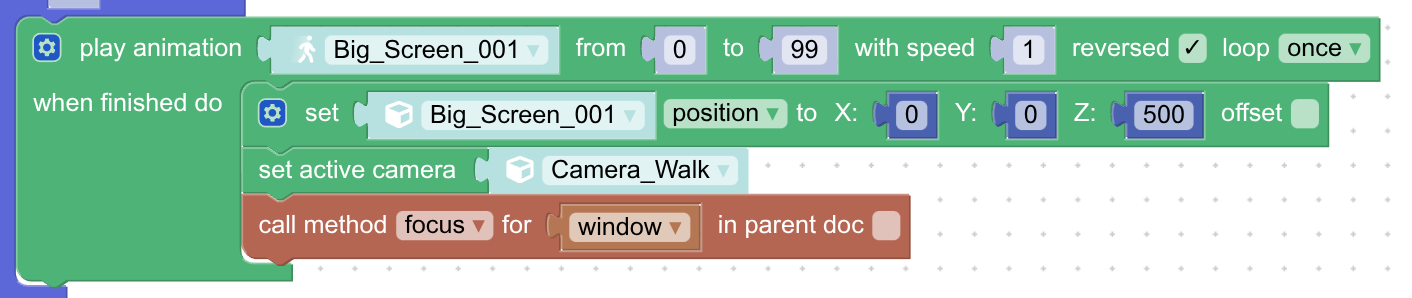
    I think I know where the root of the problem lies. There is a gotcha in web browsers when iframes are stealing the focus from the main page. To make the keyboard keys work again you need to force the focus back to the main page with the call method puzzle. I’ve added it right after you switch your camera back and everything works just fine!

    Soft8Soft Tech Chief
    Want more Verge3D updates? Follow me on X, Facebook, or LinkedIn

Viewing 6 posts - 16 through 21 (of 21 total)
  • You must be logged in to reply to this topic.