
Home › Forums › General Questions › Model not responding to parent UI button clicks after load
- This topic has 5 replies, 2 voices, and was last updated 4 months, 2 weeks ago by
 Alexander Kovelenov.
-
AuthorPosts
-
2026-06-09 at 11:17 pm #87485
3dma
CustomerHi guys! For some reason, after loading, the model sometimes not responding to parents html UI button clicks. After refresh page, it starts working most time
The buttons are injected into the parent index.html page only once on initial load from Webflow CMS depending on a URL query parameter.
Do you have any ideas as to what might be causing this and how it can be fixed?
2026-06-10 at 12:25 pm #87493 Alexander KovelenovStaff
Hi,
I’d suggest inserting print to console to verify that:1) Elements are present when you start your Puzzles.
2) Actual event listeners got registered on the elements.
3) Events were fired upon clicks.See here for more info.
-
This reply was modified 4 months, 3 weeks ago by Alexander Kovelenov.
2026-06-12 at 7:55 am #87505CustomerHi Alexander, It seems that Verge loads first and doesn’t attach listeners to the buttons that appear later.
Is there a way to add a loading/initialization delay inside Verge, within the puzzles?
For now, I’ve managed to add a temporary fix to the index.html file
<script> let lastButtonCount = 0; let stableChecks = 0; function startVergeWhenUIReady() { const iframe = document.querySelector(".model_component"); const optionsReady = !!document.querySelector("#options-items"); const buttonCount = document.querySelectorAll("[data-option-btn][id]").length; if (buttonCount > 0 && buttonCount === lastButtonCount) { stableChecks++; } else { stableChecks = 0; lastButtonCount = buttonCount; } if (iframe && iframe.dataset.src && optionsReady && buttonCount > 0 && stableChecks >= 3) { if (!iframe.getAttribute("src")) { iframe.setAttribute("src", iframe.dataset.src); console.log("3D iframe started after UI. Buttons:", buttonCount); } return; } setTimeout(startVergeWhenUIReady, 100); } window.Webflow = window.Webflow || []; window.Webflow.push(function () { setTimeout(startVergeWhenUIReady, 300); }); </script>-
This reply was modified 4 months, 3 weeks ago by
3dma.
2026-06-12 at 4:12 pm #87509Alexander KovelenovStaffHi,
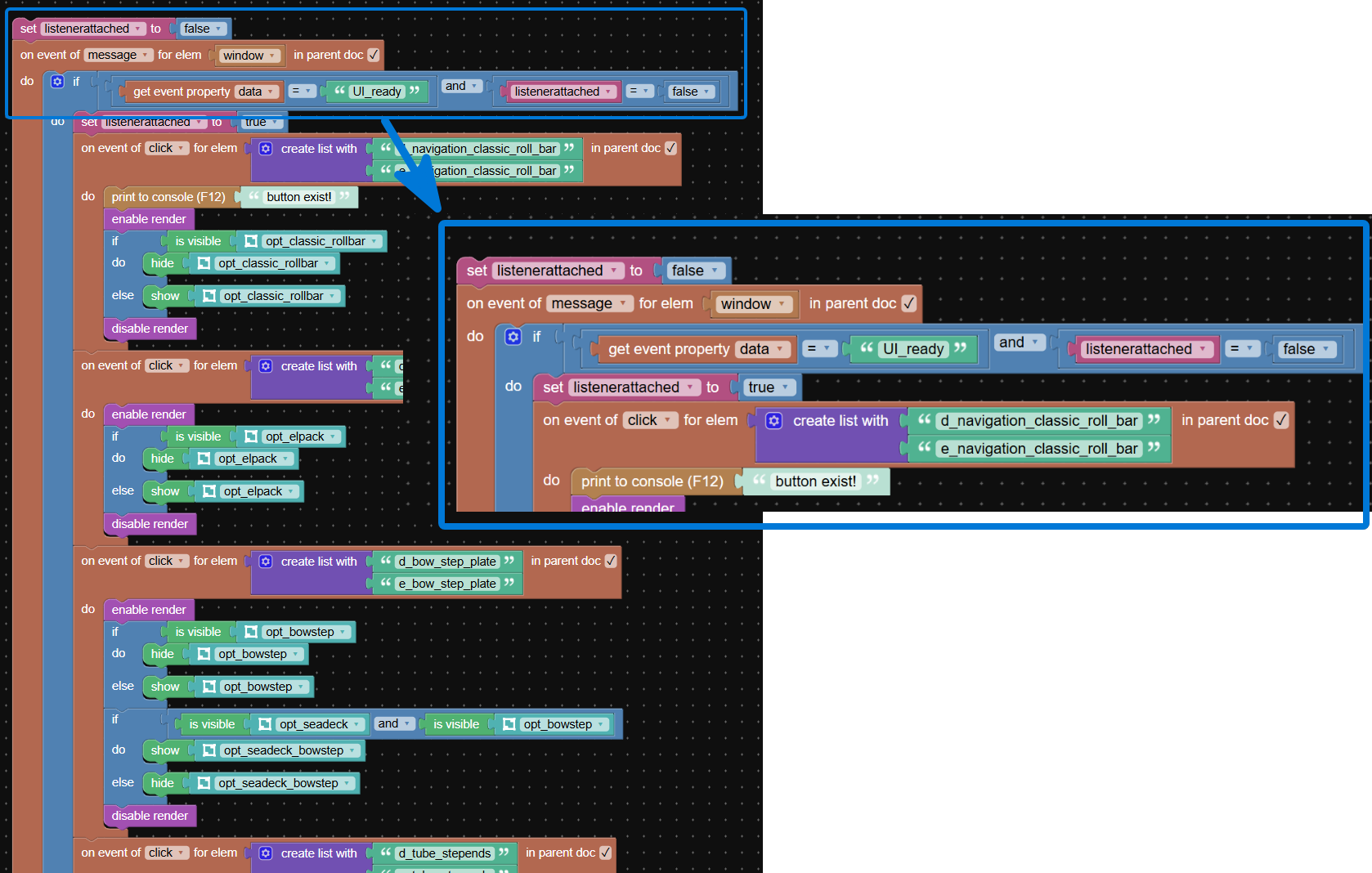
Delaying Verge3D page startup might not be the most efficient method to fix this issue. Instead you can try running the verge app normally, but send a message (with postMessage) to the iframe once the buttons are ready. In puzzles you can catch this message by using the on event of puzzle and attach all required event listeners in the do slot of this puzzle.2026-06-12 at 7:52 pm #87511CustomerThanks for the suggestion!
1. Could you please explain why delaying the Verge3D iframe startup is not the most efficient approach? In my quick test seems to prevent the issue, so I’d like to understand the possible downsides
2. If possible could you please clarify deeper how the postMessage solution should look in Puzzles?
I attached a screenshot of how I understood it. Is this structure correct? And if yes, does it mean I need to move all ~100+ click event puzzles there inside that do slot Or turn all of this in procedure to make list shorter?
Thanks!Attachments:
2026-06-15 at 5:05 pm #87516Alexander KovelenovStaffWhen you load the main frame first, and iframed Verge3D app second, there is some time lost. By utilizing postMessage you can load both in parallel and delay registering event listeners then the elements will actually be available.
Your snippet looks OK. If there are any issues, try to debug with print to console puzzle.
-
This reply was modified 4 months, 3 weeks ago by
-
AuthorPosts
- You must be logged in to reply to this topic.