
- This topic has 4 replies, 3 voices, and was last updated 6 months, 2 weeks ago by
 c4cc.
c4cc.
-
AuthorPosts
-
2026-03-03 at 8:16 pm #86427
 c4ccParticipant
A little late, but time to offset the Monday fucking blues by introducing new exciting features and gameplay mechanics to Megaman X: Nightmare! Long as it was since the last updates, it was necessary to ensure the new gameplay mechanics and user features were accurately implemented and ran smoothly as intended without bugs or errors.
Updates
Gameplay:
- Fireball, Petra dash now launches further
- Flamethrower
- Charged Flamethrower
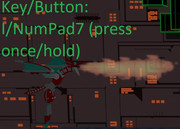
Press Key I/NumPad 7, once, repeatedly, or held down to fire a simple flamethrower
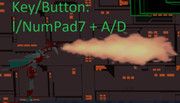
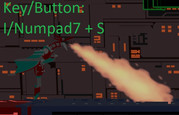
When Key I/Numpad 7 is held down more than a second, rapidly tap the directional button that Petra is facing twice (e.g., if Petra is facing right, and Key I/Numpad 7 held down, tap Key D at least twice, Key A for left). When flamethrower gets bigger, it may be aimed downwards to a limited degree by holding down Key D. Note in this flamethrower mode, player is unable to move.
Game features:
- Placement of heart tanks and energy capsules are now different
- Player now flashes white when damage is taken.
- Certain stage platforms have flowing emission as electric/data currents.
Website Features:
- “Desktop Version” link under game window is now changed to “Retry Stage”.
- Game pages now have gameplay manuals under the game screen
Bugs fixed:
- Enemies’ damage outputs are now consistent.
- Caliberated intended movement speeds and ranges to run equally on all devices (e.g., no excessive movement speeds in fullscreen mode on UWQHD monitors, or on 60 Hz monitors at 60 fps)
- Fixed player controls to prevent spamming excessive dashing movement and speed caused when a dashing is playing – player must wait for dash to complete fully before executing another.
- General optimization of code to increase fps for optimal user experience, especially for lower device ranges.
- Using touchscreen on the webpage’s gamepad buttons will no longer prompt image downloads
- Petra can no longer dash and kick/use flamethrower simultaneously; only shoot fireballs while dashing
Credits:
xeon
Giving me a headstart and pointing me in the right directions by answering questions like”- holding down keys/buttons
- multiple emissions in a material
- consistent game speeds/stats for all device and desktop specs
Alexander Kovelenov
Answering my question regarding increasing app speed and responsiveness via:- screen scale puzzles
- Original credits to the individuals who helped me release the prototype trial product for this web browser game
Please note that I will no longer update the current playable character Petra, but I will move on to implementing other playable characters, enemies, gameplay features/mechanics, stage layouts, visuals, etc. Hell, I’m planning to develop other browser games in the near future too.
Naturally, feedback and suggestions are always welcome. Again, a big shout out to those of you who helped me, especially by answering forum questions, and stay tuned for more exciting news and updates! Cheers!

-
This topic was modified 6 months, 2 weeks ago by c4cc.
-
This topic was modified 6 months, 2 weeks ago by c4cc.
-
This topic was modified 6 months, 2 weeks ago by c4cc.
-
This topic was modified 6 months, 2 weeks ago by c4cc.
-
This topic was modified 6 months, 2 weeks ago by c4cc.
-
This topic was modified 6 months, 2 weeks ago by c4cc.
-
This topic was modified 6 months, 2 weeks ago by c4cc.
-
This topic was modified 6 months, 2 weeks ago by c4cc.
-
This topic was modified 6 months, 2 weeks ago by c4cc.
-
This topic was modified 6 months, 2 weeks ago by c4cc.
FPS trialproduct 20.9.25 https://postimg.cc/gallery/LMM5vkQ/af43346e
2026-03-04 at 6:02 am #86442 Yuri KovelenovStaff2026-03-04 at 1:54 pm #86448c4ccParticipant
Thanks for the support – look forward to more exciting news and updates
FPS trialproduct 20.9.25 https://postimg.cc/gallery/LMM5vkQ/af43346e
2026-03-04 at 5:14 pm #86451 xeonCustomer
Great progress…. just some thoughts for consideration:
1. for those not familiar – what is the objective?
2. Color selection is green and orange tones – these are the two colors most frequently problematic for people with color blindness.
3. Contrast – you may want to use some emissive materials to make objects brighter. The scene is rather dark and emissive materials may be more performant than lights. This is a game creative so its subjective.Xeon
Route 66 Digital
Interactive Solutions - https://www.r66d.com
Tutorials - https://www.xeons3dlab.com2026-03-04 at 6:45 pm #86452c4ccParticipant1) It’s a side scrolling game, based of Megaman X. Get from one end of level to another –
naturally I’d develop more complex and complete stages later on2) Again, as it’s based of Megaman x6, green and orange is unfortunately part of background
3) Alright, I’ll see how I can use emissive materials to make the objects brighter, do you mean
the stage platforms or all the objects in the game (e.g., characters, platforms)?Thanks for the feedback, I’ll work on those ASAP
FPS trialproduct 20.9.25 https://postimg.cc/gallery/LMM5vkQ/af43346e
-
AuthorPosts

- You must be logged in to reply to this topic.