We use cookies to ensure that we give you the best experience on our website. If you continue to use this site we will assume that you are happy with it.

Keyboard input sensing

Home Forums General Questions Keyboard input sensing

Viewing 9 posts - 1 through 9 (of 9 total)
  • Author
    Posts
  • #86459
    visualizer
    Customer

    Hi
    In published scene, can we use keyboard “key” as input to trigger any function in verge? OR can we assign hotkey to any function in verge? like what we do in Blender typically?
    Not WASD thing but other keys as well.

    • This topic was modified 1 month ago by visualizer.
    • This topic was modified 1 month ago by visualizer.
    • This topic was modified 1 month ago by visualizer.
    • This topic was modified 1 month ago by visualizer.
    #86469
    xeon
    Customer
    #86470
    saurav
    Participant

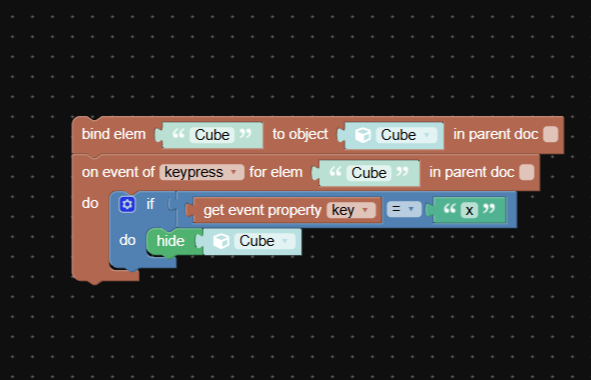
    I am trying to perform keypress function. Is this the right way?

    Attachments:
    #86472
    c4cc
    Customer

    Yes, any key user input can have functions, even if not WASD

    credit to kdv for teaching me this – while it’s WASD, you can still apply this to other keys like “I”, “O”, “P”, etc

    FPS trialproduct 20.9.25 https://postimg.cc/gallery/LMM5vkQ/af43346e

    #86473
    visualizer
    Customer

    Interesting.
    its been a time I hvnt seen KDV here anymore.

    #86474
    c4cc
    Customer

    kdv was really helpful to us, and he was immeasurably knowledgeable too. I can only aspire to have his level of skills someday

    FPS trialproduct 20.9.25 https://postimg.cc/gallery/LMM5vkQ/af43346e

    #86615
    saurav
    Participant

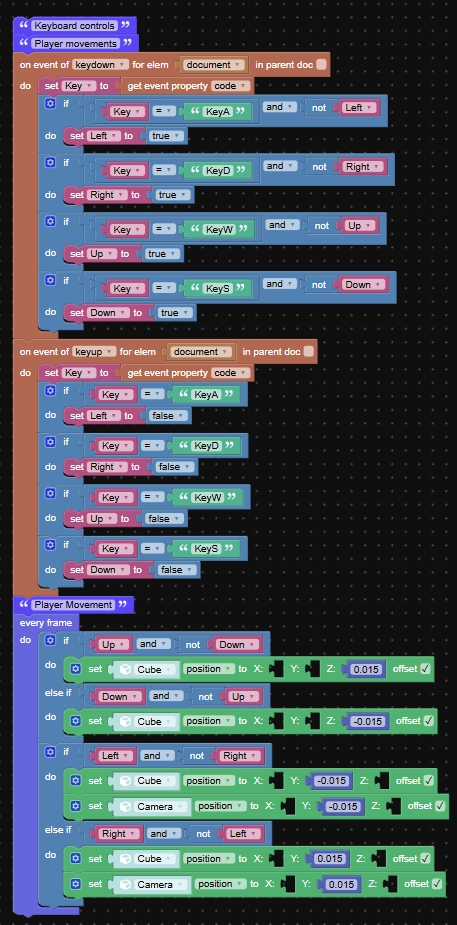
    I have tried implementing the puzzle, but it is working inverted. I have also changed the values of X,Y,Z and keys but still works the same. What could be the issue?

    #86626
    xeon
    Customer

    Show your puzzles and describe what you are wanting it to do and I am sure the group can help

    Xeon
    Route 66 Digital
    Interactive Solutions - https://www.r66d.com
    Tutorials - https://www.xeons3dlab.com

    #86634
    saurav
    Participant

    On pressing W key it must move up, but the cube moves down. Similar issues happen with ASD keys as well. I have also tried inverting the keys, changing the position values of Y and Z but still doesn’t work.

Viewing 9 posts - 1 through 9 (of 9 total)
  • You must be logged in to reply to this topic.