
Home › Forums › Graphics / Blender › Scrub object’s animation with a draggable div?
- This topic has 9 replies, 3 voices, and was last updated 4 months, 3 weeks ago by
 jefferywright2194.
-
AuthorPosts
-
2026-05-05 at 8:29 pm #87094
 jefferywright2194Participant
I have a div constrained within a container, movement limited to the x axis, via jquery on the web page
$( “#draggable” ).draggable({ axis: “x”, containment: “#drag”, scroll: false });
When the div is dragged right, I want a few object’s animations to play forward, and back when the div is dragged back to its default left justified starting position.
The only solution a search uncovered was:
Get the slider’s value or position. (um, okay?)Map to Animation: Use a math block to map the position (\(x\) or \(y\)) of the dragged object to the set animation frame puzzle. (what math block?)
…with no further explanation or description of the specific steps.
Has anyone managed to get a draggable slider to scrub through an object’s animation sequence?
How did you do it?
Thanks!
-
This topic was modified 5 months ago by jefferywright2194.
2026-05-06 at 2:07 pm #87107jefferywright2194ParticipantI have added to the jquery on my page code that reports the relative x position of the draggable element:
$( function() {
    $( "#draggable" ).draggable({ axis: "x", containment: "#drag", scroll: false });

$("#draggable").draggable({
    drag: function(event, ui) {
        // ui.position.left gives the relative x value
        console.log("Relative X:", ui.position.left);
		let dragPos = ui.position.left;
    }
});

  } );
It’s unclear how I can get Verge3D puzzles to capture that value, assuming this is the next logical step in the process.
I have a variable puzzle “dragPositionX” who’s value should be ui.position.left. I set dragPositionX to dragPos .
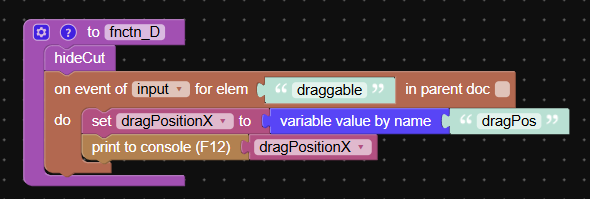
The console logs Relative X but does not log the value for dragPositionX.
-
This reply was modified 5 months ago by jefferywright2194.
-
This reply was modified 5 months ago by jefferywright2194.
-
This reply was modified 5 months ago by jefferywright2194.
-
This reply was modified 5 months ago by jefferywright2194. Reason: This forum has no preview function
2026-05-06 at 2:12 pm #87113jefferywright2194ParticipantI have added to the jquery on my page code that reports the relative x position of the draggable element:
$( function() {
    $( "#draggable" ).draggable({ axis: "x", containment: "#drag", scroll: false });

$("#draggable").draggable({
    drag: function(event, ui) {
        // ui.position.left gives the relative x value
        console.log("Relative X:", ui.position.left);
		let dragPos = ui.position.left;
    }
});

  } );
It’s unclear how I can get Verge3D puzzles to capture that value, assuming this is the next logical step in the process.
I have a variable puzzle “dragPositionX” who’s value should be ui.position.left. I set dragPositionX to dragPos .
The console logs Relative X but does not log the value for dragPositionX.
2026-05-06 at 2:13 pm #87114jefferywright2194ParticipantThis forum is not displaying what I submit.
There is something wrong, there should be 3 posts as seen in this view.
But here in the post, there is only two?

If I try to resubmit my post that is not appearing I get this:

If it already exists, why does it not appear here?
-
This reply was modified 5 months ago by jefferywright2194. Reason: This forum has no preview function
-
This reply was modified 5 months ago by jefferywright2194. Reason: This forum has no preview function
-
This reply was modified 5 months ago by jefferywright2194. Reason: This forum has no preview function
-
This reply was modified 5 months ago by jefferywright2194. Reason: This forum has no preview function
Attachments:
2026-05-06 at 3:52 pm #87123 Yuri KovelenovStaff2026-05-07 at 8:14 am #87124
 Alexander KovelenovStaff
Hi,
“variable value by name” works only for the variables defined in Puzzles. To retrieve a JavaScript variable assign it to the “window” object (to make it global) and then use the “javascript object → window” puzzle to retrieve it. See the example:
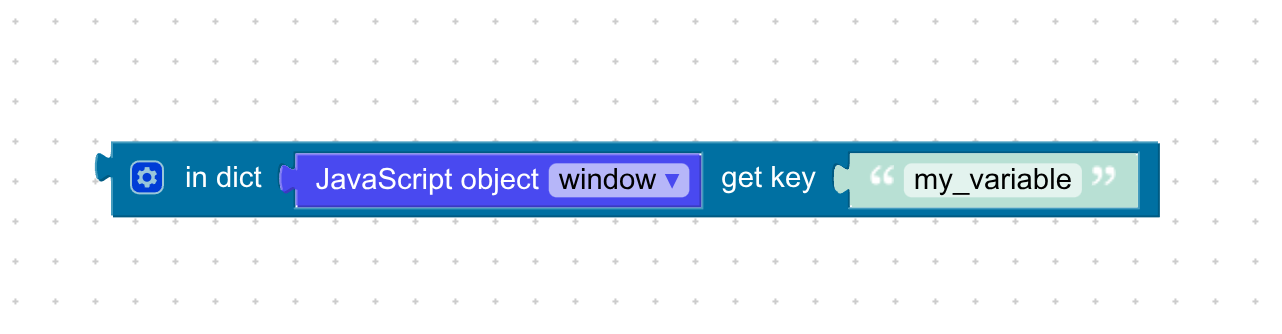
An alternative approach would using API calls or message passing as described here.
-
This reply was modified 5 months ago by
 Alexander Kovelenov.
-
This reply was modified 5 months ago by Alexander Kovelenov.
2026-05-07 at 2:08 pm #87154jefferywright2194ParticipantThanks, I am using Google AI to create a detailed, step by step process to achieve the outcome I want, but it has posted this issue:
If the get prop puzzle in your version of Verge3D lacks a gear icon, it is because you are using a version where “flexible input” is not enabled via a menu. Instead, you must use a specific combination of puzzles to “force” a manual property entry.
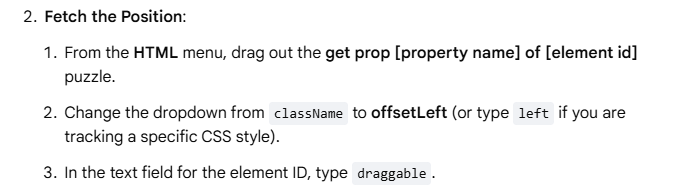
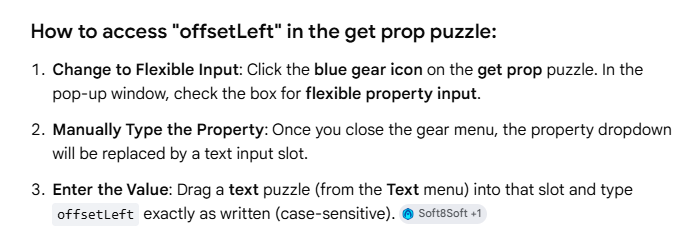
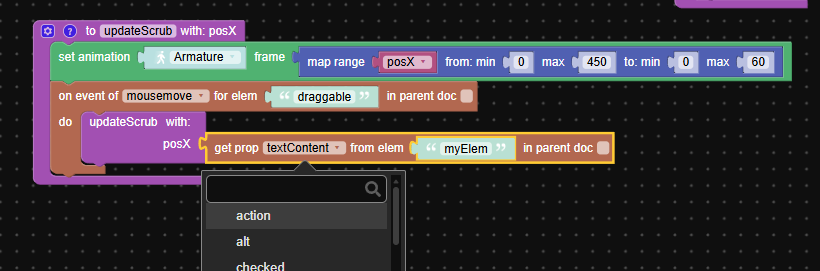
What version of Verge3D has a blue gear icon on get prop?
-
This reply was modified 5 months ago by jefferywright2194. Reason: This forum has no preview function or simple add image function
2026-05-07 at 4:23 pm #87159Alexander KovelenovStaffWhat version of Verge3D has a blue gear icon on get prop?
Unfortunately none. The entire answer looks like an AI hallucination. I’d suggest going with the global variable approach.
-
This reply was modified 5 months ago by Alexander Kovelenov.
2026-05-12 at 4:31 pm #87217jefferywright2194ParticipantTrue, Google AI constantly hallucinated, a very weird experience.
ChatGPT did far better, this procedure worked, see the attached document. I don’t fully understand it, I never ever would have figured this out on my own and it seems like no one has done this before, as I can find no examples of this anywhere.
This might make a good app template to include for users to access in the manager someday.
Procedure: Verge3D 4.10.0 + JQuery Drag Div to Scrub Object Animation
-
This topic was modified 5 months ago by
-
AuthorPosts
- You must be logged in to reply to this topic.