
- This topic has 4 replies, 2 voices, and was last updated 2 months ago by
emadamsinc1.
-
AuthorPosts
-
2026-09-22 at 2:43 pm #88434
emadamsinc1
ParticipantI need help refreshing my scene ideally it would reactivate the pre-loader like when you type ctrl-r to reset the whole app but I do not see that as an option so have explored two other solutions.
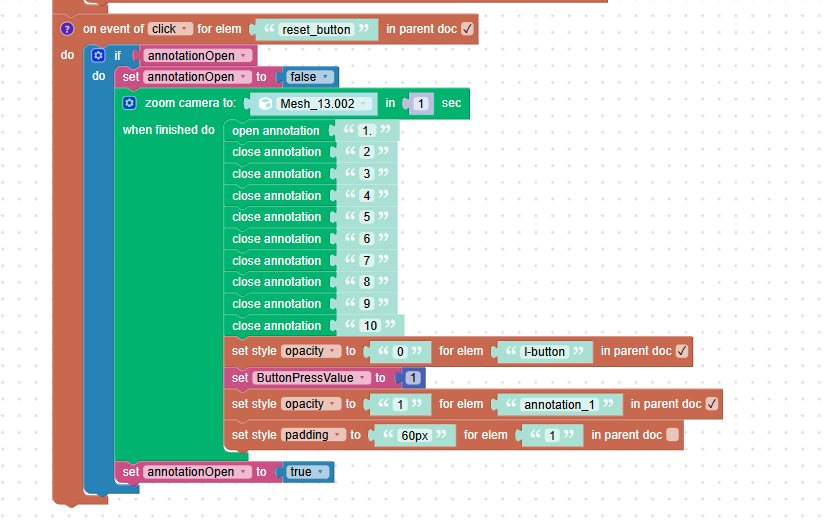
Solution 1 (screenshot below): I looked at a different solution which was resetting the scene back to my first annotation and turning off all annotations that were open. When I do that, I can’t get the annotation that was open in the sequence to close but this article says they should by creating a list: https://www.soft8soft.com/topic/make-all-annotation-popups-text-windows-disappear-when-clicking-elsewhere/
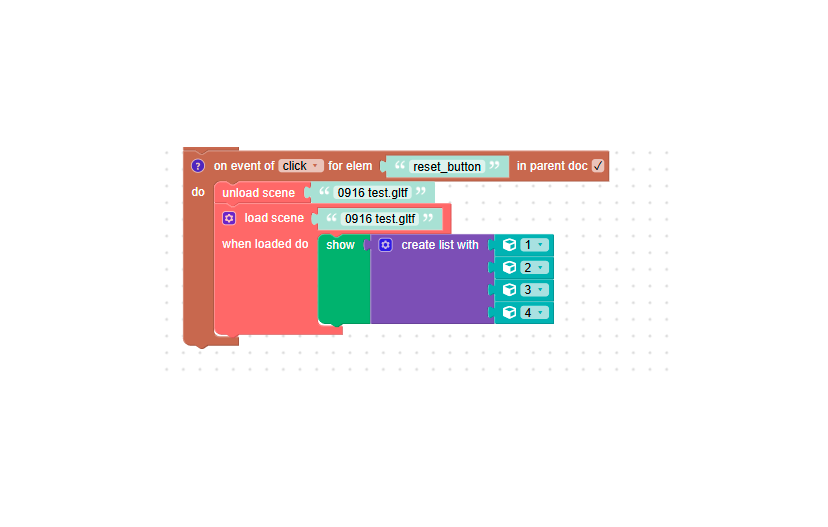
Solution 2 (screenshot below): I looked over this response however, this is for going between scenes and when I do something with the load/unload scene puzzles all my annotations disappear in the scene: https://www.soft8soft.com/topic/how-to-enable-verge3d-preloader-after-loading-new-scene/
Solution 3 (ideal solution): When the reset button is hit it would reset the page in the same way ctrl+r refreshes the browser or desktop app, that way the preloader shows again and the annotations do not disappear like in solution 2
Thank you – sorry to have a second question in such short succession
-
This topic was modified 2 months ago by
Attachments:
2026-09-22 at 7:42 pm #88438 xeonCustomer
Ok…happy to provide some help. The following is based on my experience…your specific needs may differ.
I have never seen or encountered a need to restart an app from the preloader. Even when creating “games”, an interactives that require a reset of sorts…starting from the preloader is not required.
Whats important is creating a “startup” procedure and a “reset” procedure.
The startup procedure should execute the required items to start your app.
The reset procedure should reset all the variables, cameras, frame positions, etc. that would exist under a restart.So now comes the bigger question….are…you just trying to reset the annotations or are you trying to do a full reset?
Xeon
Route 66 Digital
Interactive Solutions - https://www.r66d.com
Tutorials - https://www.xeons3dlab.com2026-09-22 at 8:39 pm #88439ParticipantA reset procedure that just reset the annotations back to one would be fine. But since I was running into an issue with closing the open annotations upon return to 1 I had initially just thought full reset would be the easiest solution.
2026-09-22 at 9:15 pm #88440xeonCustomerOk…so you are going to want to pay attention to how V3D executes puzzles and the order in which they are fired.
I do many of the MOD and MOAs that you look to be creating and a simple approach to a restart is in the project file here:
Xeon
Route 66 Digital
Interactive Solutions - https://www.r66d.com
Tutorials - https://www.xeons3dlab.com2026-09-24 at 3:43 pm #88482ParticipantThank you for taking the time to respond. This was very helpful and I am starting to understand better how the puzzles trigger.
-
This topic was modified 2 months ago by
-
AuthorPosts
- You must be logged in to reply to this topic.