
Home › Forums › Bug Reports and Feature Requests › Reporting an issue with Verge3D
- This topic has 69 replies, 20 voices, and was last updated 11 months ago by
 Alexander Kovelenov.
-
AuthorPosts
-
2025-03-25 at 4:04 am #80871
dx556po
ParticipantI have tried all the solutions you mentioned, but they have not worked. I still cannot solve this problem. I used Verge3d 4.9.0 and Blender 3.6.0
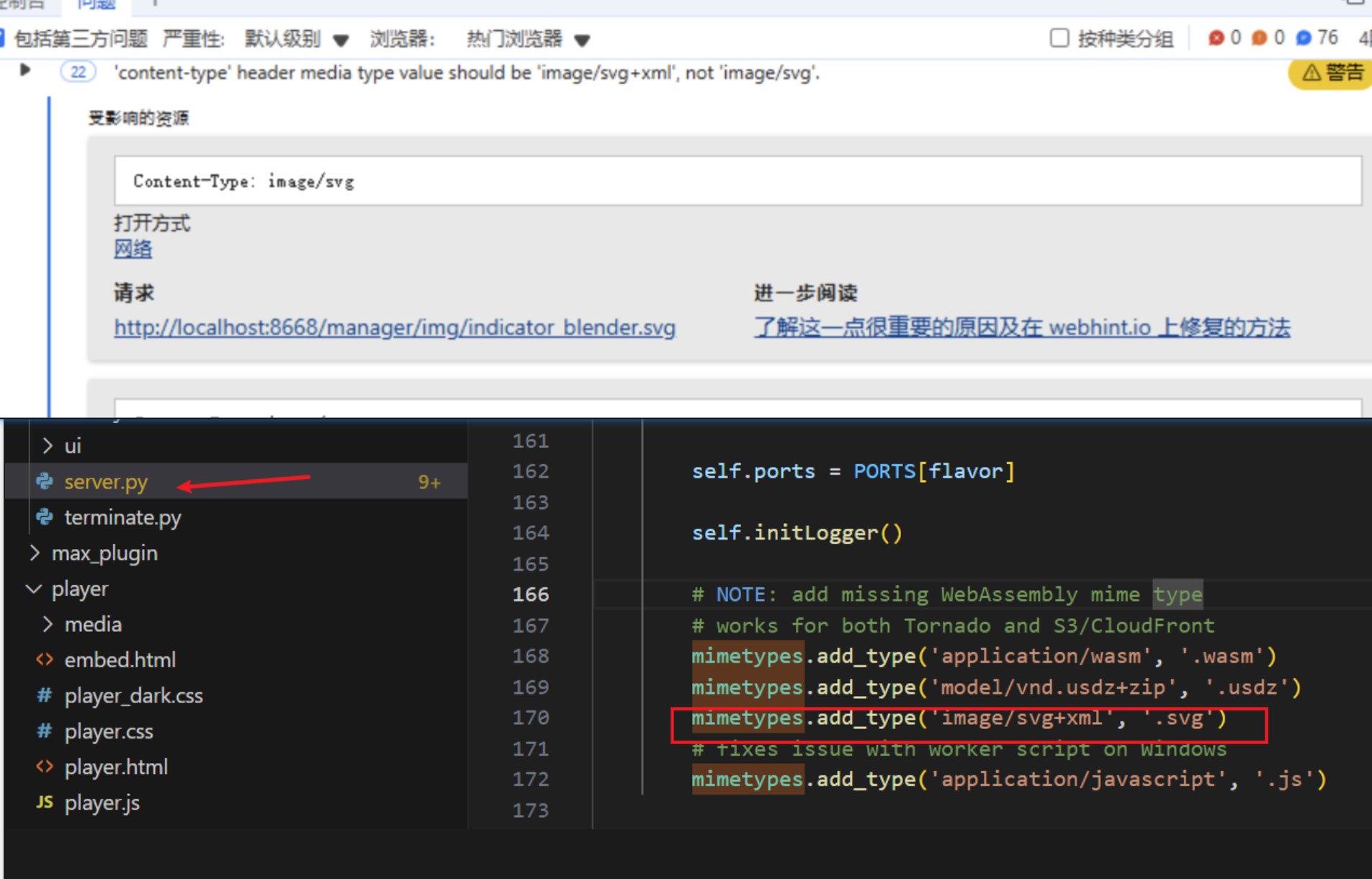
2025-03-25 at 5:24 am #80873ParticipantFind the file ‘server. py’ in the ‘manger’ directory of your installation directory.
Insert under 166 lines of code.
mimetypes.add_type(‘image/svg+xml’, ‘.svg’)2025-03-25 at 5:36 am #80874 QiangGeParticipant
This issue has been resolved. By adding mimetypes on the server, it is likely that the default types were modified due to the use of Google Web Designer,
Officially, it can be directly added to the server configuration to prevent modificationAttachments:
2025-03-25 at 5:55 am #80876 Alexander KovelenovStaff
That’s really strange SVG mime type is missing! Anyway, we’re going to provide workaround in the upcoming Verge3D update.
BTW could you confirm this works for you?
if mimetypes.guess_type('abc.svg')[0] == None: mimetypes.add_type('image/svg+xml', '.svg')2025-03-25 at 9:45 am #80878wangrui
ParticipantI have found a solution, and users who need it can replace the file I gave. The previous reason is that this file has no code to recognize svg, and its address is Verge3D_for_Blender\manager.
2025-03-25 at 9:46 am #80879ParticipantHahahaha, some netizens in China have found it for you.But thank you all the same.
2025-03-25 at 9:47 am #80880 FunJoy.TechCustomer
That’s really strange SVG mime type is missing! Anyway, we’re going to provide workaround in the upcoming Verge3D update.
BTW could you confirm this works for you?
if mimetypes.guess_type('abc.svg')[0] == None:
    mimetypes.add_type('image/svg+xml', '.svg')
We’ve confirmed with them that this works for him. However, we haven’t yet identified the cause, not able to reproduce it on our side. So far, we’ve received two identical reports of this issue.
As feedbacks, the browser console shows a 200 status for the SVG file, confirming it’s being found and served correctly (no 404 errors). If directly accessing the icon URL triggers an SVG file download.
2025-03-25 at 10:37 am #80881Alexander KovelenovStaffWe’ve confirmed with them that this works for him. However, we haven’t yet identified the cause, not able to reproduce it on our side. So far, we’ve received two identical reports of this issue.
I believe considering severity of this issue for the Chinese users we’ll need to issue a minor 4.9 update soon!
2025-04-01 at 9:23 am #81032Alexander KovelenovStaff2025-04-03 at 9:04 am #81089Alexander KovelenovStaff -
AuthorPosts

- You must be logged in to reply to this topic.