
Home › Forums › Graphics / 3ds Max › expose transparency value
- This topic has 16 replies, 4 voices, and was last updated 3 months, 3 weeks ago by
 NaxosCG.
-
AuthorPosts
-
2026-02-18 at 3:12 pm #86273
 NaxosCGCustomer
Hello there !
I’m using Physical material for some objects (lightbulb), and i’d like to be able to change transparency, as for some coloured lights, the bulbs are no more transparent, but opaque glass.
I can’t figure-out how to expose the transparency param to verge3D :
tried all this in 3DSmax:
– controller in the transparency slot;
– RGBA controler in the transparency color slot;
– colormap in the transparency color slot;
– bitmap in the transparency color slot;
– set an animation key;…and this in verge3D puzzles :
– change bitmap or set value or set color… Transparency is not in the list…
– use flexible input mode to force “transparency” valueNo way.
I could also use 2 different shaders, but as the material is in a multi/sub one (because i need the lightbulb to be attached to the other parts, it is one only mesh with matIDs and multiSub…
So if someone has an idea, that would help.
Regards"1+1=3... for large values of 1"
2026-02-19 at 9:51 am #86275 Mikhail LuzyaninStaff
Can you share a simple example file with your material? it’s can be attached to a simple shpere or only with the bulb in the scene.
-
This reply was modified 6 months, 4 weeks ago by
 Mikhail Luzyanin.
Co-founder and lead graphics specialist at Soft8Soft.
2026-02-19 at 2:46 pm #86277NaxosCGCustomerCan you share a simple example file with your material? it’s can be attached to a simple shpere or only with the bulb in the scene.
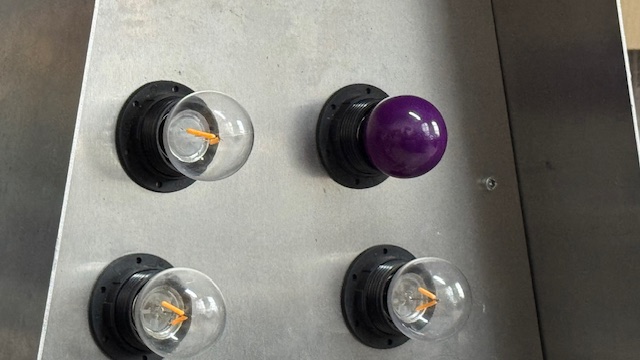
Here is the object
The bulb material has be changed into opaque one regardless of the choosen color, with puzzles.
see attached photo.Thnaks.
-
This reply was modified 6 months, 4 weeks ago by NaxosCG.
"1+1=3... for large values of 1"
2026-02-20 at 8:57 am #86282Mikhail LuzyaninStaffSeems like it’sa bug because of emittion settings, we’ll find out how to fix this in future, but for now you can fix it by using emittion intencity parameter instead of emition color to turn of a bulb lighting and always set emittion intencity to 0 before change the trancperency.
Attachments:
Co-founder and lead graphics specialist at Soft8Soft.
2026-02-20 at 4:51 pm #86284NaxosCGCustomerthing is i will need both emission and transparency / opacity…
Is there anyway to change material inside a multi/sub mtl within verge3D using puzzles ?
"1+1=3... for large values of 1"
2026-03-05 at 10:02 am #86453 Alexander KovelenovStaff2026-03-05 at 2:11 pm #86456NaxosCGCustomer
Hi,
We’ve found a bug with processing emission for glTF-compatible materials. The fix will be included in the upcoming Verge3D release.Great to read ! Many thanks !!
"1+1=3... for large values of 1"
2026-03-17 at 2:03 pm #86625NaxosCGCustomerHi,
We’ve found a bug with processing emission for glTF-compatible materials. The fix will be included in the upcoming Verge3D release.Hello again,
Do you know when this will be fixed and released ? My current project needs it
Best regards.
"1+1=3... for large values of 1"
2026-03-18 at 6:00 am #86631 Yuri KovelenovStaff2026-03-18 at 1:45 pm #86641NaxosCGCustomer
Releasing Verge3D for Blender today, so the Max flavor can be expected tomorrow
Youhouuuu !
"1+1=3... for large values of 1"
2026-03-20 at 10:53 am #86703NaxosCGCustomerHello again,
Sorry but the bugfix did not helped me, as i tried hundred of shaders and only physical gives me the desired render…
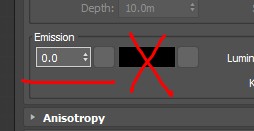
Problem is still that transparency is not available in puzzles… Even with a controller in parameter.
See screenshot, please.Attachments:
"1+1=3... for large values of 1"
2026-03-20 at 10:54 am #86705NaxosCGCustomerSolution could be to assign another material, but this one is part of multi/sub material, as the mesh contains several materials.
As i’m cloning it, it is best to keep it as one mesh with multi/sub mtl.Maybe it is possible to assign a new material only for specific ID within multiMap ?
"1+1=3... for large values of 1"
2026-03-20 at 11:20 am #86706NaxosCGCustomerOk, i think i could manage it, using the (new ?) “multi-material index” to change only the transparent mtl.
"1+1=3... for large values of 1"
2026-03-20 at 11:39 am #86708Alexander KovelenovStaff2026-03-20 at 1:30 pm #86712NaxosCGCustomerI guess we fixed some other bug then
 We’ll try to address the right one in the upcoming Verge3D update.
"1+1=3... for large values of 1"
-
This reply was modified 6 months, 4 weeks ago by
-
AuthorPosts


- You must be logged in to reply to this topic.