We use cookies to ensure that we give you the best experience on our website. If you continue to use this site we will assume that you are happy with it.

Vr camera height adjustment issue

Home Forums General Questions Vr camera height adjustment issue

Viewing 5 posts - 1 through 5 (of 5 total)
  • Author
    Posts
  • #86443
    visualizer
    Customer

    Hi
    I am facing an issue with camera height adjustment when entered in VR model.

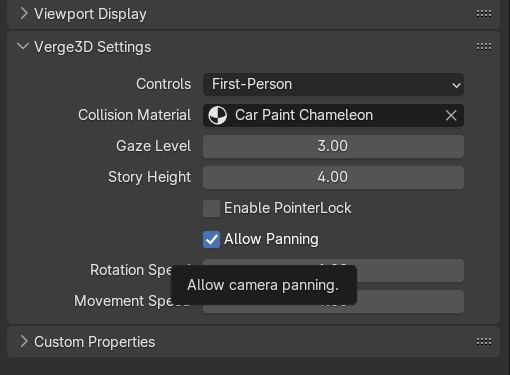
    I tried changing both the settings of first person but it doesn’t work, What I am missing?

    • This topic was modified 1 week, 4 days ago by visualizer.
    • This topic was modified 1 week, 4 days ago by visualizer.
    Attachments:
    #86447

    Hi,
    Firstperson camera settings are not used in VR mode. The height of the camera is determined by the real helmet position above the ground. Please check out the following guide for more info.

    Soft8Soft Tech Chief
    Want more Verge3D updates? Follow me on X, Facebook, or LinkedIn

    #86450
    visualizer
    Customer

    Oh!
    what is the meaning of those options exactly & how they work then?
    1. Gaze level
    2. story height

    Secondly,
    do I need to scale ( up or down ) my VR scene to adjust the first person’s height gives normal feel? I guess then this is the only trick which might work.

    #86455

    Gaze level/story height only work fpr conventional, non-VR firstperson controls.

    On the other side, VR scenes use real-world metrics. E.g. the gaze level is the distance between your eyes and the floor level, object dimensions should match the dimensions of real objects and so on.

    Soft8Soft Tech Chief
    Want more Verge3D updates? Follow me on X, Facebook, or LinkedIn

    #86458
    visualizer
    Customer

    Ok got it !
    clear now ! :good:

Viewing 5 posts - 1 through 5 (of 5 total)
  • You must be logged in to reply to this topic.
