
- This topic has 4 replies, 2 voices, and was last updated 2 months, 4 weeks ago by
 NaxosCG.
-
AuthorPosts
-
2026-07-30 at 2:13 pm #88171
 NaxosCGCustomer
Hello there,
New project but i have to R&D to find if i can do it.
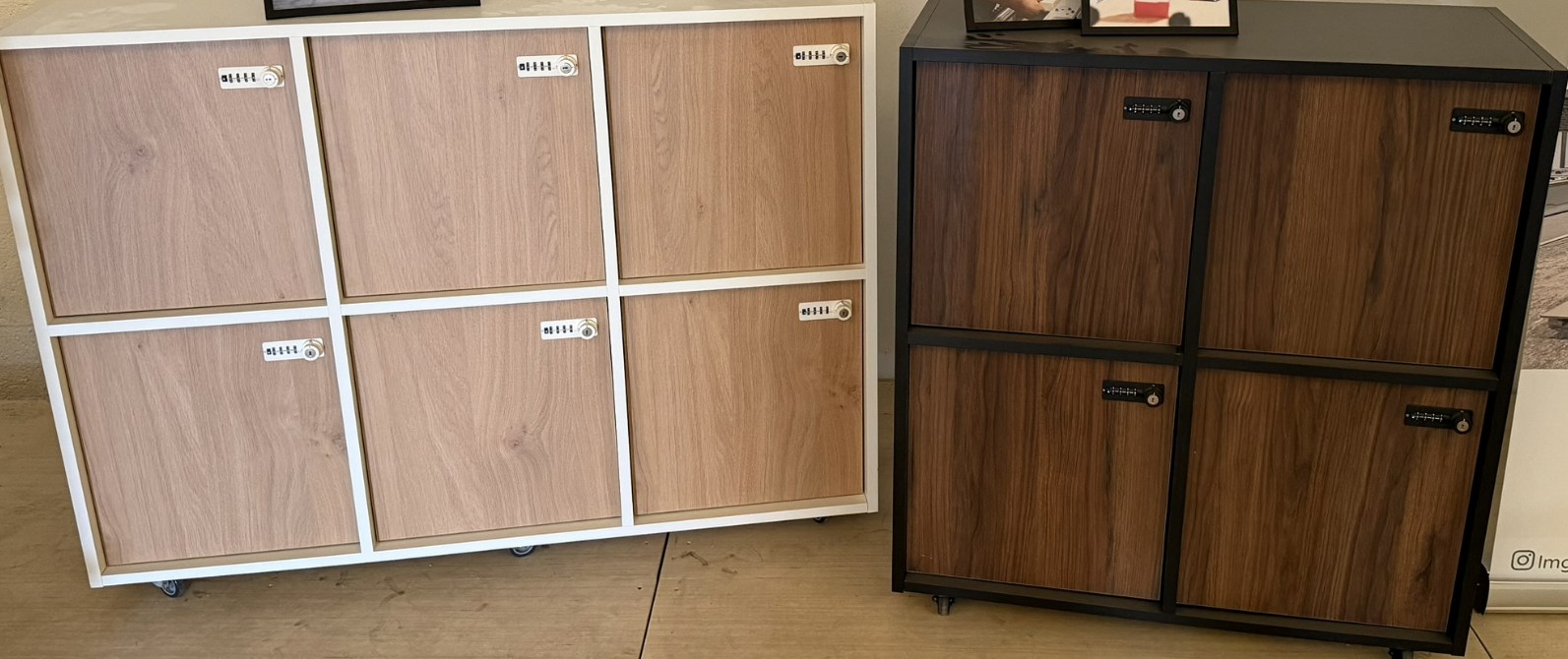
The customer makes box-shaped furnitures, like ikea ones (see picture)Those are coming in several flavours : 1×2, 2×1, 2×2, 2×3 and 3×2 (squares)
Let the end user change colors and number of doors (small squares ones, or double sized or even triple-sized ones, options…) i can do.
BUT
After choosing colors and doors and options, the new setted furniture has to be manipulated beside (or above) other ones, so the end user can create a full wall of square furnitures.
So questions :
1 – How do i let the user to move an object to be “snapped” beside an already placed furniture ? (beside or above if less than 3 meters for ex.)
2 – How do i let the user to select onr specific placed furniture to let him change colors, doors, options ?Any help for knowing where to start would be nice… will i need Dictionaries or some dev-oriented stuff ?
Regards.
Attachments:
"1+1=3... for large values of 1"
2026-07-30 at 4:50 pm #88174 xeonCustomer
It sounds like your dimensions are perfect for a grid. You just create a dictionary or list to keep track of where an item is. You then snap move objects based on the grid and use drag and drop if there is nothing in the grid spaces where the object is released. If there is something occupying the space where you want to drag the object to then it would just revert to last good position, ignoring the input.
Xeon
Route 66 Digital
Interactive Solutions - https://www.r66d.com
Tutorials - https://www.xeons3dlab.com2026-07-31 at 8:49 am #88176NaxosCGCustomerIt sounds like your dimensions are perfect for a grid. You just create a dictionary or list to keep track of where an item is. You then snap move objects based on the grid and use drag and drop if there is nothing in the grid spaces where the object is released. If there is something occupying the space where you want to drag the object to then it would just revert to last good position, ignoring the input.
Hello Xeon,
Sounds good indeed. I can imagine doing this without difficulties for 1×1 squares, but not sure how to manage it with 1×2, 2×1, 2×2, 2×3 and 3×2 elements.
Sorry to ask, remember i’m a 3D guy, not a code guy. I guess it is quite simple for coders.It looks like a jigsaw puzzle game, or a Tetris one… But how to code ?
Also, i guess once the different elements in place, i will be able to select one, isolate it then choose doors and colors.
"1+1=3... for large values of 1"
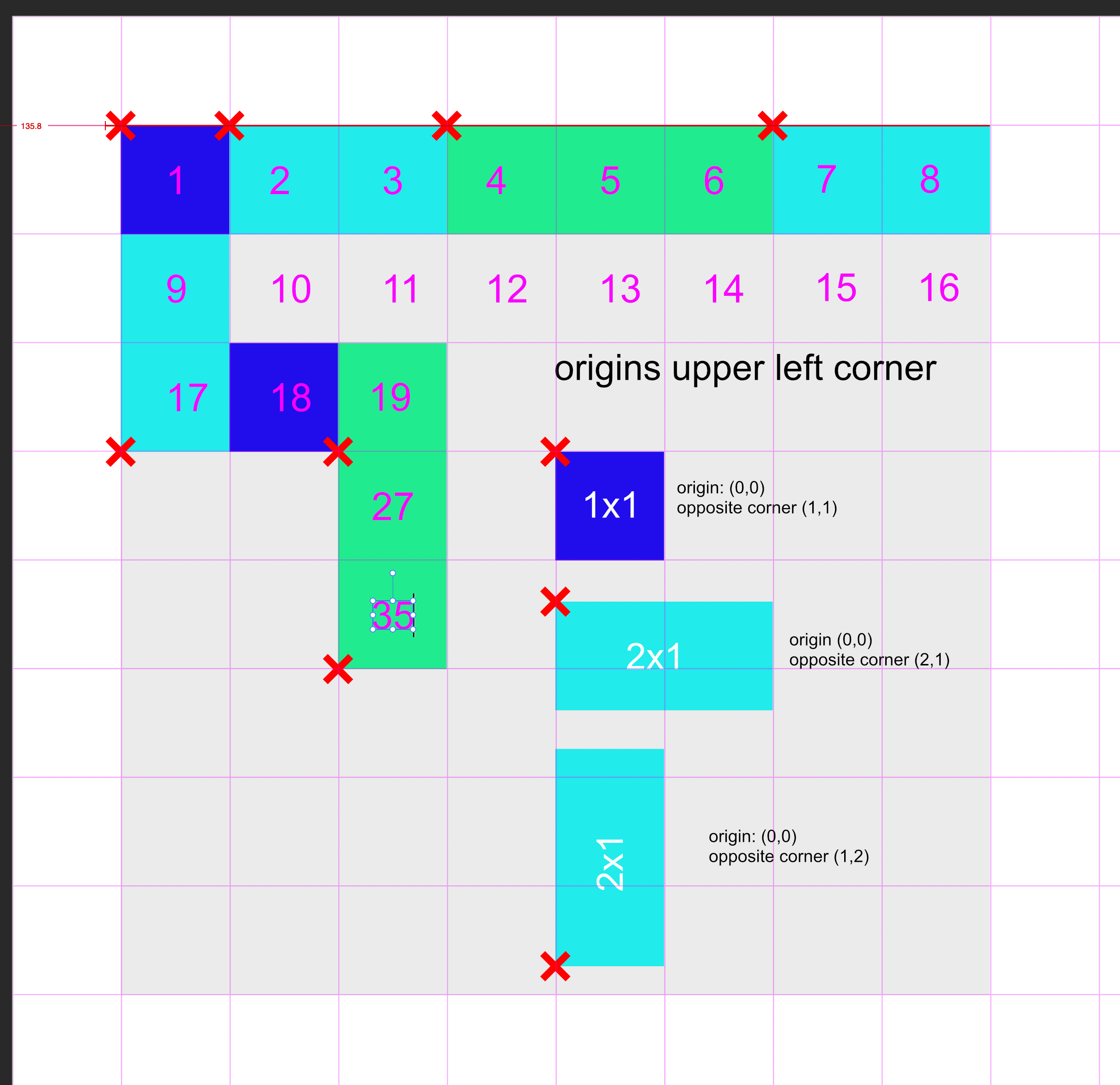
2026-07-31 at 2:32 pm #88177xeonCustomerYou may want to consider giving your objects partnumbers or sku numbers and create a dictionary item for each. In your example it seems you only 4 items or potentially7 if a 2×1 and a 1×2 are not the same object just rotated differently. Regardless…you may want to create the objects so they all have the same origin. I would suggest the selecting a corner…then creating a dictionary of the items that have the part number, the origin coordinate and the opposite corner coordinate.
I would then create another dictionary that would represent the grid and it would contain a state…full or empty.
When an items (origin) is over the desired drop location you then determine the square its over and based on the part number which adjacent empty squares are needed. You then search the grid dictionary and see if the spots are empty…if empty…you drop the part and the mark those spots as filled by entering a part number, and the starting grid number.
If you have to move a part…you select it…it provides you the dimensions… and drag and drop resumes as stated above…once dropped…you have to clear the previoiusly stored locations and update the grid dictionary with the new location.
Here is a visual that might help.
Attachments:
Xeon
Route 66 Digital
Interactive Solutions - https://www.r66d.com
Tutorials - https://www.xeons3dlab.com2026-08-02 at 8:30 am #88186NaxosCGCustomerMany thanks, it gives me a starting point.
"1+1=3... for large values of 1"
-
AuthorPosts
- You must be logged in to reply to this topic.