
- This topic has 20 replies, 3 voices, and was last updated 6 months, 2 weeks ago by
 NaxosCG.
-
AuthorPosts
-
2026-04-15 at 4:28 am #86954
 xeonCustomer
I have tried to recreate the problem you are having…in a simplified app.
How are you parenting the cloned light to the appended object? More to the point how are you trying to parent a cloned light to a cloned Letter?I have have no issue adding cloning a light to the first imported object or even a newly added append of the same letter (not recommended). No reason to append another letter A if one is already in the scene so I am cloning that letter. Then I am trying to parent a clone of an existing spot light to that cloned letter (the second letter A). This is where things break down.
Thats were I am having the problem you are describing…its as if the parent doesnt work.
I can parent it to the append object…no problem…but after that…things get wonky at best.I have tried parenting groups, lights parented to empties and then parenting the empty, I have tried various things but no luck so far.
If you can show me the puzzles you are using to parent I can try those out.
Xeon
Route 66 Digital
Interactive Solutions - https://www.r66d.com
Tutorials - https://www.xeons3dlab.com2026-04-15 at 9:08 am #86958 NaxosCGCustomer
Prepare draggable, it is setting events in the loop. But if that is getting called every time you type a letter you are assigning a new event handler to the mesh – it will cause memory leakage and you’ll have all sorts of side effects because you are reassigning it to meshes that already have it.
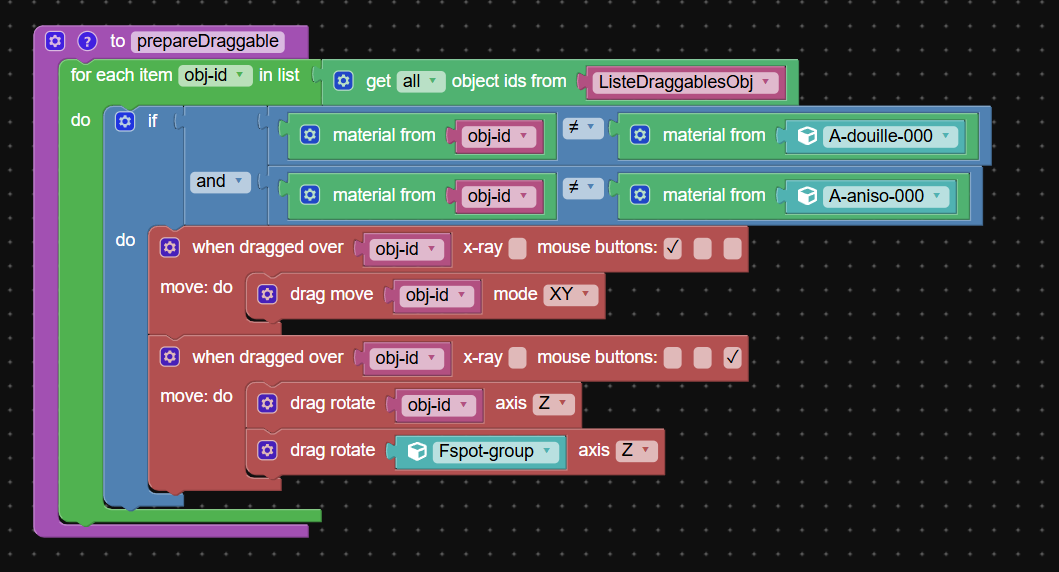
Oh i see.
To be fair, i copied a puzzle i saw here.
It is working quite well, except for my spot problem…
Did not tested with lots of letters, so maybe it well become more and more laggy."1+1=3... for large values of 1"
2026-04-15 at 9:19 am #86960NaxosCGCustomerIf you can show me the puzzles you are using to parent I can try those out.
Here is the test link, can you find what you need here ?
go in the menu, add letters, then clic and drag (left button : move – right button rotate)
All works, except for the spot that stay looking at it’s target
"1+1=3... for large values of 1"
2026-04-15 at 3:50 pm #86970xeonCustomerHappy to help and try a few things but the application is not as useful.
If you can zip up your project I can take a look.
If you want to send the link privately you can email me at xeons3dlab at gmail dot com.Xeon
Route 66 Digital
Interactive Solutions - https://www.r66d.com
Tutorials - https://www.xeons3dlab.com2026-04-15 at 7:19 pm #86978bigmike814
ParticipantOk look at the console errors.
I don’t know if you know this, but since you said you arent a coder, im going to assume you don’t, but look at the errors your console is throwing and then look at the stack trace. You can see the visual logic is throwing the error (they are written into the puzzle behind the scenes) and the function that is calling the function throwing errors in the stack is your function PrepareDraggable puzzle I was telling you about.
Here is the claude report I put together for you. Hope this helps.
# prepareDraggable() Fix — Plain Language Summary## The Core Issue
Your
prepareDraggable()is calling **get all objects** onListeDraggablesObj
which traverses the full hierarchy — so it picks up your cloned Fspot lights as
well as your letter meshes. Lights have no material, hence the console flood.Then it loops the **entire list** every time a new letter is added. So by letter 3,
letter 1 has been registered 3 times, letter 2 twice, etc. Handlers stack up fast.—
## Fix Part 1 — Switch from “get all” to “get mesh”
Instead of:
`
getObjectsFrom(ListeDraggablesObj, ‘ALL’, …)
`Just use
MeshIdentifierdirectly — it’s already the newly added letter,
it’s already a mesh, no traversal, no lights getting caught up in it.You don’t need to loop the whole list at all.
prepareDraggable()only
needs to register the one letter that was just added.—
## Fix Part 2 — Guard Against Re-registration (the delete/re-add case)
Since V3D has no puzzle to remove event handlers, you need a simple
registered items list to track what’s already been set up.Add a variable at the top of your app (alongside
ListeDraggablesObj):`
ListeRegistered = [] ← new list, starts empty
`Then at the top of
prepareDraggable(), before registering anything:`
IF MeshIdentifier is already in ListeRegistered
→ DO NOTHING, return earlyIF MeshIdentifier is NOT in ListeRegistered
→ register the drag handlers as normal
→ add MeshIdentifier to ListeRegistered
`This handles the case where a user adds “M”, deletes it, then adds “M” again.
Without the check, the second add would stack a second handler on top.
With the check, it sees “M” already exists inListeRegisteredand skips.**Important:** When the user hits delete and
unloadScene()runs,
also clearListeRegisteredfor that position:`
on BT_Delete click:
→ unload scenes (already doing this)
→ clear ListeDraggablesObj (already doing this)
→ also clear ListeRegistered ← add this
`Or if you have separate registered lists per position (bot/mid/top),
clear only the relevant one.—
## Fix Part 3 — Remove the Fspot-1 Rotation Line
In
prepareDraggable()you have this on the rotate handler:`
dragRotateAdv(‘Fspot-1’, ‘Z’, ‘WORLD’, …)
`Remove this line entirely. Here’s why it’s not needed:
In
Merge_gltf()you already do:
`
tempoSpot = cloneObject(‘Fspot-1’, …)
makeParent(tempoSpot, metal_mesh_of_letter)
`The cloned spot (Fspot-2, Fspot-3 etc.) is **parented to the letter’s metal mesh**.
When the letter rotates viadragRotateAdv, the spot clone rotates with it
automatically — that’s just how parent-child hierarchy works in Three.js/V3D.Fspot-1is the hidden template. Rotating it does nothing visible.
And even if it weren’t hidden, targeted spotlights ignore direct rotation
because their look-at constraint recalculates direction every frame anyway.—
## The Fixed prepareDraggable() Logic (pseudocode)
`
function prepareDraggable():obj_id = MeshIdentifier ← use this directly, not getObjectsFrom(ListeDraggablesObj)
IF obj_id already in ListeRegistered → return, do nothing
IF position is ‘bot’:
IF material of obj_id ≠ material of ‘A-douille-000’
AND material of obj_id ≠ material of ‘A-aniso-000’:registerOnDrag(obj_id, mouseButton[0]):
→ dragMoveAdv(obj_id, ‘XY’, ‘WORLD’, …)registerOnDrag(obj_id, mouseButton[2]):
→ dragRotateAdv(obj_id, ‘Z’, ‘WORLD’, …)
← no Fspot-1 rotation here, spot clone follows parent automaticallyadd obj_id to ListeRegistered
`—
## Summary
| What to change | Why |
|—|—|
| UseMeshIdentifierinstead ofgetObjectsFrom(ListeDraggablesObj, 'ALL', ...)| Stops traversal picking up light children, stops the loop re-registering old letters |
| AddListeRegisteredcheck before registering | Handles delete + re-add without stacking duplicate handlers |
| ClearListeRegisteredon BT_Delete | Keeps the registered list in sync with the actual scene |
| RemovedragRotateAdv('Fspot-1', ...)| Spot clone already follows letter rotation via parent hierarchy |Hope this helps! The stacking bug especially was subtle — it would have gotten worse with every letter added.
-
This reply was modified 6 months, 2 weeks ago by
bigmike814.
-
This reply was modified 6 months, 2 weeks ago by
-
This reply was modified 6 months, 2 weeks ago by
3d Configurator | https://mc2sheds.com/builder
Site | https://mc2cpq.com
2026-04-16 at 9:05 am #86986NaxosCGCustomerMany thanks, i’ll try to figure out and to implement this.
"1+1=3... for large values of 1"
-
This reply was modified 6 months, 2 weeks ago by
-
AuthorPosts
- You must be logged in to reply to this topic.