
- This topic has 20 replies, 3 voices, and was last updated 5 months ago by
 NaxosCG.
-
AuthorPosts
-
2026-04-10 at 2:15 pm #86911
 NaxosCGCustomer
Hello there, again ^^
Now i have a new issue :
In the main gltf scene, i have a FreeSpot from 3dsmax (so standard spotlight)Each time i “append” a gltf scene (letters), i “parent / clone Fspot-001” to the fresh new appended object.
MoveDrag the appended object work well : the spot follows as it is parented to it, but DragRotate does not : the spot is still targetting at initial’s freeSpot target. It does not rotate the spot’s target (the spot follows the parent object, but not its target).Of course i tried several things :
– make the spot targetless : so within 3dsmax the spot is only oriented with rotation.
> this makes the spot in verge3D targetted to origin (0-0-0), and DragRotate does not work neither : always targetting towards origin.– tried to parent spot’s target to the spot, then parent spot to appended mesh
> same : DragRotate does not rotate the spot’s target– tried to create a group of Spot + target within 3dsmax,
> also not working : clone does not want to work with group or something.– tried to create a variable and set it to list of spot and spot target (as verge3d recognizes both in object list)
> not working– tried to create a dummy / point helper within 3dsmax, parent the spot+target to it, then parent this point to the appended mesh
> same no DragRotate– tied also to kind of force rotation with setting direction or rotation of the spot to the “get object’s rotation”.
> problem here is that the target or spot can be rotated, but as the spot always look at its target, it does not rotate it. It kinda rotate target on place, and spot still look at it.In 3dsmax, the spot’s target is quite far away, to prevent spots to focus all in the same close point, and give bad spots orientation.
Any idea ?
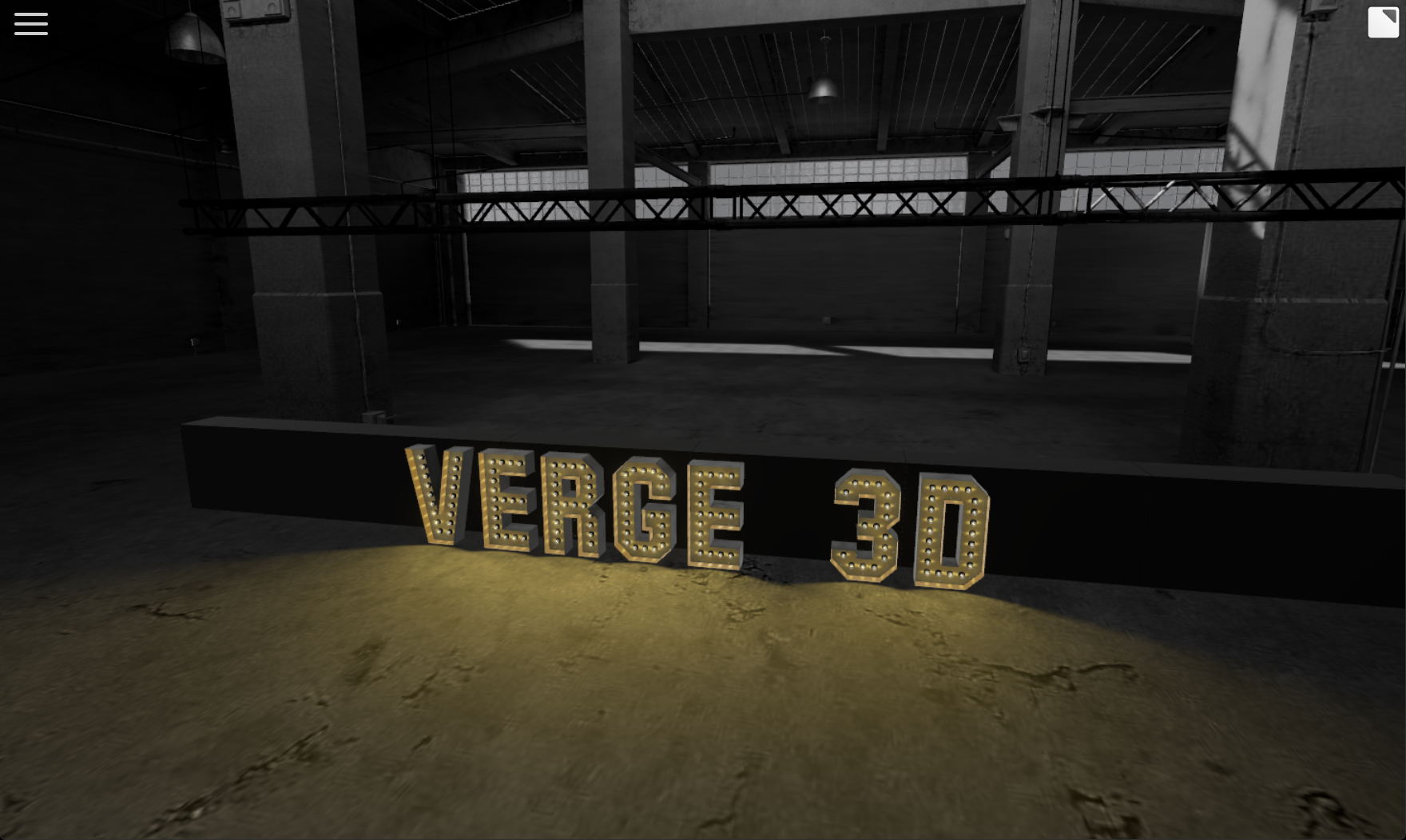
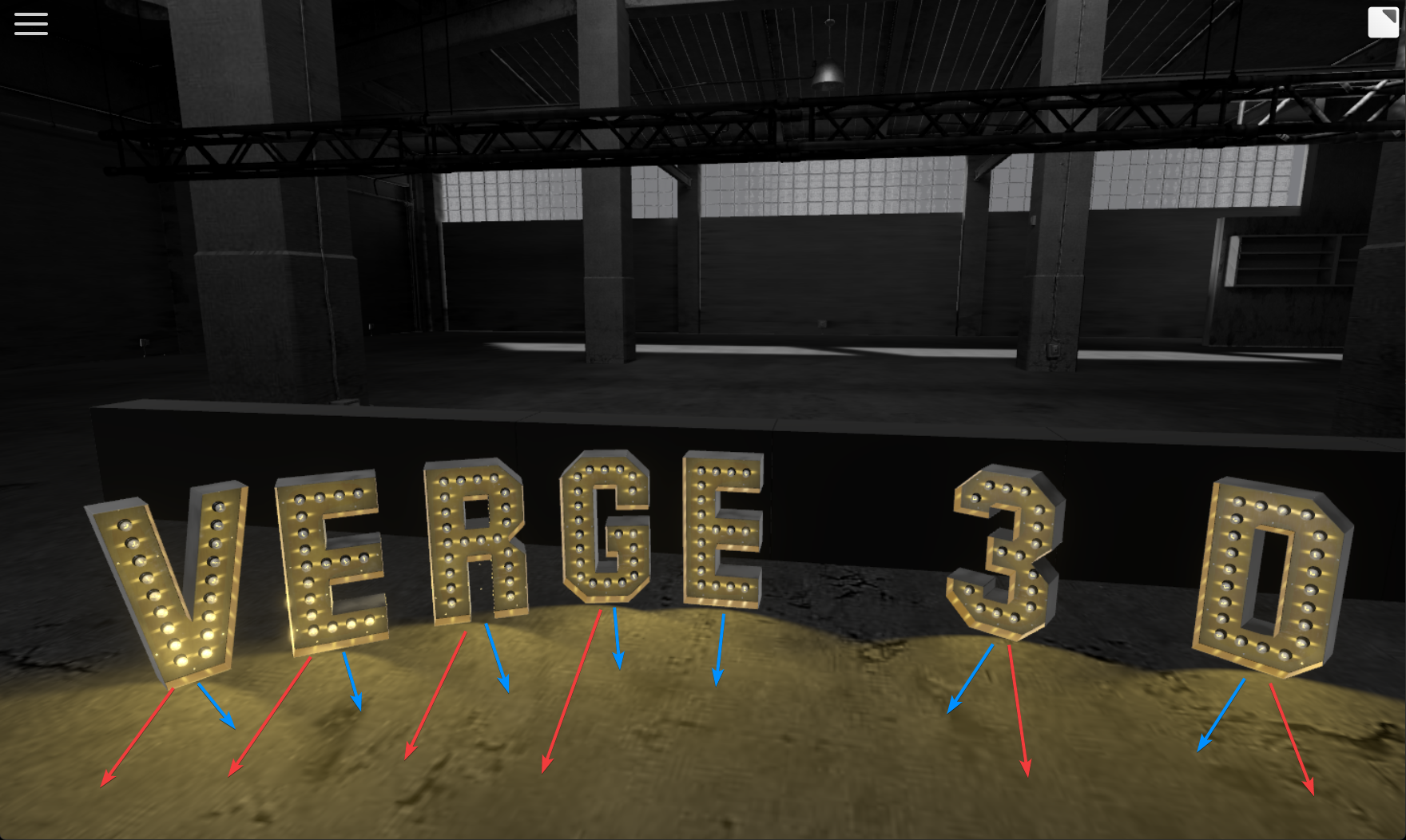
See screenshots for tests.
blue arrows : the rotation / direction spot should go
red ones : wher it goes : initial 3dsmax’s target locationAttachments:
"1+1=3... for large values of 1"
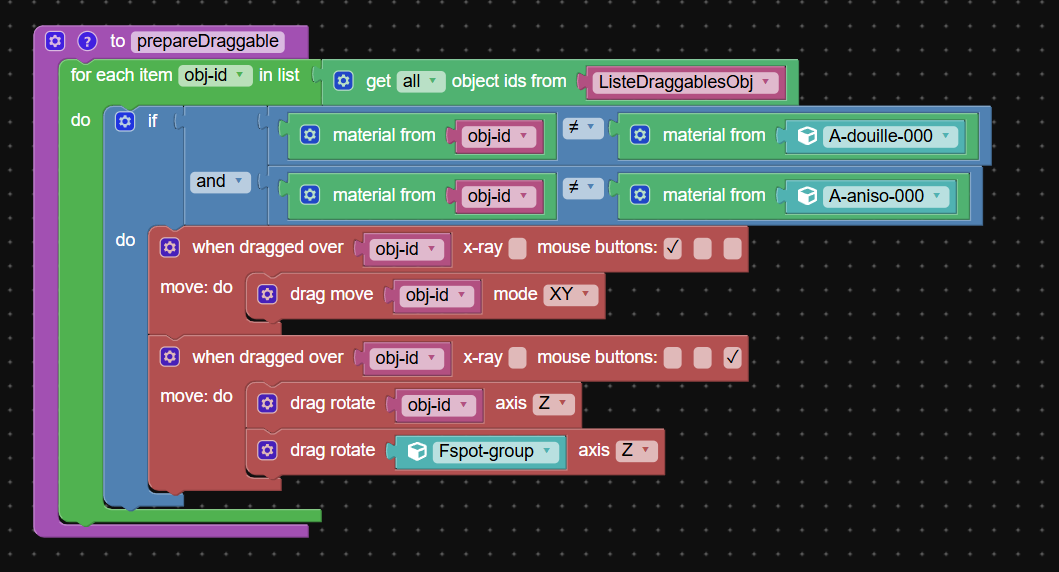
2026-04-10 at 2:39 pm #86915NaxosCGCustomerhere the puzzle i use : that procedure is triggered at the end of the append puzzle.
see attached.
"1+1=3... for large values of 1"
2026-04-10 at 4:30 pm #86918 xeonCustomer
I have been watching your progress on this and was wondering about the overall approach.
For me … at least I try to do everything I can to not have lights. The more lights the worse V3D performance gets. With that in mind…I would not attach lights to the objects…I would create an image plane and attach it to each letter object. The image plane would be a transparent floor glow of what the lights are doing…. eliminating the need for lights.This is a quick example…but you could then add multiple spotlight effects to the image plane…maybe even animate the brighness/flicker…with no cost to performance not to mention since it would be part of the letter it would rotate correct.
I also was trying to figure out the advantage of loading a new GLTF each time a character is requested. I am assuming you are creating a list of letters that have been called and then each time a new letter is requested going to the list and just cloning that new letter vs appending another copy. Given this, and the shape of our custom text characters…you should be able to keep it all in memory and not need to worry about appending at all…just clone what you need.
Obviously I do not know the full parameters of your project but just seems so far like maybe all the issues could be avoided.
Attachments:
Xeon
Route 66 Digital
Interactive Solutions - https://www.r66d.com
Tutorials - https://www.xeons3dlab.com2026-04-10 at 5:23 pm #86920xeonCustomerIn your puzzles it seems the two drag events require different mouse buttons? Is that intentional? It might work if they use the same mouse button?
Xeon
Route 66 Digital
Interactive Solutions - https://www.r66d.com
Tutorials - https://www.xeons3dlab.com2026-04-11 at 2:02 pm #86926NaxosCGCustomerI have been watching your progress on this and was wondering about the overall approach.
For me … at least I try to do everything I can to not have lights. The more lights the worse V3D performance gets. With that in mind…I would not attach lights to the objects…I would create an image plane and attach it to each letter object. The image plane would be a transparent floor glow of what the lights are doing…. eliminating the need for lights.This is a quick example…but you could then add multiple spotlight effects to the image plane…maybe even animate the brighness/flicker…with no cost to performance not to mention since it would be part of the letter it would rotate correct..
I’ve tried this, but the effect is not as nice as real spotlight, but maybe i could go further and try to find a better shader for fake lights…
"1+1=3... for large values of 1"
2026-04-11 at 2:06 pm #86927NaxosCGCustomerI also was trying to figure out the advantage of loading a new GLTF each time a character is requested. I am assuming you are creating a list of letters that have been called and then each time a new letter is requested going to the list and just cloning that new letter vs appending another copy. Given this, and the shape of our custom text characters…you should be able to keep it all in memory and not need to worry about appending at all…just clone what you need.
Obviously I do not know the full parameters of your project but just seems so far like maybe all the issues could be avoided.
Each letter (84 in total with small, large, special caracters…) have been substance-painter taken care to meet the customer’s needs, and so comes with 2 maps each.
Having all of them inside the main scene would ask for heavy initial loading, and maybe would reach vram limits with all maps…So i append each letter “on demand”, then clone lightbulbs + anisotropic effect…
"1+1=3... for large values of 1"
2026-04-11 at 2:06 pm #86928NaxosCGCustomerIn your puzzles it seems the two drag events require different mouse buttons? Is that intentional? It might work if they use the same mouse button?
Yes, one button for move, one for rotate
"1+1=3... for large values of 1"
2026-04-11 at 3:31 pm #86929xeonCustomerWhat would the total polygon count be if all letters are loaded?
What resolution are the maps?
My point is loading maps may become more problematic than the poly count?
How many characters do you allow to be placed on the screen at the same time?
Could someone place all 84 although probably not practical does your app allow it?
If not what is the maximum allowable characters?Ok…other options for controlling light rotation.
1. use the vector of the character and set the light to that vector
2. put a follow constraint on the light so its rotation matches the character
3. place an empty at the location for the light in the character GLTF/model and then add the light to the empty?
Have you tried any of these?Xeon
Route 66 Digital
Interactive Solutions - https://www.r66d.com
Tutorials - https://www.xeons3dlab.com2026-04-11 at 5:44 pm #86930NaxosCGCustomer84 different caracters, each with 2x1k maps.
The main scene is bully baked, with 8k map to prevent bad lookingEach of the 3 levels can get +- 20 caracters (depends on width)
Good points about external gltfs :
– less to load at app start, only used letters will be in ram / vram
– adding new letter is easy as all code / puzzle structure is there, even the name to append is from html/css menu.Bad points about external gltfs :
– loading each time we add a letter, but it is quite light gltf to load.
– my current drag rotate spot problem
– if i need to change something on all letters, i need to open 84 files in 3dsmax, one by one.
– clone is not made easy."1+1=3... for large values of 1"
2026-04-11 at 5:48 pm #86931NaxosCGCustomer1. use the vector of the character and set the light to that vector
2. put a follow constraint on the light so its rotation matches the character
3. place an empty at the location for the light in the character GLTF/model and then add the light to the empty?
Have you tried any of these?1. thing is that once cloned and parented, i don’t know the name of each spot for each letter…
2. tried, but the spot does rotates (i guess), and still aim to look at its target…
3. i tested similar ways"1+1=3... for large values of 1"
2026-04-13 at 3:37 am #86934xeonCustomerOne way to determine the name of a clone…is to run the app within the App Manager with the view port open in the App Manger. Add an Object Select puzzle somewhere easily accessible.
Run the app in the App Manager window (create some letters that have clone lights in your app) and then open the Object Select puzzle and you will see a list of all the clone names and light clone names.Xeon
Route 66 Digital
Interactive Solutions - https://www.r66d.com
Tutorials - https://www.xeons3dlab.com2026-04-13 at 10:19 pm #86941bigmike814
ParticipantI looked at your code and I see an issue.
You may have event handler leakage and V3D doesn’t have a way to remove the event listener so every time that function runs you are creating a new handler for the item, which confuses the code because you have more than 1 event for the material.
Are you calling that function more than once? Or is it only loaded once? It doesn’t need to be wrapped in a function if it is on load which leads me to believe you call it more than once.
If you need to update it you need to test if the material already has the event attached to it and skip if so.
As for the constraint, can you update it?
-
This reply was modified 5 months ago by
bigmike814.
-
This reply was modified 5 months ago by
3d Configurator | https://mc2sheds.com/builder
Site | https://mc2cpq.com
2026-04-13 at 10:42 pm #86944Participantthe clones are named _01 after the original and count up, right?
IDK I haven’t been using v3d for about a year now, so it may be different after updates, but thats what it always was.
3d Configurator | https://mc2sheds.com/builder
Site | https://mc2cpq.com
2026-04-14 at 3:59 pm #86947NaxosCGCustomerI looked at your code and I see an issue.
You may have event handler leakage and V3D doesn’t have a way to remove the event listener so every time that function runs you are creating a new handler for the item, which confuses the code because you have more than 1 event for the material.
Are you calling that function more than once? Or is it only loaded once? It doesn’t need to be wrapped in a function if it is on load which leads me to believe you call it more than once.
If you need to update it you need to test if the material already has the event attached to it and skip if so.
As for the constraint, can you update it?
Thank you for your message, but as i’m not a code guy, sorry but i don’t really understand this.
What function do you ask if i’m calling more than once ?"1+1=3... for large values of 1"
2026-04-14 at 6:49 pm #86948ParticipantPrepare draggable, it is setting events in the loop. But if that is getting called every time you type a letter you are assigning a new event handler to the mesh – it will cause memory leakage and you’ll have all sorts of side effects because you are reassigning it to meshes that already have it.
3d Configurator | https://mc2sheds.com/builder
Site | https://mc2cpq.com
-
AuthorPosts
- You must be logged in to reply to this topic.