
- This topic has 10 replies, 2 voices, and was last updated 5 months ago by
 NaxosCG.
-
AuthorPosts
-
2026-04-02 at 11:45 am #86837
 NaxosCGCustomer
Hello there !
I’m still on my new big project with light letters, and in my very first test i could move each letter with the drag puzzle (i’ve even asked a question about limiting the drag : https://www.soft8soft.com/topic/collision-object-with-dragmove/)
Now the project has been fully procuced, re-thinked and optimized. One of the optimizations i set is to prevent loading of 40+ letters already inside the app, using the clever “Append scene” puzzle.
But it seams that appended objects can’t me drag / moved…I was using a movable list to be able to drag any object from this list, as it did not work, i tried to use “all object” puzzle to check : all pre-existing objects are drag/movables (even the floor and walls), but none of the appended objects are…
So it seams that when we merge objects from external gltf using “append scene” puzzle, the app can pick them (tested with hover for cursor change, and print name console if clicked), but not drag/move them.
Limitation ? bug ?
Thanks for help.
"1+1=3... for large values of 1"
2026-04-02 at 12:40 pm #86839 Alexander KovelenovStaff
Hi,
when dragged puzzle works a bit differently compared to when clicked. All objects/groups (but not string names) should be resolved after you append the scene. So in your case the most straightforward way to use this puzzle would be assigning puzzles for all possible objects that can be dragged (if the amount of code is large, use procedures to reduce it).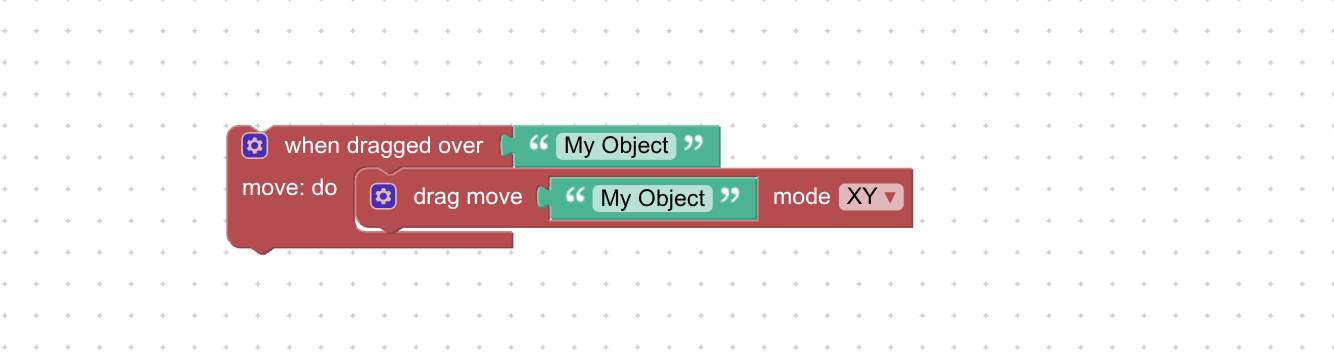
-
This reply was modified 5 months, 2 weeks ago by
 Alexander Kovelenov.
2026-04-02 at 12:56 pm #86842Alexander KovelenovStaff2026-04-02 at 1:07 pm #86843NaxosCGCustomerThanks for answer, Alexander, but i think my problem is not this.
I use a “when clicked” to set a variable “grabbedObj” to “pickedObject”,
Then i use when dragged on the variable grabbedObj…It used to work before, on my first tests, but now that the objects i need to drag/move are not inside the main scene, they are added later using “append scene”.
And then it does not move.BTW, a “dragged object” puzzle would certainly help a lot!
"1+1=3... for large values of 1"
2026-04-02 at 1:46 pm #86844NaxosCGCustomerHere is a test where i set back the dragMove puzzle i was using for early tests, just put “all objects” in the list :
https://v3d.net/1fq6PLEASE don’t share for now, it is still in dev. I’ll share the final customer’s link when finished.
As you can see, all can be dragged, except lettres (you have to open the 3 bars menu, then click some letters) The letters are merged using “append scene”
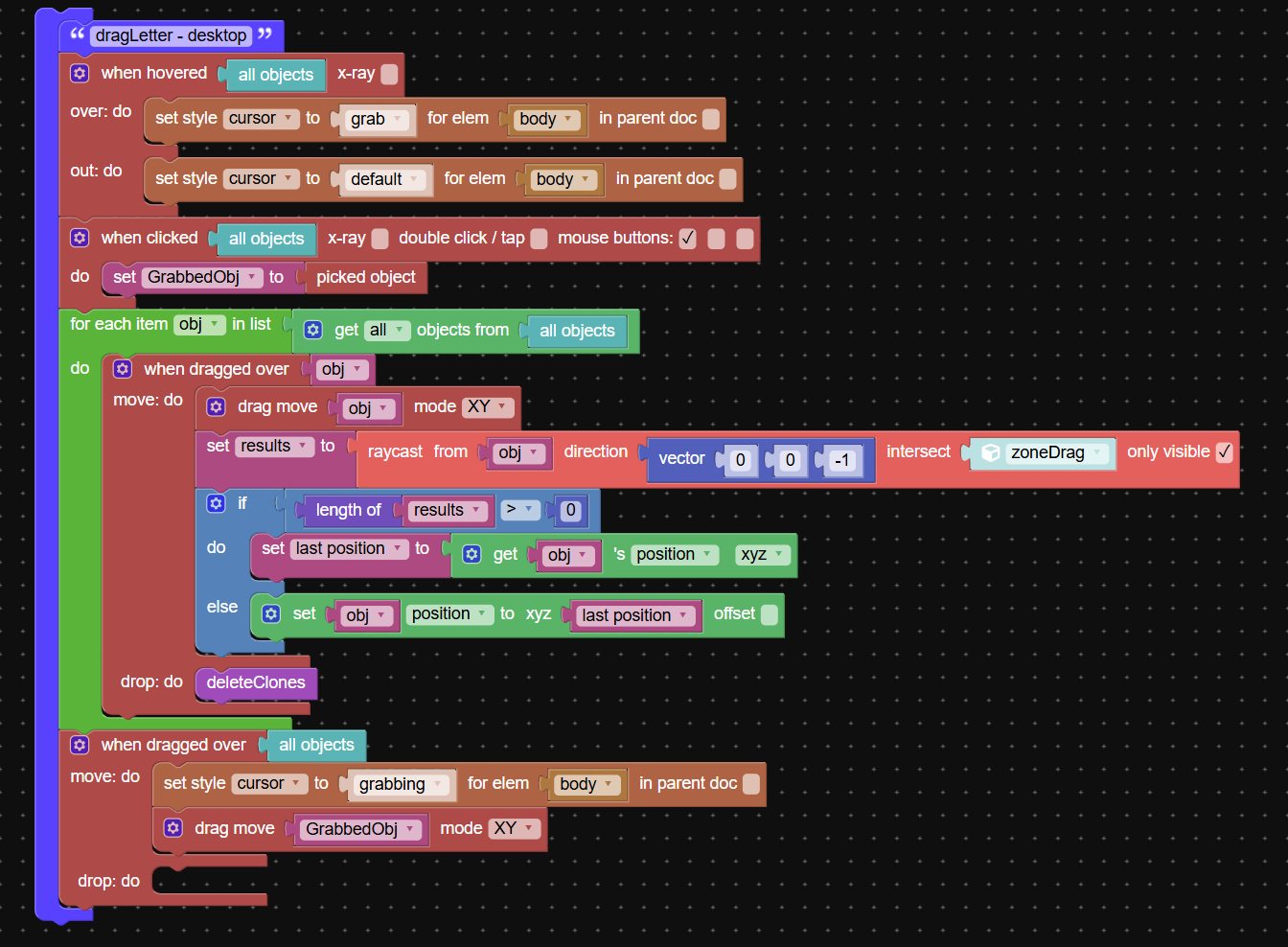
See attached screenshot for puzzle
Attachments:
"1+1=3... for large values of 1"
2026-04-03 at 7:12 am #86856Alexander KovelenovStaffYep, this is what I meant earlier. all objects will work only if the when dragged over puzzle placed in the when loaded do slot of the append scene puzzle. But since you might append multiple times (or maybe unload) this approach won’t work. Instead you should create a list with all possible letter names and attach it to the when dragged over puzzle. If the corresponding object is not yet loaded, it’s perfectly fine, the puzzle simply ignores it.
2026-04-03 at 12:23 pm #86858NaxosCGCustomerTried, but nope.
As i can merge several times the same lettre from the same gltf, it does not work : as soon as i move the second “A”, it is the first “A” that is dragged.And if i try using unique object ids, as they are random, i can’t create a list in beginning.
Of course i tried to create the “draggable” list using “get first object id from …”, but in that case, drag does not work anymore.
The app is getting so complex, it is not easy to explain how all this stuf works.
"1+1=3... for large values of 1"
2026-04-08 at 7:21 am #86887Alexander KovelenovStaffI see!
Then you can try something like that:
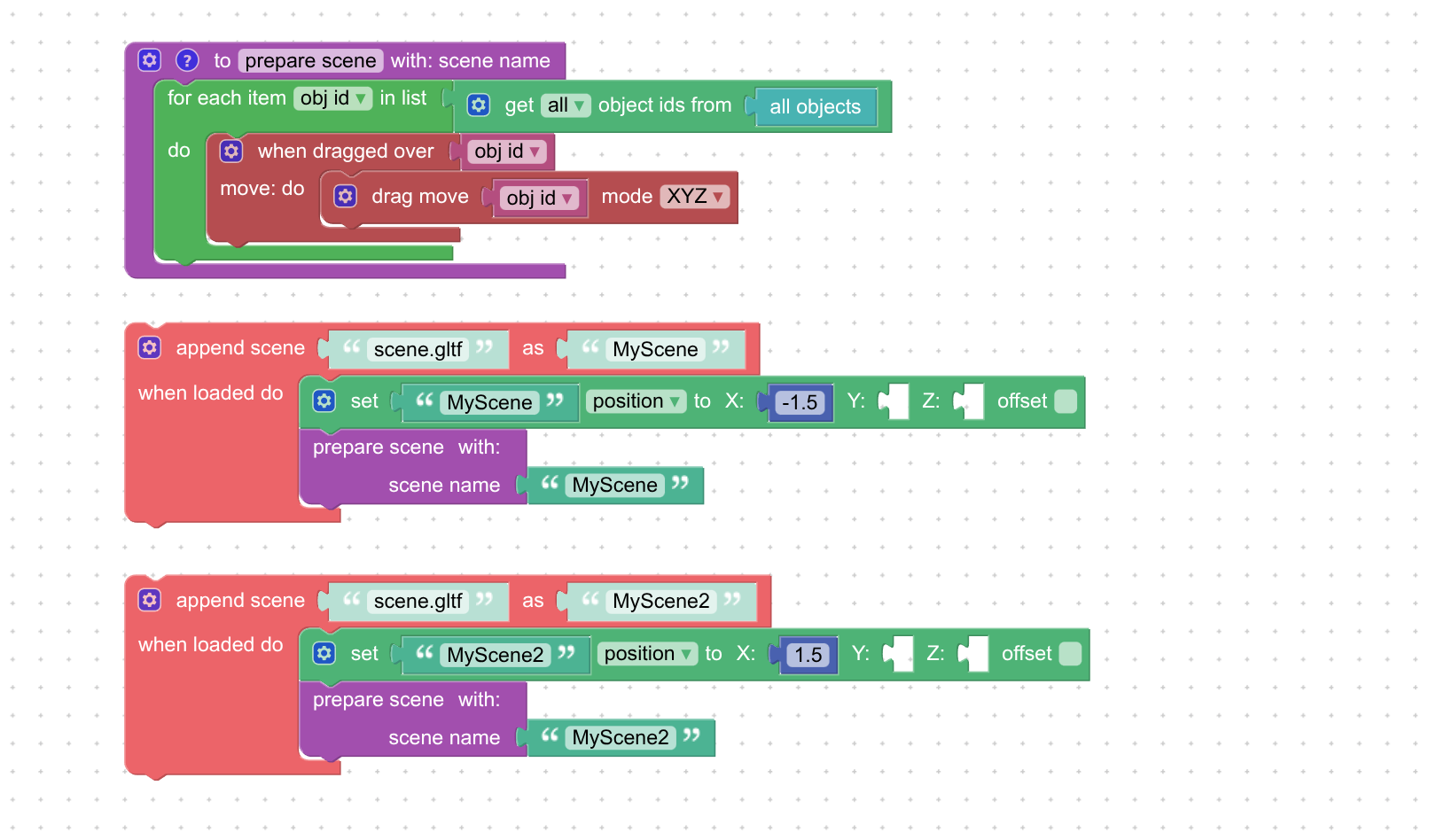
The idea is to register (or re-register) the drag event once the new scene has been loaded. In the snippet we also used UUIDs to mitigate the same-name issue.
-
This reply was modified 5 months, 1 week ago by Alexander Kovelenov.
2026-04-08 at 8:44 am #86890NaxosCGCustomerOk i understand that.
This method will set all objects to be movable, won’t it ?
The unique ID is a good thing, but i can’t filter based on name containing “abcd” for ex.I’ll give a try.
"1+1=3... for large values of 1"
2026-04-09 at 11:48 am #86894Alexander KovelenovStaffThis method will set all objects to be movable, won’t it ?
There is a name filter for the corresponding puzzle that can help a lot in your case
 2026-04-10 at 2:32 pm #86914NaxosCGCustomer
Worked, name filter and unique id (so if i append 2 “A”s, both are movables..
"1+1=3... for large values of 1"
-
This reply was modified 5 months, 2 weeks ago by
-
AuthorPosts
- You must be logged in to reply to this topic.