
Home › Forums › Graphics / Blender › New update causing objects to disappear?
- This topic has 7 replies, 3 voices, and was last updated 3 months, 1 week ago by
sbs.
-
AuthorPosts
-
2026-07-15 at 6:24 pm #87959
sbs
ParticipantLooking for a hand, I updated today and its caused most of the objects in all of my projects to disappear
Any ideas?
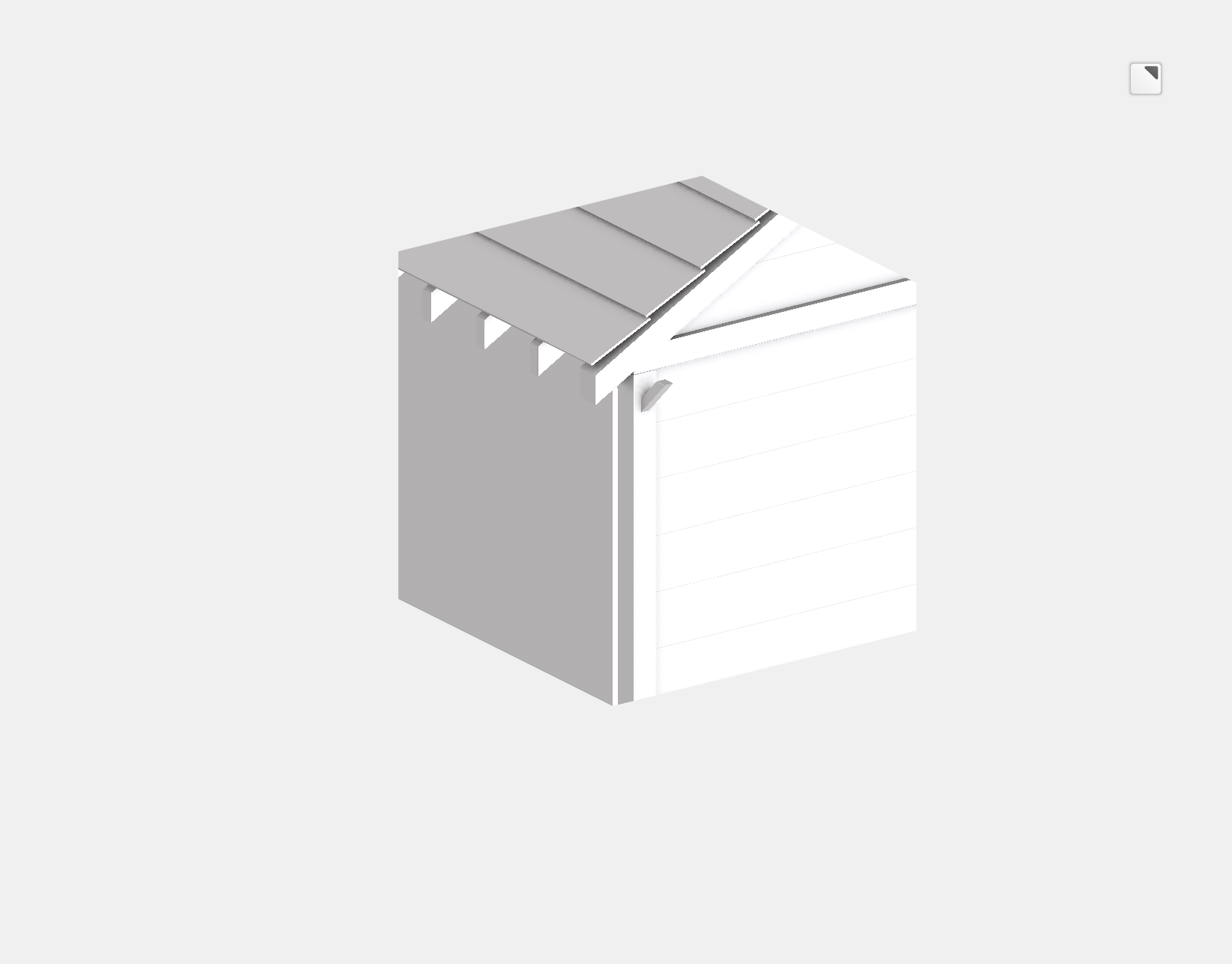
2026-07-15 at 6:32 pm #87960ParticipantJust to add to this, I’ve added a new cube object and it now allows the scene to be rendered but only inside the bounds of the cube. See attached screenshot
Attachments:
2026-07-15 at 6:48 pm #87962ParticipantAnother piece of info, when disabling ambient occlusion only the cube itself is rendered and no longer acts as a “window”
2026-07-15 at 8:18 pm #87963 Alexander KovelenovStaff
Hi,
It looks really strange. Please provide more info so we could investigate this further:
1) Have you updated properly (update app – reexport – resave puzzles)?
2) Are there any issues printed in the browser console?
3) What Blender version you use (used before the update)?
4) What Verge3D version you used before the update?-
This reply was modified 3 months, 2 weeks ago by
 Alexander Kovelenov.
2026-07-15 at 8:36 pm #87965Participant1) Yes updated correctly and even restarted PC
2) Oh yes, I forgot to check that earlier but I’m getting theseVerge3D 4.11.0 for Blender (License, WebGL 2.0)
v3d.js:2 Loading glTF with outdated version of Verge3D runtime. Please update your application!
beforeRoot @ v3d.js:2
(anonymous) @ v3d.js:2
po @ v3d.js:2
parse @ v3d.js:2
parse @ v3d.js:2
(anonymous) @ v3d.js:2
(anonymous) @ v3d.js:2
Promise.then
load @ v3d.js:2
load @ v3d.js:2
loadScene @ v3d.js:2
createApp @ Garages.js:46
await in createApp
(anonymous) @ Garages.js:8
2v3d.js:2 MeshNodeMaterial: Missing type conversion: vec3 -> bool
E @ v3d.js:2
(anonymous) @ v3d.js:2
Ph.updateNodeGraph @ v3d.js:2
Ph @ v3d.js:2
(anonymous) @ v3d.js:2
Promise.then
loadMaterial @ v3d.js:2
(anonymous) @ v3d.js:2
rr @ v3d.js:2
getDependency @ v3d.js:2
loadMesh @ v3d.js:2
(anonymous) @ v3d.js:2
rr @ v3d.js:2
getDependency @ v3d.js:2
createNodeMesh @ v3d.js:2
(anonymous) @ v3d.js:2
rr @ v3d.js:2
(anonymous) @ v3d.js:2
loadNode @ v3d.js:2
getDependency @ v3d.js:2
wC @ v3d.js:2
loadScene @ v3d.js:2
getDependency @ v3d.js:2
(anonymous) @ v3d.js:2
getDependencies @ v3d.js:2
(anonymous) @ v3d.js:2
Promise.then
parse @ v3d.js:2
parse @ v3d.js:2
(anonymous) @ v3d.js:2
(anonymous) @ v3d.js:2
Promise.then
load @ v3d.js:2
load @ v3d.js:2
loadScene @ v3d.js:2
createApp @ Garages.js:46
await in createApp
(anonymous) @ Garages.js:8
26v3d.js:2 MeshNodeMaterial: Missing type conversion: vec3 -> bool
E @ v3d.js:2
(anonymous) @ v3d.js:2
Ph.updateNodeGraph @ v3d.js:2
assignFinalMaterial @ v3d.js:2
(anonymous) @ v3d.js:2
Promise.then
loadMesh @ v3d.js:2
(anonymous) @ v3d.js:2
rr @ v3d.js:2
getDependency @ v3d.js:2
createNodeMesh @ v3d.js:2
(anonymous) @ v3d.js:2
rr @ v3d.js:2
(anonymous) @ v3d.js:2
loadNode @ v3d.js:2
getDependency @ v3d.js:2
wC @ v3d.js:2
loadScene @ v3d.js:2
getDependency @ v3d.js:2
(anonymous) @ v3d.js:2
getDependencies @ v3d.js:2
(anonymous) @ v3d.js:2
Promise.then
parse @ v3d.js:2
parse @ v3d.js:2
(anonymous) @ v3d.js:2
(anonymous) @ v3d.js:2
Promise.then
load @ v3d.js:2
load @ v3d.js:2
loadScene @ v3d.js:2
createApp @ Garages.js:46
await in createApp
(anonymous) @ Garages.js:8
v3d.js:2 v3d.WebGLProgram: shader error: 0 35715 false gl.getProgramInfoLog Fragment shader is not compiled.3) Updated to 5.2 and new verge at the same time
4) I believe it was version 4.11
2026-07-16 at 6:00 am #87993 Yuri KovelenovStaff
Hi,
Your license is compatible with Verge3D 4.11 or lower. It won’t work with Verge3D 4.12 or 4.13. Please consider renewing or download the older Verge3D version from the archive.
Please note that Verge3D 4.11 must be installed on top of Blender 5.0 or lower – see the compatibility table.
2026-07-18 at 9:01 am #88037ParticipantThanks for getting back to me, so I can’t use above version 4.11 as a free user?-
This reply was modified 3 months, 1 week ago by
2026-07-18 at 9:11 am #88038ParticipantI’ve just rolled back and apps are working fine again, I will just have to wait for black friday to renew my subscription
-
AuthorPosts
- You must be logged in to reply to this topic.