
Home › Forums › Bug Reports and Feature Requests › V3D 4.10 Alpha Hashed issue
Tagged: Alpha Hashed, Blender 4.5 LTS, Verge3D 4.10
- This topic has 3 replies, 2 voices, and was last updated 9 months, 4 weeks ago by
 Alexander Kovelenov.
-
AuthorPosts
-
2025-12-18 at 2:35 pm #85748
 illussimoCustomer
Hello, Yuri, Alexander, and the whole team,
First of all, happy Christmas and a good and fruitful New Year!
I recently decided to update my projects with Blender 4.5 LTS and Verge3D 4.10.
I noticed that whereas Alpha hashed worked well before, it now gets a white hue the moment it turns transparent.
On the forum, I found a report about this with using hair cards, but it is not specific to hair cards. It is generic.
I also noticed that if the Render method in Blender is set to Dithered, the Automatic Setting for Verge3D doesn’t pick it up, but it will use Blended for export instead. You have to set it to Alpha Hashed. (That is a minor issue though.)
I have included a test file and some screenshots
Hopefully, this issue is already resolved in 4.11.
 2025-12-19 at 9:07 am #85755
 Alexander KovelenovStaff
Hi Simone,
Indeed, there is a known inconsistency when dealing with alpha hashed transparency. The method takes a background color from the <canvas> element even if the scene background is explicitly set to be non-transparent. Please use the following puzzle to make the alpha hashed transparency work properly:
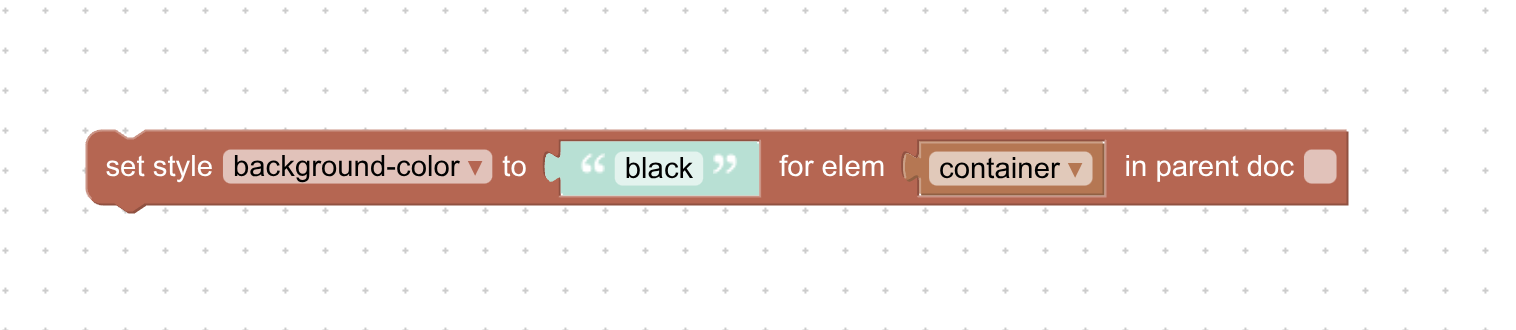
P.S. Merry Christmas to you as well!
-
This reply was modified 10 months ago by Alexander Kovelenov.
-
This reply was modified 10 months ago by Alexander Kovelenov.
2025-12-22 at 10:55 pm #85831illussimoCustomerThanks for your quick reply and the workaround. I will set it in my CSS.
Is it a Blender 4.5.x to GLTF export issue?
Is this something that can be solved in the next Verge3D version?
Anyway
Simone2025-12-23 at 11:35 am #85838Alexander KovelenovStaffUnfortunately, this is more like a hardware limitation caused by how Alpha Hash is implemented by the browsers. In older versions of Verge3D this was not reproduced because transparency was disabled for the 3D canvas, but now we are forced to always enable it. So this Puzzle is more like a feature than a workaround.
-
This reply was modified 10 months ago by
-
AuthorPosts


- You must be logged in to reply to this topic.