
Home › Forums › Graphics / Blender › Blender 5.0 and Verge 4.11 Black Screen Issue
- This topic has 4 replies, 2 voices, and was last updated 9 months ago by
 Alexander Kovelenov.
-
AuthorPosts
-
2026-01-02 at 6:51 pm #85913
andyti
CustomerI have Blender 5.0 and Verge 4.11 set up and a very simple scene with a HDR world texture and a simple Principled BSDF material on the default cube. When I hit “Sneak Peek” all I get is a black screen with the full screen icon.
has anyone else had an issue like this after updating both Blender and Verge?
Thanks,
Andy
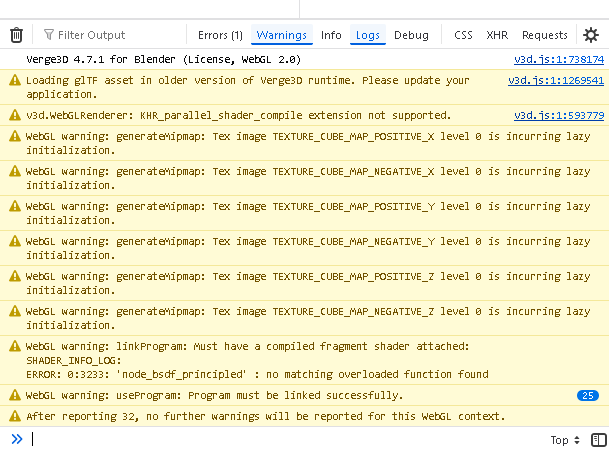
2026-01-02 at 9:12 pm #85914CustomerI think I may have found part of the issue… Firefox is using 4.7.1js runtime? see image..
Attachments:
2026-01-03 at 7:50 am #85919 Alexander KovelenovStaff2026-01-05 at 2:24 pm #85929Customer
Thank you for your reply.
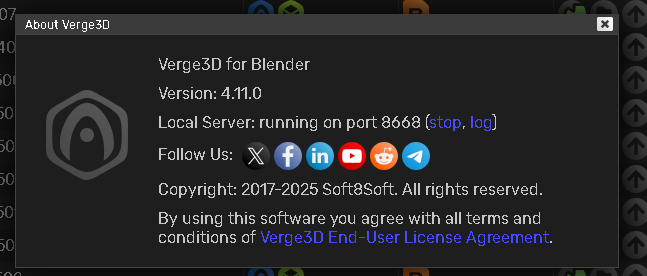
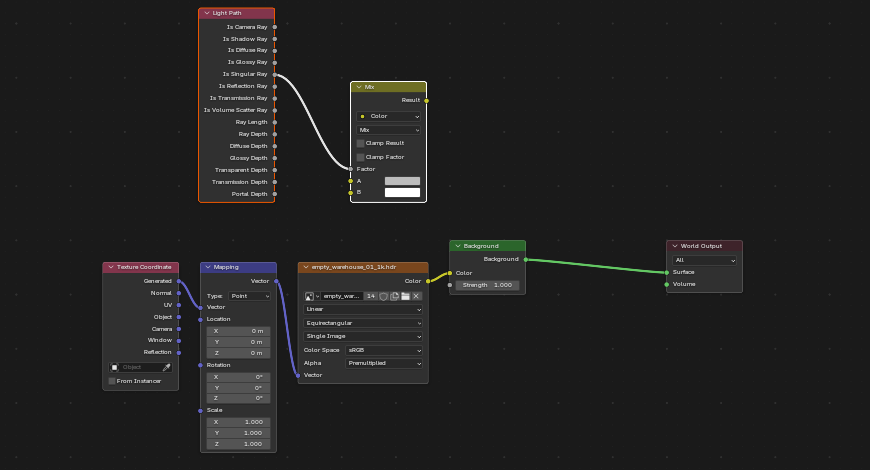
I’ve confirmed that Verge3D is up to date (please see the attached image). After conducting additional tests, I believe the issue may be related to the Light Path node in my world material setup. When connected via the Mix Color node, the screen turns black. However, when I connect the environment texture directly to the Background node, the scene is lit correctly.
This setup follows the environment node configuration from the Verge3D/Blender tutorial series, specifically using the Swiss Army knife example (I’ve attached the relevant images for reference).
Please note that the scene has not been exported to GLTF yet, as I am currently testing everything in Sneak Peek mode.
Would it be worthwhile to set up a new app to see if that alters the runtime being used by my browser?
Looking forward to your advice. Thank you for your help!
2026-01-08 at 2:37 pm #85964Alexander KovelenovStaffIt appears you have updated the Verge3D toolkit, but missing fresh engine update in the actual application (see the first line in the browser console that says the app is still using Verge3D 4.7.1). Please perform app update and check again.
-
AuthorPosts


- You must be logged in to reply to this topic.