
Home › Forums › General Questions › VR general behavior of unloading .gltf
- This topic has 10 replies, 2 voices, and was last updated 2 months ago by
 visualizer.
-
AuthorPosts
-
2025-12-19 at 7:05 am #85753
 visualizerCustomer
Hi
I noticed some strange thing in a VR scene created with Verge.
As usual when we append .gltf and unload it with some interaction it works well. No issues.But when I append .gltf in scene and grab it then it doesnt unload at all. Why is this happening?
Does it need some additional puzzle setup ? or am I missing anything in it?-
This topic was modified 2 months, 2 weeks ago by visualizer.
2025-12-19 at 9:11 am #85758 Alexander KovelenovStaff2025-12-19 at 10:40 am #85760visualizerCustomer
Yes.
When I grab the object with controller ( the grabbing happens proper no issues ) then later it doesnt unload from the scene.
If I do not grab it then it unloads properly.2025-12-20 at 5:52 pm #85769Alexander KovelenovStaff2025-12-22 at 11:32 am #85830visualizerCustomerYes Alexander. Plz. check.
looks like something needs to be addressed.2025-12-23 at 12:46 pm #85840Alexander KovelenovStaffHi,
I managed to reproduce this issue. However it appears to be a correct behavior. If you unparent your object from the controller inside the “squeezeend” event, you should return it back to the scene whence it was located originally, not to the “root” scene (which is selected when nothing is specified in the “parent” object).So instead of this:
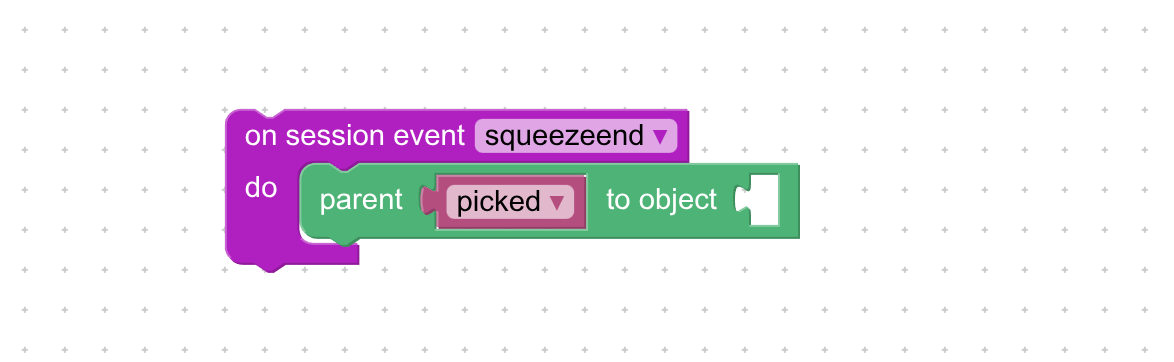
You should use something like this:
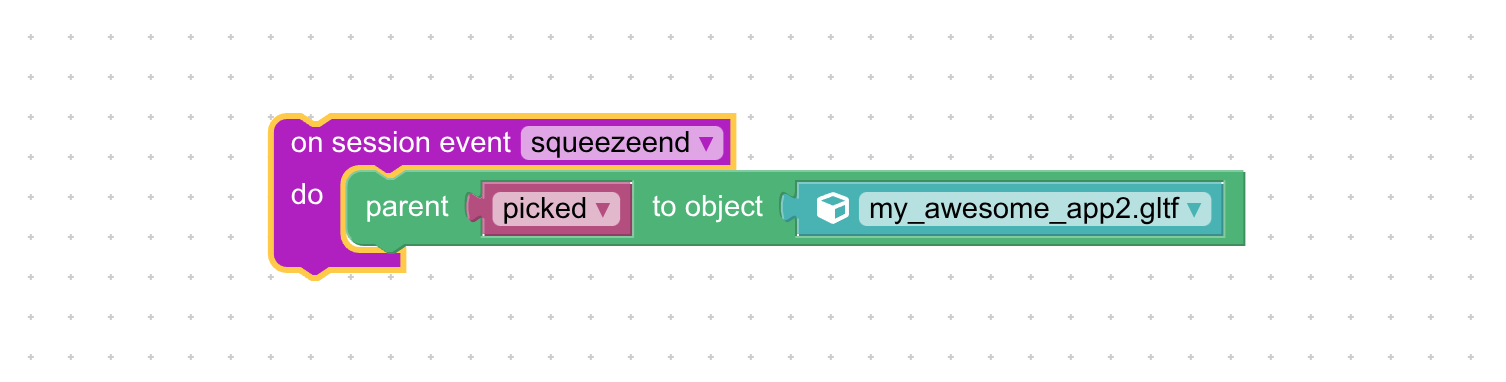
-
This reply was modified 2 months, 1 week ago by
 Alexander Kovelenov.
-
This reply was modified 2 months, 1 week ago by Alexander Kovelenov.
2025-12-24 at 3:27 pm #85856visualizerCustomerQuestion –
This my_awesome_app2.gltf file you mentioned is the main scene file or the appended scene file which is a specific added object upon interaction.Step
I create a variable “picked” and it needs to be parented to .gltf…
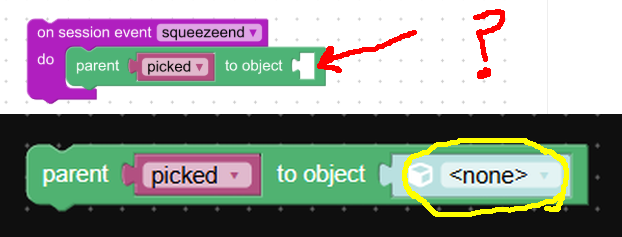
but qiestion is the puzzle dosnt allow to select the .gltf scene. How to manage this as per screenshot?How the object choosing option allows to select teh .gltf scene?
-
This reply was modified 2 months, 1 week ago by visualizer.
2025-12-25 at 6:33 am #85860visualizerCustomerI am wondering how come you are getting the “parent to object” puzzle with empty socket at the end ?
What I see in puzzle library is “parent to object” with none already which doesnt allow to select .gltf.
Attachments:
2025-12-25 at 8:15 am #85867Alexander KovelenovStaffHi,
“my_awesome_app2.gltf” is the appended scene. By default, if the alias option is not provided, the scene name would be the same as the loaded URL and this scene can be selected in Puzzles as text field. If you wish you could select some other value for the scene name.
Once the “append scene” puzzle finishes, the scene is appended to the root scene as its child, hence the objects that are located on that (“appended”) scene would have it as their parent. This is why when you do parent some object from the non-root scene and wish to unparent it, it should be parented back to the actual scene, not the root scene, hence specifying empty for the “parent” puzzle is not OK.
2025-12-26 at 6:28 am #85878visualizerCustomerHi
Alexander,
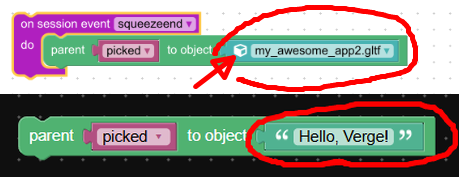
Yes got it. actually when I saw your image I was thinking of putting a text puzzle but the thing marked in image confused me.
There is an object selection indication shown in yoru puzzle and I was wondering how an object selection can allow to select the scene name?I added the text puzzle with name. That should work fine with the scene name I believe.
Once the “append scene” puzzle finishes, the scene is appended to the root scene as its child, hence the objects that are located on that (“appended”) scene would have it as their parent. This is why when you do parent some object from the non-root scene and wish to unparent it, it should be parented back to the actual scene, not the root scene, hence specifying empty for the “parent” puzzle is not OK.
Yes correct. somewhere I was thinking thi scould be the possibility but you explained it well.
Understood !
-
This reply was modified 2 months, 1 week ago by visualizer.
Attachments:
2026-01-01 at 5:34 pm #85909visualizerCustomerAlexander,
I tried something else & surprisingly worked well as of now. That is “remove object” puzzle.
It works as expected as of now.I did try your tip once -twice. didnt work may be because I missed something in puzles.
I will try again but is that “picked” you showed just for reference? or that variable needs to be created for picked object? -
This topic was modified 2 months, 2 weeks ago by
-
AuthorPosts

- You must be logged in to reply to this topic.