
Home › Forums › Graphics / Blender › Lights Limit?
- This topic has 2 replies, 2 voices, and was last updated 1 month, 2 weeks ago by
vergemo.
-
AuthorPosts
-
2026-01-16 at 5:04 pm #85991
vergemo
ParticipantHi,
I am modelling a studio setup in Blender and I reached the point where I started to add lights in the scene (point/spot/area etc…). Each new light I add, the loading time for opening the GLTF viewer in app manager increases. After I added the 8th light, the GLTF viewer doesnt open the 3D model anymore. Is there somthing I am not aware of when it comes to adding lights? is there a way to solves problem or to add ‘lighter’ lights no pun intended, ones that wont make the file heavy.
Thanks
2026-01-16 at 5:21 pm #85993 xeonCustomer
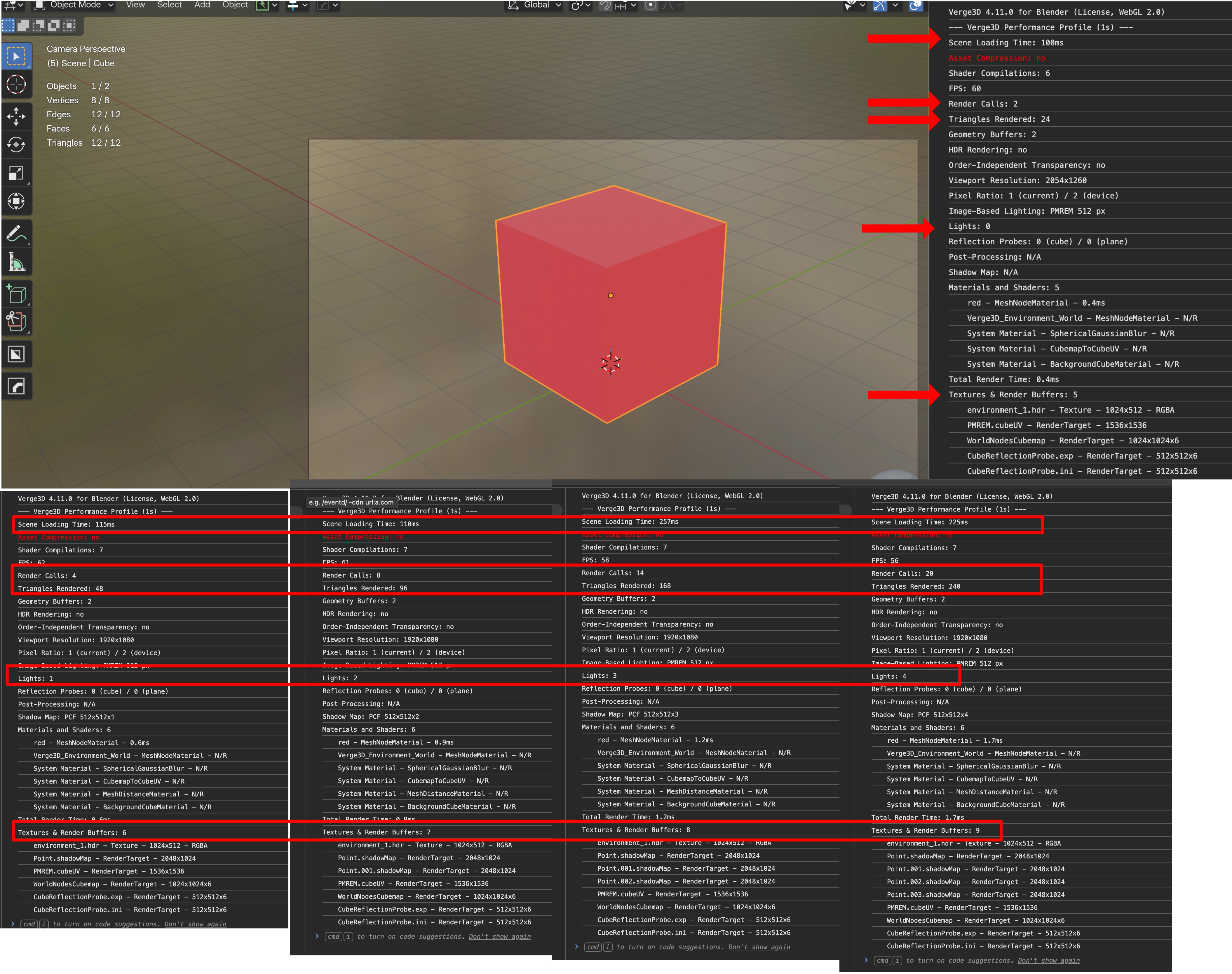
Lights are very inefficient in webgl / V3D. Each light causes the number of redraws and triangle count to increase to the point where its not sustainable.
If you need 8 lights in your scene it would be better to create an environment map with the 8 lights in the HDR and then if you need light cones or to be able to see your lights in the environment you can create objects that have emission or a gradient texture for a light cone that fakes the light glare…etc.
I always recommend you look at your scene stats in Blender and watch the triangle count then when you get to V3D view how many triangles you have….for each light you will see the number multiply along with redraws…this is what you have to avoid.
So use lights sparingly and better yet…avoid using them completely if possible.
You can test what I am saying by creating a simple cube scene with no lights. Save it and record the performance properties…..then add a light do the same thing…add another light and do it again…and you will see how quickly that simple cube becomes a problem…not because its a cube…but because of the lights.
The below data is based on a scene with just a camera and a cube, then subsequently testing performance when just adding a light each time.
-
This reply was modified 1 month, 2 weeks ago by
 xeon.
xeon.
Xeon
Route 66 Digital
Interactive Solutions - https://www.r66d.com
Tutorials - https://www.xeons3dlab.com2026-01-17 at 10:14 am #86002ParticipantThank you very much for the detailed answer. Yeah in that case ill avoid using lights and will manipulate the environment HDR instead. Speaking of which do you know of a website with good/free HDRs?
Thanks
-
This reply was modified 1 month, 2 weeks ago by
-
AuthorPosts
- You must be logged in to reply to this topic.