
- This topic has 15 replies, 2 voices, and was last updated 1 month, 1 week ago by
 xeon.
xeon.
-
AuthorPosts
-
2026-01-15 at 2:55 pm #85980
 c4ccCustomer
I need to implement user functions/player controls regarding keys being held down and released, especially within/after a certain time. How do I detect how long key is being held/pressed down?
FPS trialproduct 20.9.25 https://postimg.cc/gallery/LMM5vkQ/af43346e
2026-01-15 at 11:04 pm #85983 xeonCustomer
easiest way seems through JS does it need to be puzzle based?
Xeon
Route 66 Digital
Interactive Solutions - https://www.r66d.com
Tutorials - https://www.xeons3dlab.com2026-01-15 at 11:41 pm #85984xeonCustomerhere is a puzzle based solution…for a specific key:
https://v3d.net/1eh2Xeon
Route 66 Digital
Interactive Solutions - https://www.r66d.com
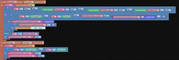
Tutorials - https://www.xeons3dlab.com2026-01-16 at 8:13 am #85985c4ccCustomerTried it for animations, unfortunately it didn’t work, help? Need animation played once when key is pressed and released, and looping animation played when key is pressed/held down after certain time
Procedures
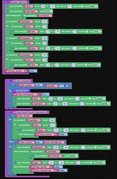
KeyDown/up
-
This reply was modified 1 month, 2 weeks ago by
 c4cc.
c4cc.
FPS trialproduct 20.9.25 https://postimg.cc/gallery/LMM5vkQ/af43346e
2026-01-16 at 4:46 pm #85990xeonCustomerThe initial question was a key down timer….the solution provided does that…but what you are asking now is a different question that has many different solutions
Here are two examples:
Press the 7 key and it will jump
Hold the 7 key and it will rotate…. no time gap between the two eventsPress 8 and it will jump
Press 8 and hold the 8 key for 3 seconds and it will jump then rotate indefinitely until the 8 key is released.project file located here: https://v3d.net/1eh2
demo here: https://v3d.net/1ehgHope this helps.
-
This reply was modified 1 month, 2 weeks ago by xeon.
Xeon
Route 66 Digital
Interactive Solutions - https://www.r66d.com
Tutorials - https://www.xeons3dlab.com2026-01-16 at 7:41 pm #85999c4ccCustomerSo far this seems to work, thanks
FPS trialproduct 20.9.25 https://postimg.cc/gallery/LMM5vkQ/af43346e
2026-01-20 at 5:37 pm #86014c4ccCustomer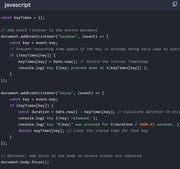
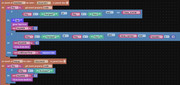
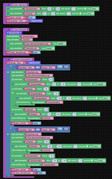
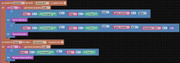
I’m trying to recreate above javascript into puzzles to detect time when a key is held down, compared to time a key is released, so I can play different animations, depending on a key being instantly pressed, vs a key being held down for some time.
While I can cancel the immediate key press animation, to play a key held down animation, the key held down animation when key is released STILL plays the immediate key press ending animation. I don’t want the key held down animation to play the immediate key
press ending animation.How do I get the key held down animation to play its own ending animation when the key held down is released? Where did I go wrong with these puzzles
-
This reply was modified 1 month, 1 week ago by c4cc.
FPS trialproduct 20.9.25 https://postimg.cc/gallery/LMM5vkQ/af43346e
2026-01-20 at 11:31 pm #86016xeonCustomerJavascript would make this so much cleaner I think but here is a puzzle solution:
Hold the 8 key down briefly. ( less than .5 seconds ) it just plays animation one. Hold the 8 key down for more than .5 seconds it will play animation one…then loop animation 2…then when you let go of the 8 key…it will play animation 3. Animation three only plays after the 8 key is held down.
Project file here: http://localhost:8668/manage/?app=X3L_key_down_timer#:~:text=X3L_key_down_timer.zip
Xeon
Route 66 Digital
Interactive Solutions - https://www.r66d.com
Tutorials - https://www.xeons3dlab.com2026-01-21 at 2:18 am #86017c4ccCustomerSorry, I can’t download the file, could you reupload it please? Thanks-
This reply was modified 1 month, 1 week ago by c4cc.
FPS trialproduct 20.9.25 https://postimg.cc/gallery/LMM5vkQ/af43346e
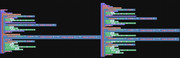
2026-01-22 at 5:58 pm #86025c4ccCustomerThanks for your demo, I modified it for my needs, and it works as intended. The modified puzzles
FPS trialproduct 20.9.25 https://postimg.cc/gallery/LMM5vkQ/af43346e
2026-01-22 at 6:39 pm #86026xeonCustomerGlad you were able to make it work.
You may want to consider minimizing the amount of stuff that is run through the “Everyframe” puzzles. You could consolidate and have only one “Everyframe” puzzle and pull the onkeydown event listeners out of the “Everyframe” puzzle since they are event based and don’t need to be triggered or retriggered every frame. You may find some performance gains.Xeon
Route 66 Digital
Interactive Solutions - https://www.r66d.com
Tutorials - https://www.xeons3dlab.com2026-01-23 at 3:18 am #86027c4ccCustomerThanks for your suggestions, I’ll look into it
Just wondering, weren’t your original onkeydown event listener puzzless inside the everyframe puzzles?
-
This reply was modified 1 month, 1 week ago by c4cc.
FPS trialproduct 20.9.25 https://postimg.cc/gallery/LMM5vkQ/af43346e
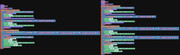
2026-01-23 at 6:30 am #86029c4ccCustomerDo you mean consolidating/minimizing puzzles like this:
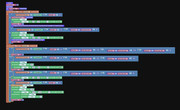
But in practice, I need different puzzle variants for different user inputs, so I separated them into different sets:
FPS trialproduct 20.9.25 https://postimg.cc/gallery/LMM5vkQ/af43346e
2026-01-23 at 4:22 pm #86033xeonCustomerThe first image is probably your most efficient means.
You only want one key down event listener…within it you can put the If statements that control the various key conditions. Splitting them up may seem organizationally efficient but from a program perspective can lead to problems.All of the example puzzles I provided are in the current project. In the main tab is the first iteration, the last tab is the second itteration and the middle tab is the most recent.
Xeon
Route 66 Digital
Interactive Solutions - https://www.r66d.com
Tutorials - https://www.xeons3dlab.com2026-01-23 at 5:04 pm #86034c4ccCustomerThe first image is probably your most efficient means.
You only want one key down event listener…within it you can put the If statements that control the various key conditions. Splitting them up may seem organizationally efficient but from a program perspective can lead to problems.Agreed, I only split those puzzles up as reference for future programming, I won’t use both sets together
Also, any way for me to further simplify/optimize these puzzles?

-
This reply was modified 1 month, 1 week ago by c4cc.
FPS trialproduct 20.9.25 https://postimg.cc/gallery/LMM5vkQ/af43346e
-
This reply was modified 1 month, 2 weeks ago by
-
AuthorPosts
- You must be logged in to reply to this topic.