
Home › Forums › Graphics / Blender › Getting odd shadows on objects
- This topic has 10 replies, 3 voices, and was last updated 2 years, 1 month ago by
kdv.
-
AuthorPosts
-
2024-07-18 at 3:38 pm #76050
sbs
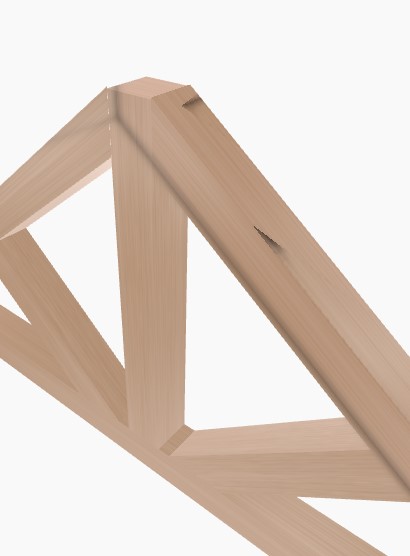
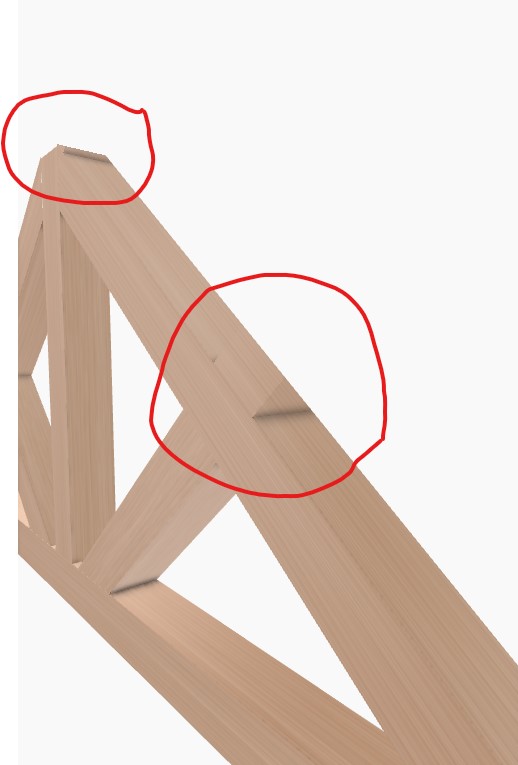
ParticipantAs title reallly, I’m getting some odd shadows on my model, not sure if they are from clipping planes?
Cheers for any help
Attachments:
2024-07-18 at 5:19 pm #76053kdv
ParticipantDisable dynamic AO. See the result.
Puzzles and JS coding. Fast and expensive.
If you don’t see the meaning in something it primarily means that you just don’t see it but not the absence of the meaning at all.
2024-07-22 at 10:15 am #76119ParticipantExcuse my ignorance but where would I disable that? I upgraded to blender 4.2 and all the usual AO settings have been removed by the looks of things
2024-07-22 at 11:16 am #76121 Yuri KovelenovStaff
Hi,
Please upgrade to Verge3D 4.7 to be able to use the AO settings with Blender 4.2. See also this migration guide
https://www.soft8soft.com/wiki/index.php?title=Blender_4.2_migration_guide#Ambient_Occlusion2024-07-22 at 12:03 pm #76126ParticipantThank you, unfortunately this has not solved my issue. I have reattached an image, I have tried turning any sort of shadow settings off but the shadows persist, they look better but I am still getting shadows where I shouldn’t
Attachments:
2024-07-22 at 2:52 pm #76128ParticipantAttach your .blend file here. As simplified as possible.
Puzzles and JS coding. Fast and expensive.
If you don’t see the meaning in something it primarily means that you just don’t see it but not the absence of the meaning at all.
2024-07-23 at 9:15 am #76149ParticipantPlease find attached
2024-07-23 at 9:17 am #76151ParticipantFor some reason its not allowing me to attach so I have put it in my google drive
https://drive.google.com/drive/folders/110SVuiJR-YZqF1mX6byYorqlRrCmqIHH?usp=sharing2024-07-23 at 10:15 am #76152ParticipantI see no shadow issues at all in your example file

Puzzles and JS coding. Fast and expensive.
If you don’t see the meaning in something it primarily means that you just don’t see it but not the absence of the meaning at all.
2024-07-23 at 10:27 am #76153ParticipantHmm odd, let me try and put the model in a fresh app and see what happens
2024-07-23 at 10:35 am #76154ParticipantEven with dynamic AO enabled I see no issues. Try to switch to EEVEE instead of EEVEE Next.
Puzzles and JS coding. Fast and expensive.
If you don’t see the meaning in something it primarily means that you just don’t see it but not the absence of the meaning at all.
-
AuthorPosts
- You must be logged in to reply to this topic.