
- This topic has 5 replies, 2 voices, and was last updated 1 year, 4 months ago by
 Alexander Kovelenov.
-
AuthorPosts
-
2025-04-19 at 8:59 pm #81454
dmon86
CustomerHello,
I am trying to make our App work in VR and am running into a coupe issues/ have some questions about capability.
1. When the VR app loads, The object is huge and you are inside of it. How do i set the scale of the world in VR?
2. Can I use the same HTML menu in our standard app in the VR space?
3. I would like to be able to click the objects and rotate around the object or have the objects rotate. even better if possible it would be ideal to have the object tied to one of the controllers and the movement of it related to that.This is our app: https://apeironweapons.com/wp-content/uploads/verge3d/4385/index.html
Thanks
2025-04-21 at 7:14 am #81458 Alexander KovelenovStaff
Hi,
1. The objects in VR mode look the same as they would in the “real” world. So you should tweak the sizes accordingly.
2. HTML is not supported in VR mode, for UI elements try camera-parented planes or similar objects. Best way would be designing UI elements as 3D objects in the scene itself (buttons, switchers control handles etc.).
3. You can use animation to rotate your objects and regular “when clicked” puzzle to detect the clicking upon them.
2025-04-21 at 5:29 pm #81462CustomerOk thank you,
I must have the scale off in Blender then. I will check into that.
Thank you.Is there a tutorial for camera parented planes?
2025-04-21 at 5:59 pm #81463Alexander KovelenovStaffIs there a tutorial for camera parented planes?
You might check the Ring and E-Learning demos in the Asset Store. They made purely with camera-parented UI elements.
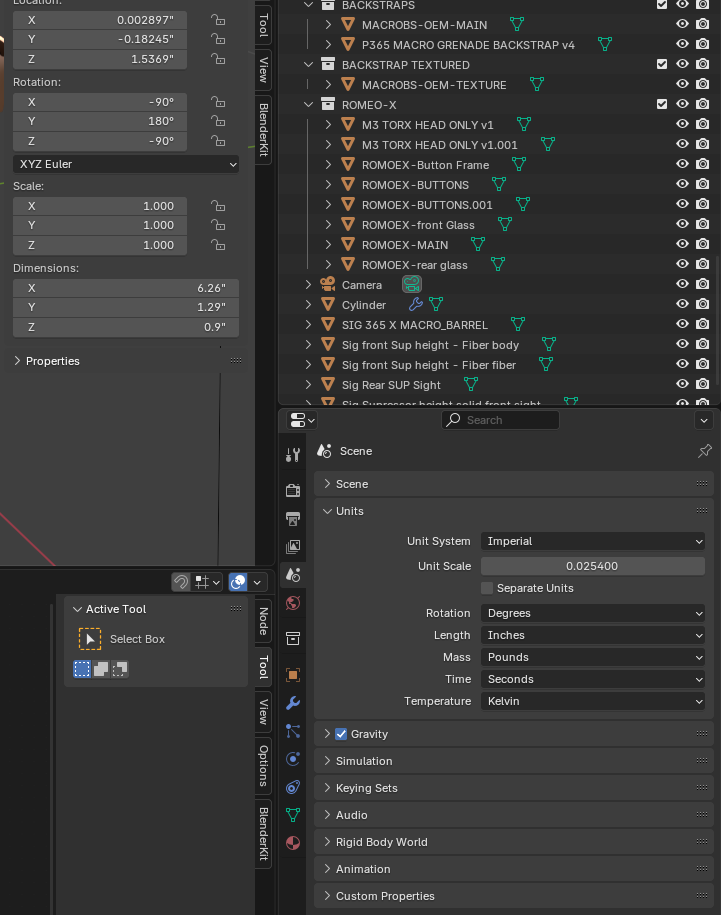
2025-04-21 at 6:19 pm #81465CustomerI checked my blender file and i do believe the units are setup correct. See screenshot.
Attachments:
2025-04-22 at 6:32 am #81468Alexander KovelenovStaffBlender uses metric system internally, so this is what will be exported to Verge3D. Imperial is set only for Blender UI. Hence, to be consistent with the internal metric system the “Unit Scale” parameter should be kept as 1.
-
AuthorPosts
- You must be logged in to reply to this topic.