
- This topic has 16 replies, 7 voices, and was last updated 5 years, 9 months ago by
 GLiFTeK.
-
AuthorPosts
-
2019-09-25 at 5:06 pm #19281
hoody
ParticipantHey Guys, how can i make the background of the texture thats generated by the “texture from text puzzle” transparent? By default its white.
Greets
2019-09-25 at 6:08 pm #19282ParticipantNever Mind – i figured it out :)
2019-09-26 at 1:04 am #19301 GLiFTeKCustomer
helllllo invert node my darling
Visit the GLIFTEK Verge3D Plugins Store!
GLIFTEK.com for Plugin Documentation & LIVE DEMOS!
LIKE The GLIFTEK Facebook Page for updates!
Join the Verge 3D Discord Server!
plz share Discord link & on your signature!2019-09-26 at 7:34 am #19317 Yuri KovelenovStaff2020-04-05 at 12:18 am #25329
canatac
ParticipantHello, I couldn’t do it. How did you solve? Please share :)
2020-04-05 at 11:41 pm #25350ParticipantI solved this with Color Ramp node in Blender by adjusting black areas as alpha.
2020-04-06 at 5:24 am #25357GLiFTeKCustomerusing the invert node wouldn’t work?
Visit the GLIFTEK Verge3D Plugins Store!
GLIFTEK.com for Plugin Documentation & LIVE DEMOS!
LIKE The GLIFTEK Facebook Page for updates!
Join the Verge 3D Discord Server!
plz share Discord link & on your signature!2020-04-07 at 5:20 pm #25451ParticipantI actually could not understand how to use invert node in this situation. Sorry, I am still a newbie. However, RampNode worked well.
By the way, Verge3D is awesome! I played with three.js but it was too hard for me. I am planning to buy a licence after these virus days passed and get my job back. Good work!
2020-04-08 at 6:47 am #25463 Mikhail LuzyaninStaff
Can you share your blend file with a texture?
Co-founder and lead graphics specialist at Soft8Soft.
2020-04-08 at 8:13 pm #25518ParticipantOf course. Blend file attached.
Attachments:
2020-04-09 at 6:25 am #25527Mikhail LuzyaninStaffHere’s your example back and fixed.
Attachments:
Co-founder and lead graphics specialist at Soft8Soft.
2020-04-10 at 10:42 pm #25634ParticipantThank you so much sir. I appreciate your help. Have a nice day!
2020-04-11 at 5:03 am #25635Yuri KovelenovStaff2020-05-08 at 7:43 am #27401 quasarCustomer
Hey. Here is a really working method
With this method, the text has full transparency, which allows you to use even non-repeating textureshttps://inpretium.com - интерактивные решения
2020-10-29 at 2:18 pm #34716kreattiva
CustomerHello everybody,
I am a beginner and i am making a 3D product configurator.
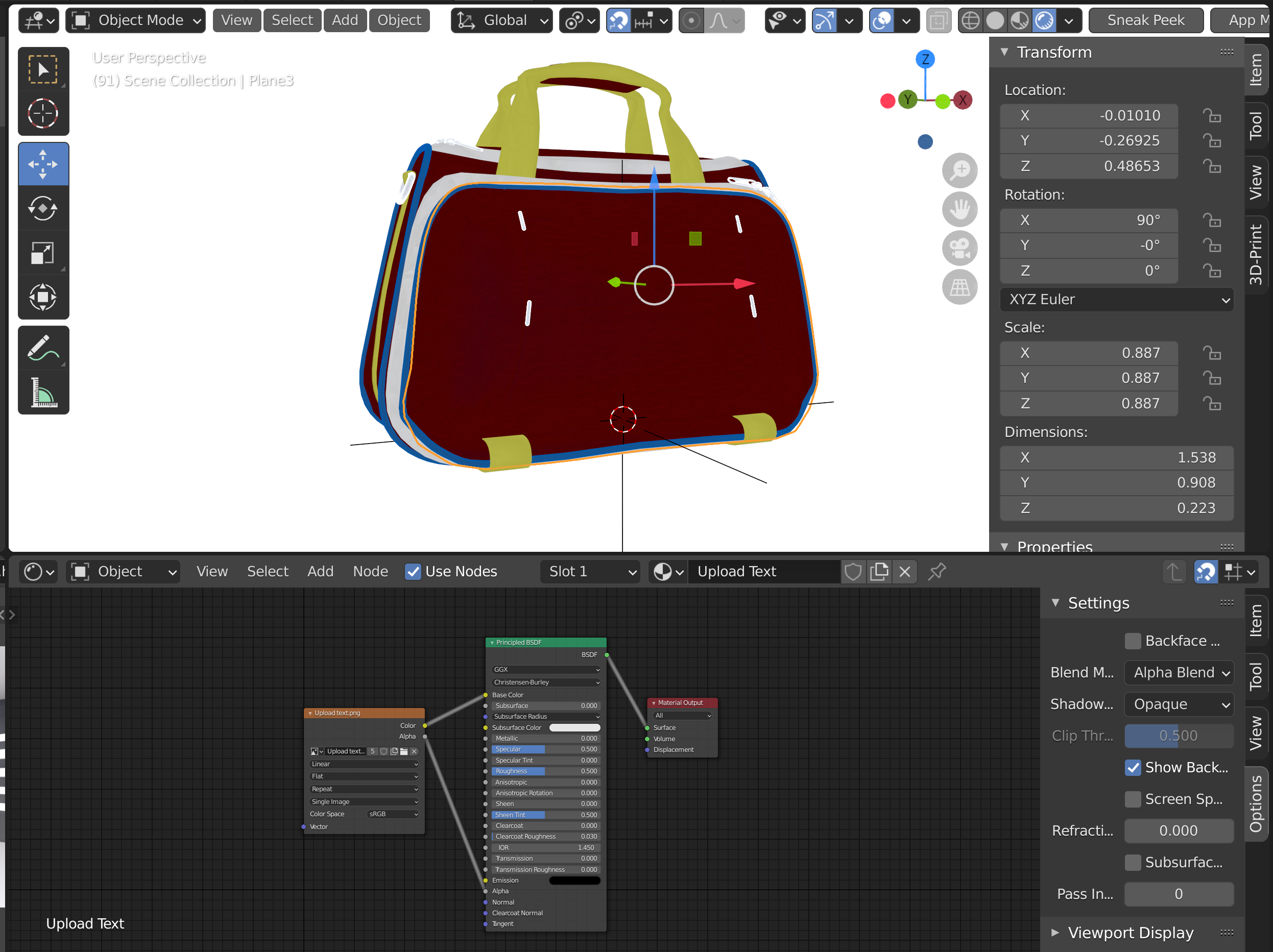
I managed to create a text editor where i can change the font, body and color of the writing, but i want the “white background” that is automatically generated to disappear so that only the writing remains, I have already tried the different methods listed above, but none seem to work.
I attach descriptive images, in image 1 I am attaching the basic material I created to write some text, in image 2 what I see for now.How can i fix it?
Thank you very much,
Kreattiva -
AuthorPosts


- You must be logged in to reply to this topic.