
- This topic has 9 replies, 2 voices, and was last updated 4 months, 3 weeks ago by
 NaxosCG.
-
AuthorPosts
-
2026-05-11 at 8:03 am #87173
 NaxosCGCustomer
Well hello there !
A new strange behaviour now :
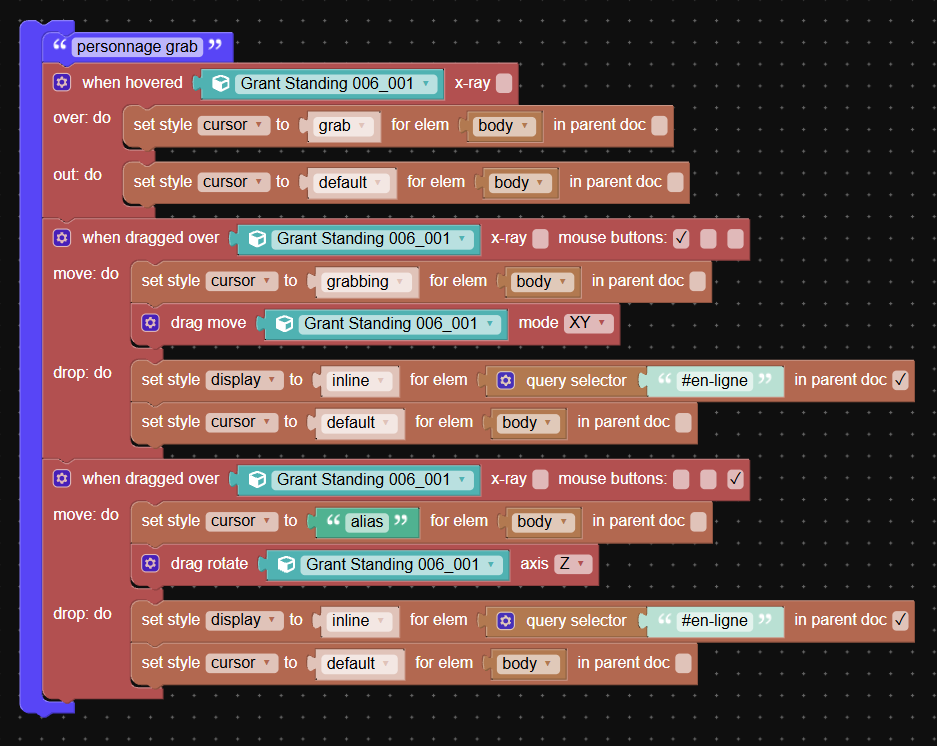
For a simple object in my scene, the dragMove puzzle seams to offset the move.
Is there anyway to add some maths in the resulting move ?
Or did i puzzled it wrong ?
see attached : png for puzzle, mp4 for video of “bug”
the app : https://v3d.net/1g7pThanks.
-
This topic was modified 4 months, 3 weeks ago by NaxosCG.
-
This topic was modified 4 months, 3 weeks ago by NaxosCG.
"1+1=3... for large values of 1"
2026-05-11 at 12:07 pm #87180 Alexander KovelenovStaff2026-05-11 at 5:29 pm #87182NaxosCGCustomer
I will copy / paste into a simple scene, but when you add a letter (open the hamburger menu to do so), then edit mode, then move mode, it dragmove nicely…
"1+1=3... for large values of 1"
2026-05-11 at 5:31 pm #87183NaxosCGCustomerIn fact no, it offsets also, but a bit less…
Attachments:
"1+1=3... for large values of 1"
2026-05-11 at 5:39 pm #87185NaxosCGCustomer2026-05-11 at 5:41 pm #87186NaxosCGCustomerwith a fresh new scene, it works : https://v3d.net/1ga6
Same copied puzzle
I don’t understand."1+1=3... for large values of 1"
2026-05-11 at 5:45 pm #87187NaxosCGCustomeradded my guy mesh, and it offsets again…
BUT : only when grabbed far away from z=0…
see attached.
https://v3d.net/1ga6Attachments:
"1+1=3... for large values of 1"
2026-05-11 at 6:50 pm #87190Alexander KovelenovStaffI see it now!
There is a space distortion caused by perspective camera that prevents proper positioning of such stretched objects. I believe switching to ortho camera is not an option, so there are methods to slightly decrease this effect:
1) placing center of geometry at the middle, not the bottom part of the object
2) decreasing camera FOV and placing the camera at more distant position to compensate scaling (this method reduces camera perspective distortion)2026-05-12 at 7:29 am #87192NaxosCGCustomerI’ll try number 1.
Number 2 is not an option for now, as the camera needs to be that focal wide, and that distance : the client chosed it."1+1=3... for large values of 1"
2026-05-12 at 7:53 am #87194NaxosCGCustomerOk, i did both

Many thanks for that !"1+1=3... for large values of 1"
-
This topic was modified 4 months, 3 weeks ago by
-
AuthorPosts
- You must be logged in to reply to this topic.