
- This topic has 7 replies, 3 voices, and was last updated 3 months, 1 week ago by
 xeon.
xeon.
-
AuthorPosts
-
2025-12-24 at 9:19 am #85848
 NaxosCGCustomer
Hello there !
I need to let the end user to drag&move objects in a 3D scene.
Is there anyway to define a collision object to limit the drag&move so the draged object does not go outside the scene ?If the scene were rectangular, i could use limit puzzle, but what if it is not ?
Thanks for help.
Attachments:
"1+1=3... for large values of 1"
2025-12-24 at 12:56 pm #85852 Alexander KovelenovStaff
Hi,
You can either use physics for that, or, much easier, just raycast a ray from the object downwards and organize some kind of “navigation map/mesh” below that will constraint your objects. Check out the raycast example in the manual. In your case the raycasting would be done from the individual objects, not the camera.-
This reply was modified 3 months, 1 week ago by
 Alexander Kovelenov.
2025-12-24 at 2:11 pm #85854NaxosCGCustomerHi,
You can either use physics for that, or, much easier, just raycast a ray from the object downwards and organize some kind of “navigation map/mesh” below that will constraint your objects. Check out the raycast example in the manual. In your case the raycasting would be done from the individual objects, not the camera.Hello Alexander.
As you may remember, i’m far from coder guy. And i have to admit this raycast puzzle sounds a bit too nerdy for me.
Would you create a simple exemple, with a cube that we can drag&move indise a bigger one ?
I can’t code / hard puzzle, but i can understand examples and reuse in my own ones.That would be a nice Christmas gift

"1+1=3... for large values of 1"
2025-12-24 at 8:57 pm #85859 xeonCustomer
I have tried to cast rays from an object to another object but get nothing but empty arrays.
It seems no matter what I can only get data when casting from the camera. Any way to get object to object casting?Xeon
Route 66 Digital
Interactive Solutions - https://www.r66d.com
Tutorials - https://www.xeons3dlab.com2025-12-25 at 7:59 am #85863Alexander KovelenovStaffMerry Christmas!
It’s actually not very hard to do with puzzles. Please check out the following example:
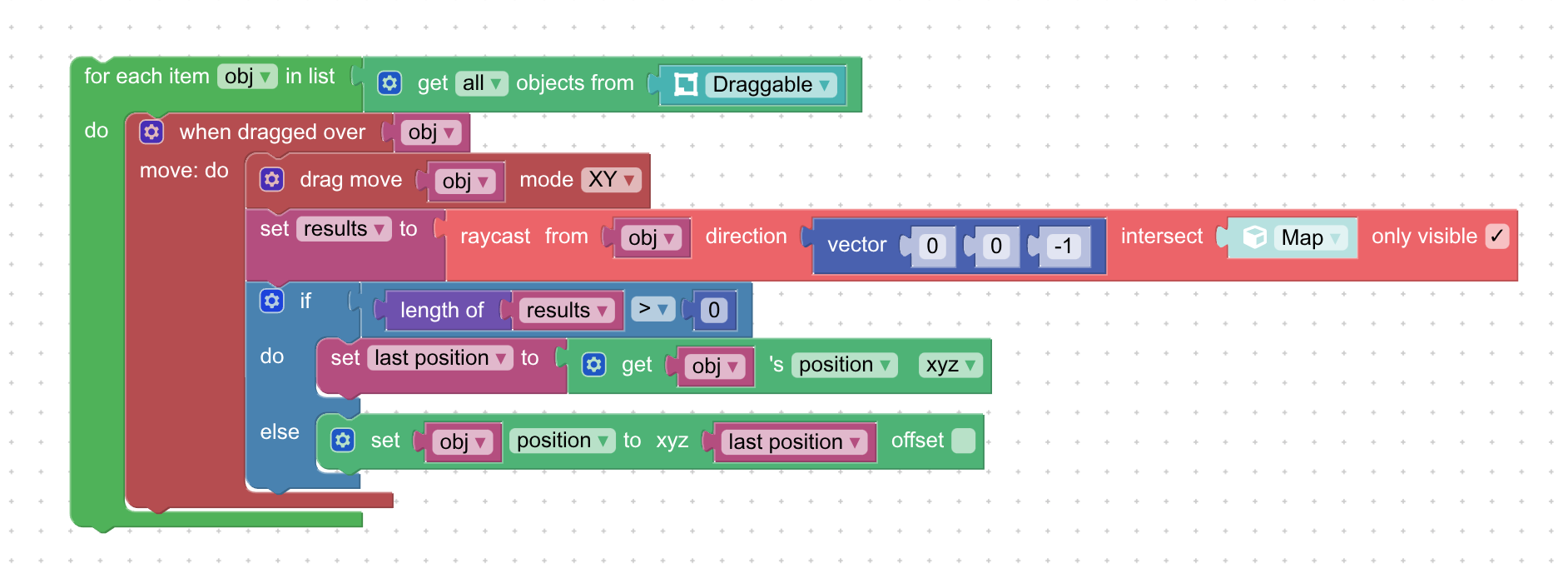
Here we have some objects from the “Draggable” group. After the actual dragging happens, we cast a ray in the down direction to the “Map” which is a navigation mesh below the objects. If ray hit happens, the puzzle returns some data in the list, if miss happens the list is empty. If we’re allowed to move, we save actual object position to the “last position” variable if we don’t this position is used to place the object where it should be located.
I’ve upload the actual project to Verge3D Network, feel free to check out: https://v3d.net/1e87
-
This reply was modified 3 months, 1 week ago by Alexander Kovelenov.
-
This reply was modified 3 months, 1 week ago by Alexander Kovelenov.
2025-12-25 at 11:54 am #85873NaxosCGCustomerYouhouuuuu !! (This is happyness scream in French, but i guess also in english, as Omer Simpson says that a lot)
Thank you Alexander, and merry Christmas !
"1+1=3... for large values of 1"
2025-12-25 at 11:59 am #85874NaxosCGCustomerWorks like a charm !!!
"1+1=3... for large values of 1"
2025-12-26 at 5:57 am #85876xeonCustomerSeems my mistake was thinking the raycast puzzle was looking for a direction that could be taken from a get object direction puzzle. Perhaps changing the name within the puzzle to object vector would be more appropriate. Once you use a vector all works well….thanks.
Xeon
Route 66 Digital
Interactive Solutions - https://www.r66d.com
Tutorials - https://www.xeons3dlab.com -
AuthorPosts
- You must be logged in to reply to this topic.