I need help refreshing my scene ideally it would reactivate the pre-loader like when you type ctrl-r to reset the whole app but I do not see that as an option so have explored two other solutions.
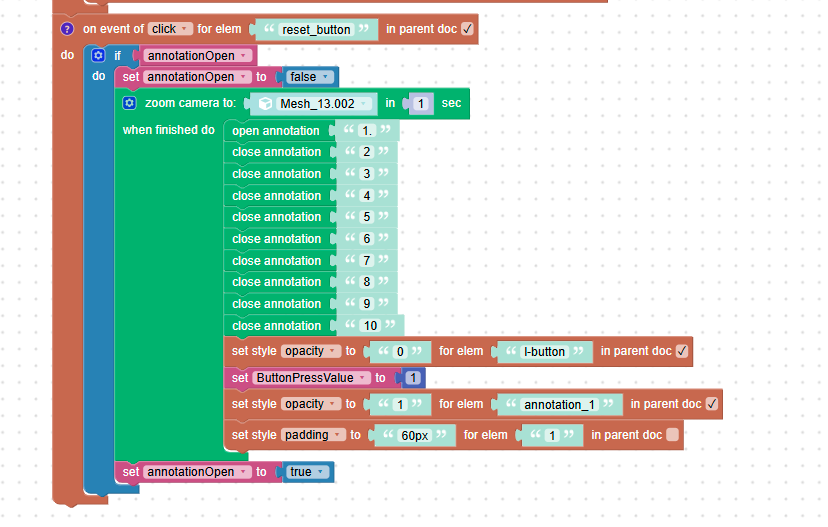
Solution 1 (screenshot below): I looked at a different solution which was resetting the scene back to my first annotation and turning off all annotations that were open. When I do that, I can’t get the annotation that was open in the sequence to close but this article says they should by creating a list: https://www.soft8soft.com/topic/make-all-annotation-popups-text-windows-disappear-when-clicking-elsewhere/
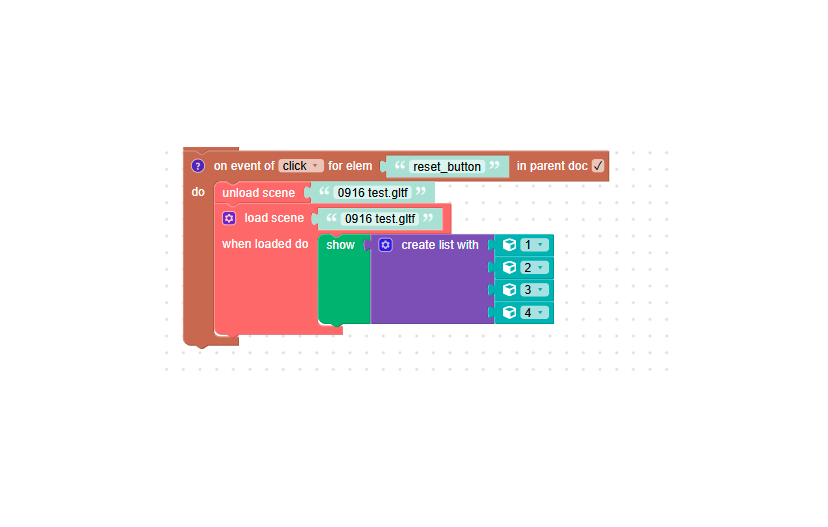
Solution 2 (screenshot below): I looked over this response however, this is for going between scenes and when I do something with the load/unload scene puzzles all my annotations disappear in the scene: https://www.soft8soft.com/topic/how-to-enable-verge3d-preloader-after-loading-new-scene/
Solution 3 (ideal solution): When the reset button is hit it would reset the page in the same way ctrl+r refreshes the browser or desktop app, that way the preloader shows again and the annotations do not disappear like in solution 2
Test file: https://www.dropbox.com/scl/fi/4188d406cd0e9dm15wcuw/0922-test-2.zip?rlkey=44v1s76mamddfkjekceqln14b&st=ssq32uqw&dl=0
Thank you – sorry to have a second question in such short succession
-
This topic was modified 1 hour, 25 minutes ago by
 emadamsinc1.