
Home › Forums › General Questions › Zoom/Fov mouse wheel
- This topic has 8 replies, 2 voices, and was last updated 4 years, 3 months ago by
ATGmedialab.
-
AuthorPosts
-
2022-04-22 at 4:10 pm #51287
ATGmedialab
CustomerDear all,
I am making a project where we can rotate around a 3D factory model with several clickable rooms.
When one is clicked the camera flies to the centre of the room and the user can view the room 360 degrees from inside. The customer wants to be able to zoom in/out or change the fov of the camera at this point.How can I modify the mouse wheel value when is scrolled to change the fov instead of doing a dolly movement?
Please if you can provide an example to support me.
Thank you all.
A.2022-04-23 at 12:57 pm #51298 Mikhail LuzyaninStaff
You can create a multiple cameras with different FOV and scroll speed and swithc between them using puzzle Set Active Camera.
Co-founder and lead graphics specialist at Soft8Soft.
2022-04-26 at 11:19 am #51373CustomerExcuse me if I misunderstood your answer.
What I need is to change the FOV of the active camera with the mouse-wheel in real-time. Instead of translating the camera forward & backwards.
Hope someone can help to code this.
2022-04-26 at 12:28 pm #51378Mikhail LuzyaninStaffThen you can use Set Param Camera puzzle for that.
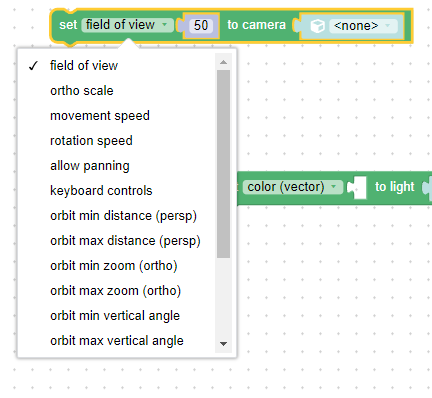
Attachments:
Co-founder and lead graphics specialist at Soft8Soft.
2022-04-26 at 1:18 pm #51387CustomerThat’s a good idea indeed.
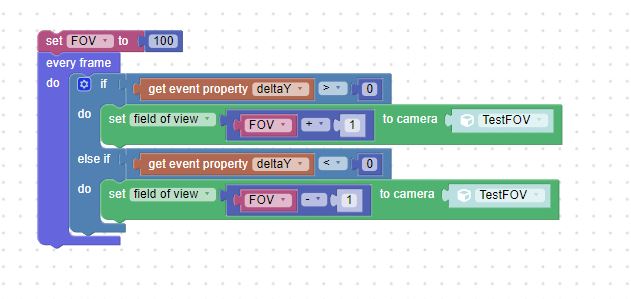
But the parameter ’50’ should be driven by the mouse-wheel input from the user.
How do we link the FOV parameter to the mouse-wheel input?Thanks for the follow-up.
Pd: The attached is an idea that does not work =(
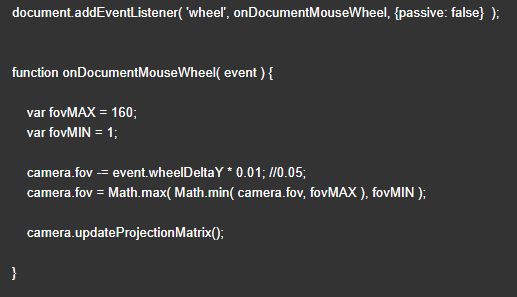
Pd: I got this code from the web (codeFOV.jpg)
Could you explain where to add these lines? Can I call/execute it with the puzzles somehow?Attachments:
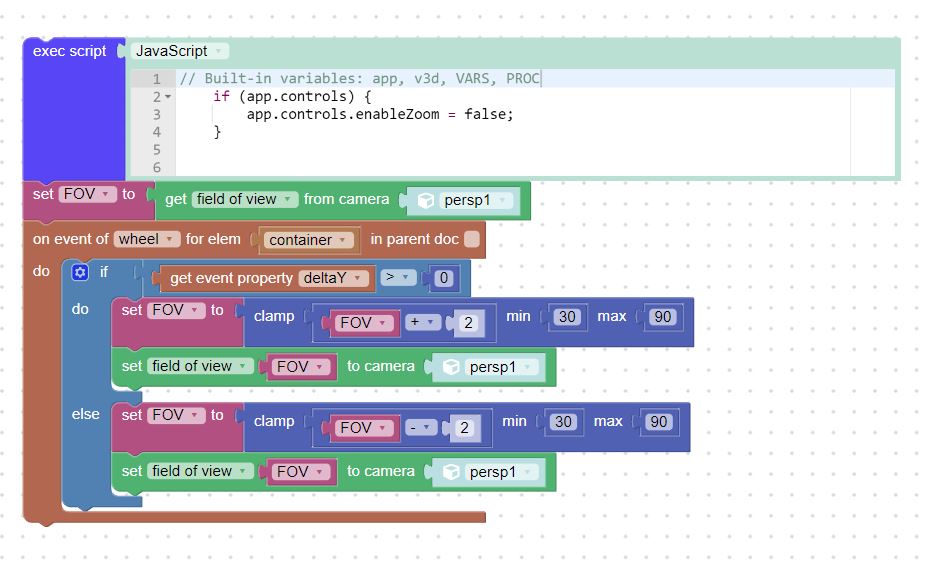
2022-04-27 at 7:10 am #51396Mikhail LuzyaninStaffHere’s an example for you.
Attachments:
Co-founder and lead graphics specialist at Soft8Soft.
2022-04-29 at 4:45 pm #51502CustomerEy Mikhail,
Thank you a lot, this is great and really helpful.
You’re fantastic guys.Best regards,
A.2022-04-29 at 4:46 pm #51503Mikhail LuzyaninStaffYou’re welcome!

Co-founder and lead graphics specialist at Soft8Soft.
2022-05-11 at 3:08 pm #51949CustomerUpdate: To anyone interested in changing the camera FOV with the mouse wheel. I post another solution I found more appropriate for my project.
Attachments:
-
AuthorPosts
- You must be logged in to reply to this topic.