
Home › Forums › Graphics / Blender › V3D 4.10 webm = v3d.GLTFLoader: Couldn’t load texture
Tagged: GLTFLoader, Video, webm
- This topic has 9 replies, 4 voices, and was last updated 4 months ago by
 xeon.
xeon.
-
AuthorPosts
-
2026-05-13 at 3:28 pm #87241
 jefferywright2194Participant
I have a webm file with an alpha channel placed on an object, I have configured the mimetype for my server:
 <!-- Remove to avoid duplicate errors -->
    <remove fileExtension=".webm" />
    <mimeMap fileExtension=".webm" mimeType="video/webm" />
I also have the same error for Quicktime .mov format…
Has anyone successfully used a webm file with an alpha channel as a material?
How did you do it?
Thanks.
-
This topic was modified 4 months, 3 weeks ago by
 jefferywright2194.
2026-05-14 at 9:31 am #87277 Alexander KovelenovStaff2026-05-14 at 12:49 pm #87283jefferywright2194Participant
I haven’t, I know that it can be published to the network via manager, but we have security on our server that prevents this, I get these errors:
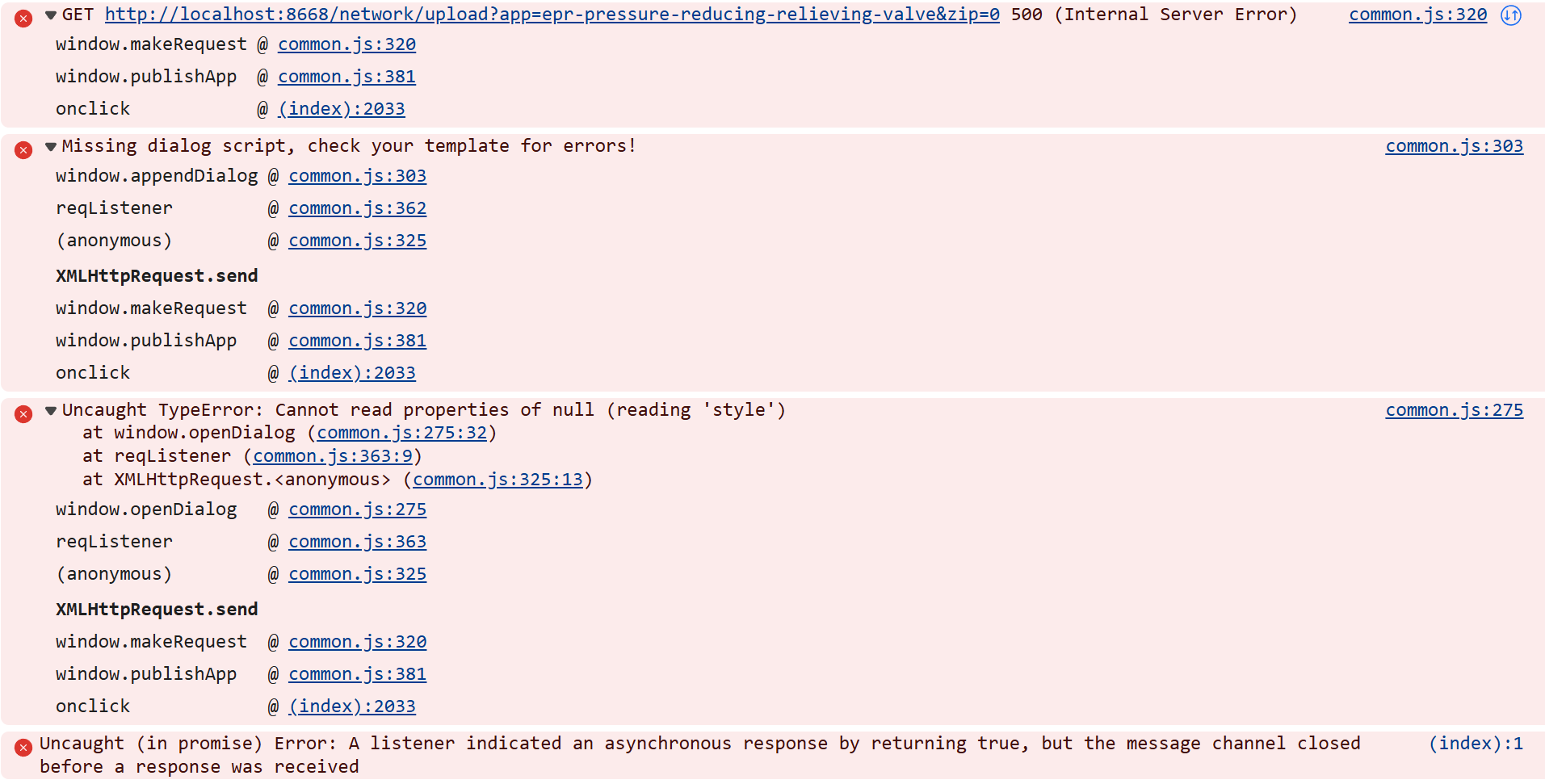
Is there manual access to the network?
Does this error have anything to do with the webm not displaying?
v3d.js:1 v3d.WebGLProgram: gl.getProgramInfoLog() (123,3-49): warning X3557
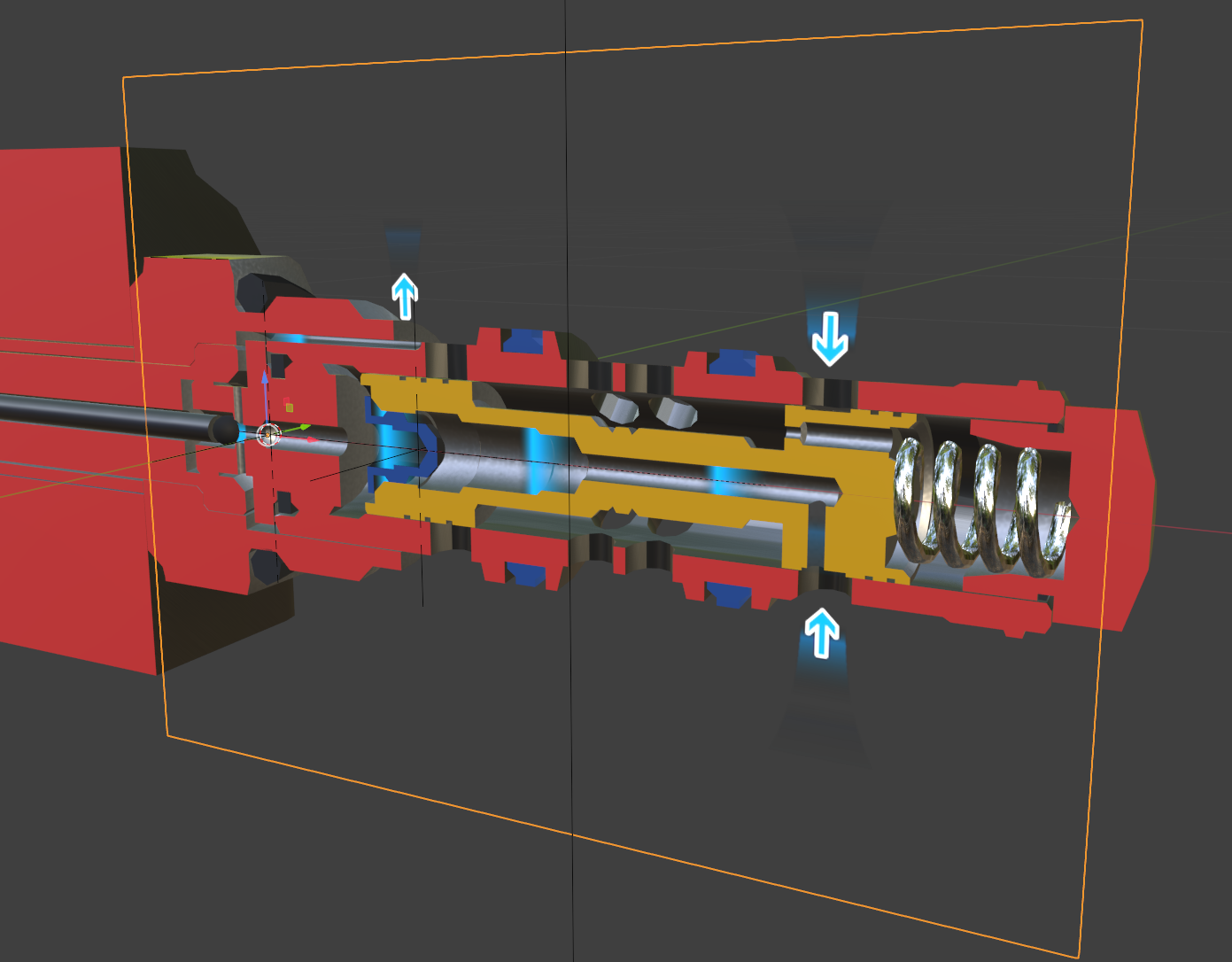
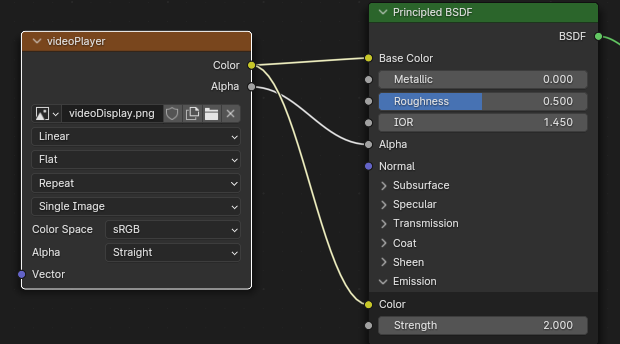
The shader displays in Blender properly:
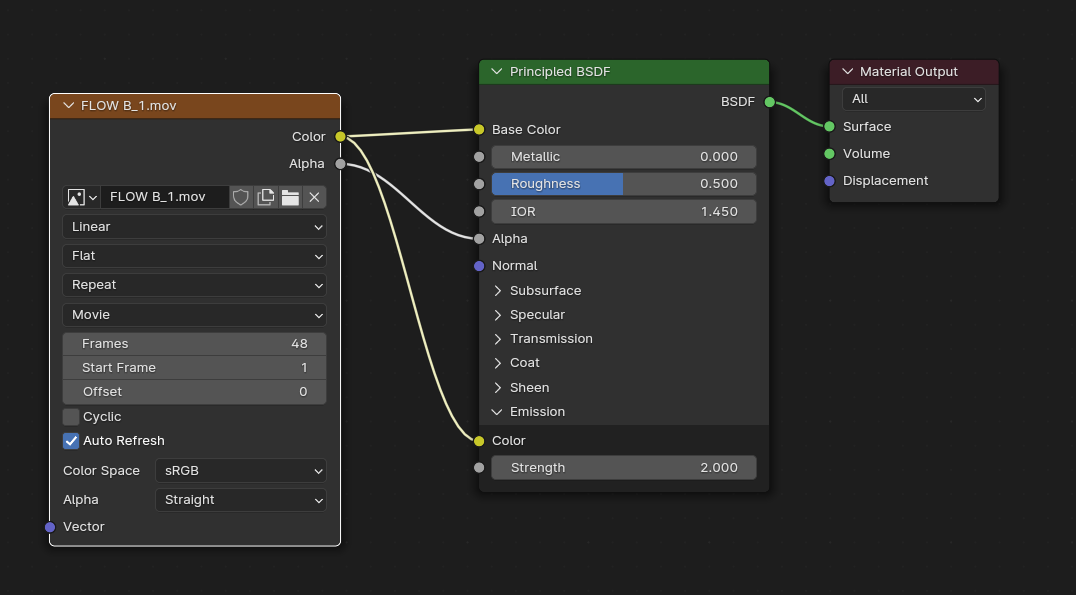
This is the shader setup:
The app I’m developing can be found here: App Dev
Thanks!
-
This reply was modified 4 months, 3 weeks ago by jefferywright2194. Reason: This forum has no preview function or simple add image function
2026-05-14 at 7:13 pm #87288 xeonCustomer
Ok…so it sounds like you have few issues…so I think it may help if you increment through this list and see if you have the same problems.
The fits step is to test this thing locally.
Instead of using your project….create a new one with just a plane and assign it your video texture. You should be able to play this back with the app manager and your browser.If that works… try publishing it to your server and see if you can get that to work. If not the problem is more in your server setup than than V3D material.
Xeon
Route 66 Digital
Interactive Solutions - https://www.r66d.com
Tutorials - https://www.xeons3dlab.com2026-05-14 at 7:45 pm #87289jefferywright2194ParticipantThanks, the files would not load locally, I had to use a full url to get the video to load and display on the object.
This only works if I replace texture onload…

When I load the texture in a function, it does not load when called.
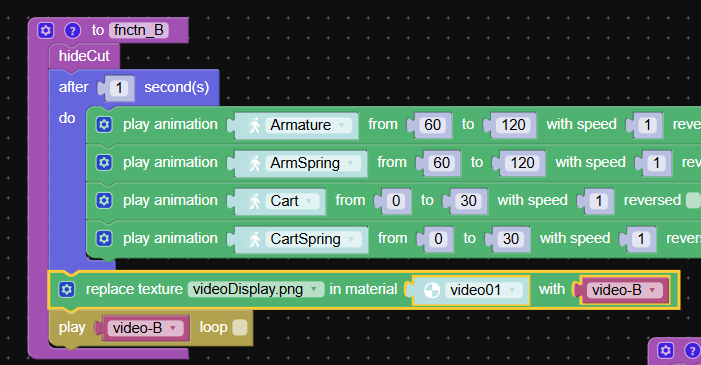
this makes very little sense.
Shouldn’t it load just like it does onload?
Thanks again.
-
This reply was modified 4 months, 3 weeks ago by jefferywright2194. Reason: This forum has no preview function or simple add image function
2026-05-17 at 5:26 pm #87318bigmike814
ParticipantIt’s a race condition. You’re trying to play a video as soon as you initiate the load. On your local host it loads right away, on the server it hasn’t loaded yet because latency and depending on your server it will take longer to load than directly from the disk on your computer. Try adding a callback function or a timeout and mess with the time on it. Or just preload it and call it later.
Open up your network and see if the file loads after the play loop throws the error.
3d Configurator | https://mc2sheds.com/builder
Site | https://mc2cpq.com
2026-05-19 at 7:40 pm #87384jefferywright2194ParticipantThanks, you’re right, the video is loading now.
The video display object’s material is a blank, transparent png.
To display a video, I replace the image “videoDisplay.png” with the video for a given section (B, C, D, etc…) iow: There will be a video for video-B, video-C, video-D, etc… that I want to display on that video display object.
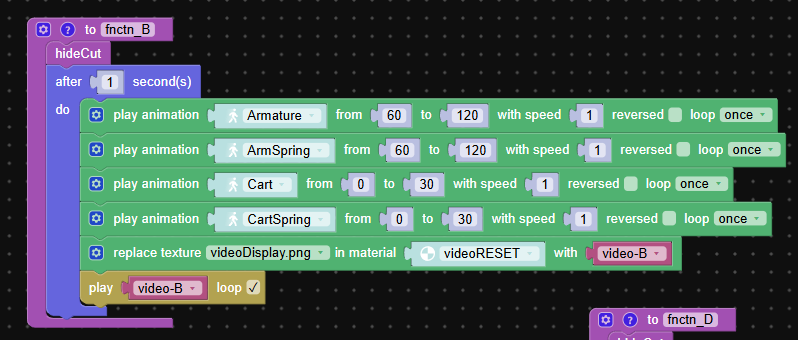
So, depending on what the user presses, I want the current video on the display object to be replaced with the original transparent png, resetting the display object, before it loads the video that corresponds to the section.
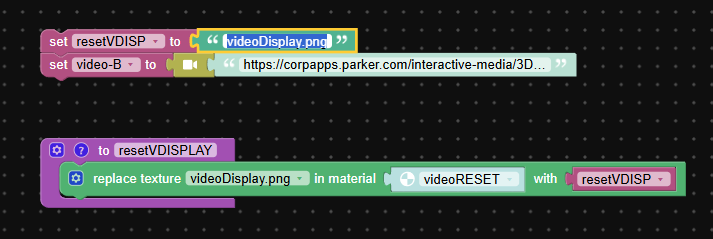
Replace Texture in the puzzle piece is a fixed value, how do I make it variable, to replace whatever video currently occupies the material?
Thanks!
-
This reply was modified 4 months, 2 weeks ago by jefferywright2194. Reason: This forum has no preview function or simple add image function
2026-05-20 at 12:26 pm #87389jefferywright2194ParticipantBuilding up a logic chain might work, but the replace texture puzzle is very restrictive, is there another way to do this?
There does not seem to be an option to replace the new current texture (FLOW-B.webm) with the original default image:
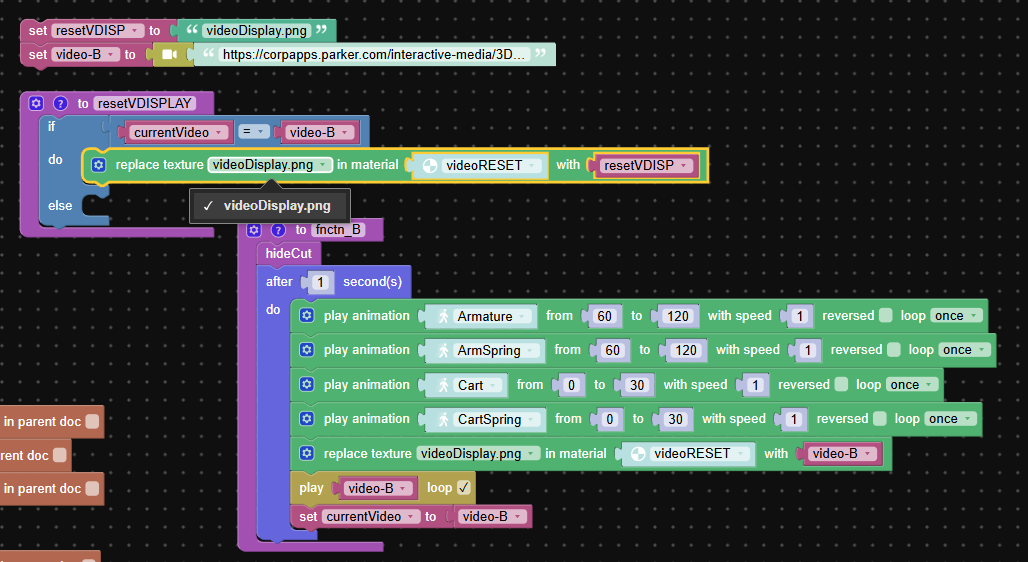
-
This reply was modified 4 months, 2 weeks ago by jefferywright2194. Reason: This forum has no preview function or simple add image function
2026-06-02 at 1:28 pm #87424jefferywright2194ParticipantThe answer is: I created placeholder objects to store my textures in Blender, now I can access these textures in Puzzles, where I created a Variable for every texture and replaced the reference to the webm in the material with a full url link to it so the video will load. Then I can simply Assign the materials to my video display object.
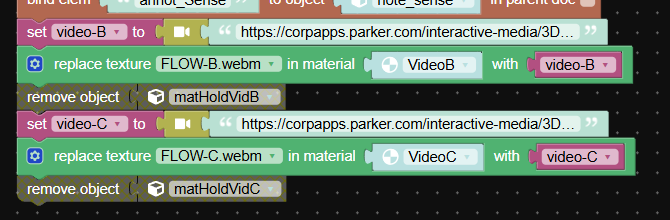
This causes console errors, since the materials will not load the original referenced webm in the Blender Shaders…

So this is basically a workaround hack?
I want to reduce the memory burden in the app, so instead of having numerous objects offscreen playing the videos, I removed the objects via puzzle, being assured that the materials will still be present:
The rendering memory, or cache, stores materials and textures independently from the physical mesh instances. When you use the remove object logic, Verge3D removes only the Mesh geometry and its corresponding transform data from the active webGL scene. The material data and textures associated with the deleted object stay loaded in the browser, leaving them ready to be reassigned to remaining objects if needed.
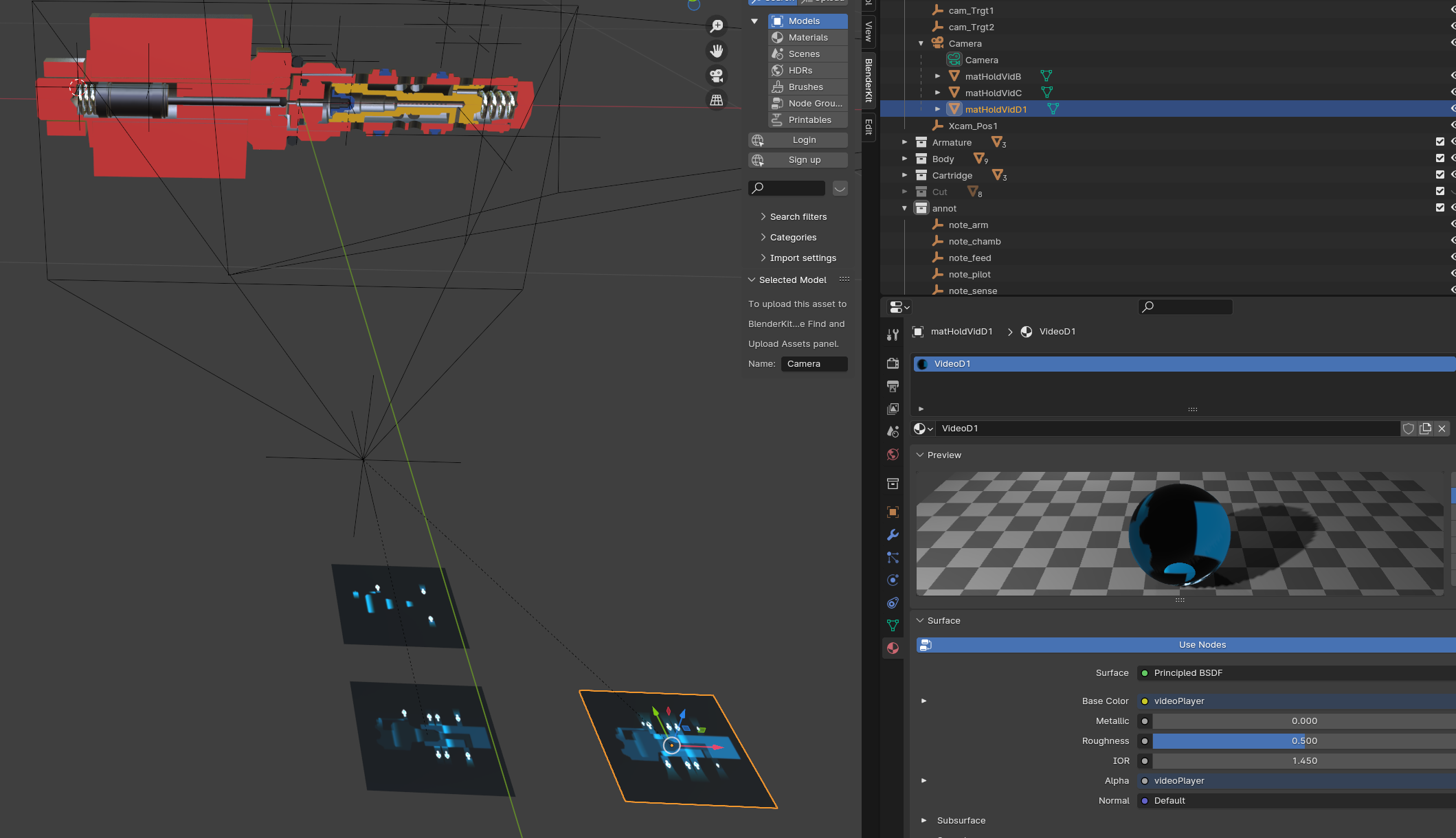
However, this is not the case, when the objects are removed, the videos will not appear when called so it seems the materials are also removed.
Is there a better way to have these video textures at the ready without all the videos playing on placeholder objects?
-
This reply was modified 4 months ago by jefferywright2194. Reason: This forum has no preview function or simple add image function
-
This reply was modified 4 months ago by jefferywright2194. Reason: This forum has no preview function or simple add image function
2026-06-02 at 4:25 pm #87430xeonCustomerWhen using video in a online V3D app in the manner you are describing requires a few techniques to make it the most efficient.
First I would recommend loading your videos in the init tab. You want to preload them the same way you would audio. This helps eliminate the latency if a user immediately selects a video as its already cached and you they dont have to wait for the download.
If your app and your video files are going to be on the same domain…you don’t need the full URL as long as the files are found in the relative directories. If you place the videos in a local folder within your project and reference those locally then when you upload the entire project the video files will be uploaded and will be accessed by your app without issue.
You will want to create plane objects and assign your video assets to them out of camera view… separate from other objects in your scene. I typically parent them to the camera and make sure they do not produce shadows. There only purpose is to maintain the texture/video in memory. Regardless of what objects you add or remove from the scene.
You can then either replace textures.
Note: depending on the memory footprint of the videos…you can overload the memory buffer of the browser. So you will need to manage video memory carefully. With only a hand full of videos its probably not a big concern but when you have hundreds its very messy.
Xeon
Route 66 Digital
Interactive Solutions - https://www.r66d.com
Tutorials - https://www.xeons3dlab.com -
This topic was modified 4 months, 3 weeks ago by
-
AuthorPosts
- You must be logged in to reply to this topic.