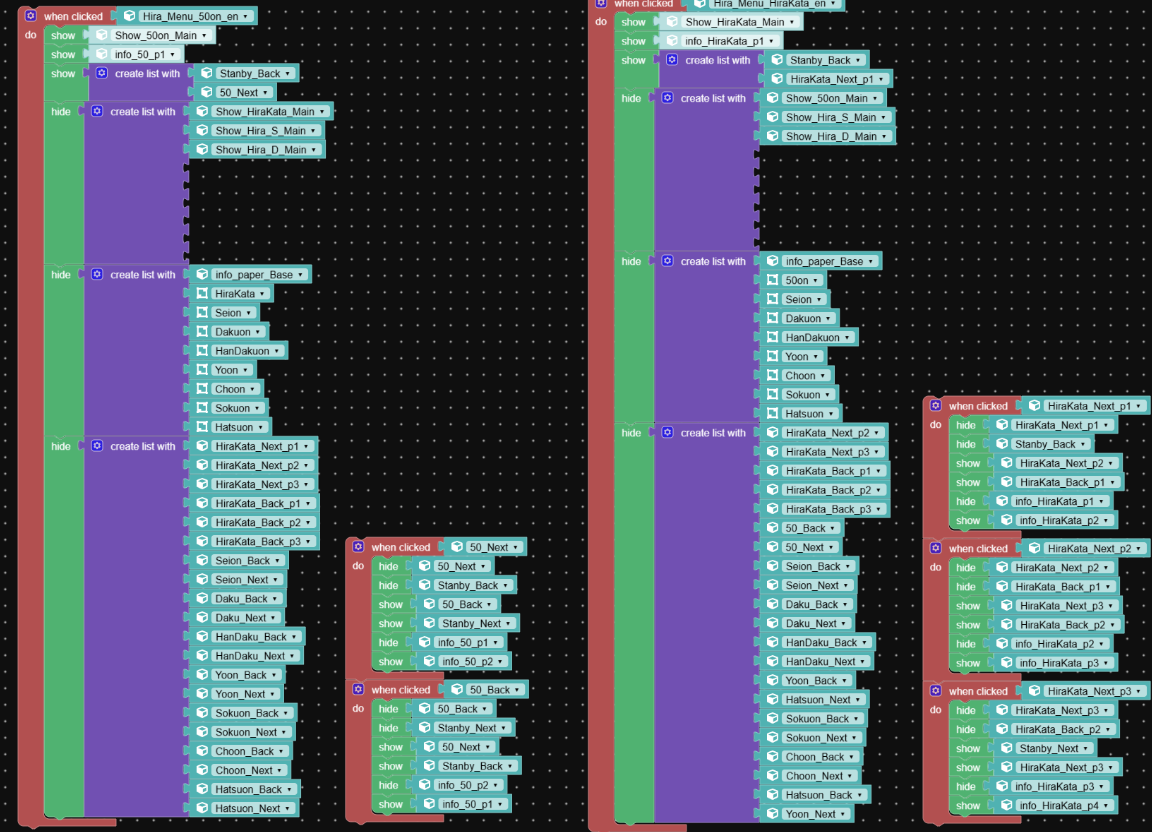
I’m struggling with a very basic setup where buttons are used to switch between object. Despite the simplicity, it’s not working and I can’t identify the cause. Would it be more helpful if I shared the project files or a screen recording of the issue?
I have worked on Verge3D projects before and have never encountered an issue like this. I thought it would be a straightforward step, but I can’t quite understand why this problem is occurring. Is it possible that I’ve missed some crucial logic? Or perhaps there are specific steps required to update certain materials, objects, or even the entire scene that I’m unaware of? I would really appreciate any help to resolve this… I’ve hit a complete dead end with my Puzzle logic and simply can’t figure out what I might have missed.
here is the video capture file
https://drive.google.com/file/d/1jg198-mNxAA5mpKr8FBkJApPQAdBy7Ae/view?usp=sharing
-
This topic was modified 1 day, 3 hours ago by
 gee_lau2000.
 .
.