
Tagged: video texture playing end puzzle
- This topic has 6 replies, 3 voices, and was last updated 5 years, 3 months ago by
 Yuri Kovelenov.
-
AuthorPosts
-
2020-12-10 at 8:42 pm #36394
Joep Brinkman
CustomerHi,
I would really like to know if there’s a way to detect the end of a video with puzzles and act upon it. I know about the ‘is playing’ puzzle but that seems to keep in the playing state, even when the video has ended. Am i doing something wrong? I would like to keep away from the workaround of having a timer run in parallel.
I am scaling a plane from 0 to 1, play a video on it, and then would like the plane to scale back when the video ends. I have a few video’s with different lengths that need to do this so having the ‘has ended’ trigger would be super useful.
I hope you can help me out!
Cheers,
Joep
2020-12-11 at 7:13 am #36406 Yuri KovelenovStaff
Hi,
you can implement it with a small JavaScript snippet which you can put inside the exec script puzzle.
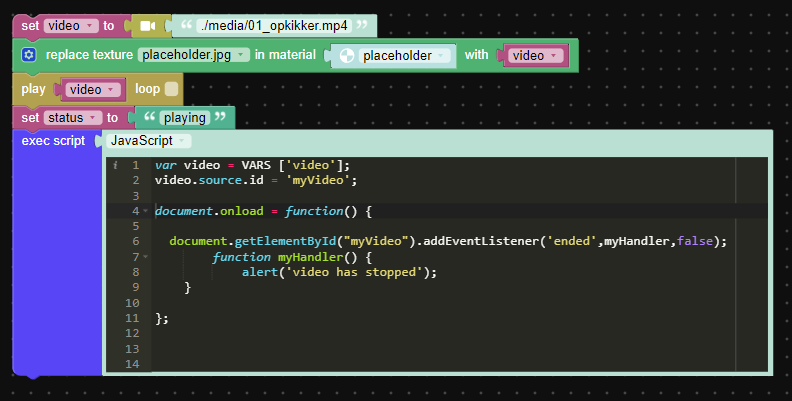
2020-12-11 at 7:41 am #36407CustomerThanks for the heads up Yuri, i was curious if there would be a puzzles-only solution, but I will tackle it this way then.

Really awesome support from you guys by the way, thanks!2020-12-11 at 3:15 pm #36417CustomerI’m really scratching my head on how to do this. Nothing i try seems to work as i hope. Could you help me out with a few simple pointers perhaps?
Attachments:
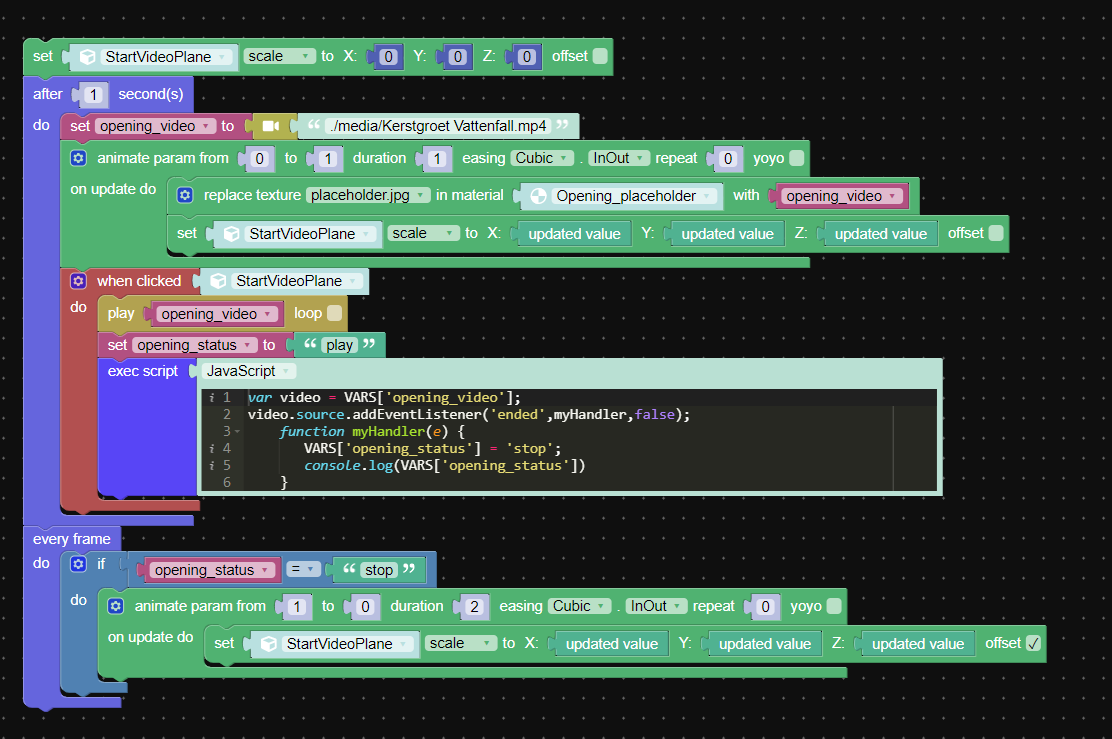
2020-12-11 at 11:49 pm #36423CustomerIn the meantime I managed to solve this myself. I had to simplify things a bit in the end. If someone’s looking to do the same, I attached a screenshot of what works for me in the end. Also, tips of doing this more efficient/optimal are always welcome.
Attachments:
2020-12-12 at 6:00 am #36428 GLiFTeKCustomer
The serious of the issue lies in the practice of non-a-synchronous executing puzzles. I feel this it a practice that needs to be shown in the beginning steps of puzzle network creation.
So many issues arise from non-use of it!
Just as functions have control of WHEN they’re executed, just as PROCEDURES should be taught as to.

Visit the GLIFTEK Verge3D Plugins Store!
GLIFTEK.com for Plugin Documentation & LIVE DEMOS!
LIKE The GLIFTEK Facebook Page for updates!
Join the Verge 3D Discord Server!
plz share Discord link & on your signature!2020-12-12 at 10:21 am #36435Yuri KovelenovStaff -
AuthorPosts
- You must be logged in to reply to this topic.