
Home › Forums › Graphics / 3ds Max › ORM maps auto creation
- This topic has 6 replies, 2 voices, and was last updated 6 months, 4 weeks ago by
 NaxosCG.
-
AuthorPosts
-
2026-02-09 at 10:16 pm #86193
 NaxosCGCustomer
Hello there !
Is there anyway to prevent the OcclusionRoughnessMetallic map auto generation ?
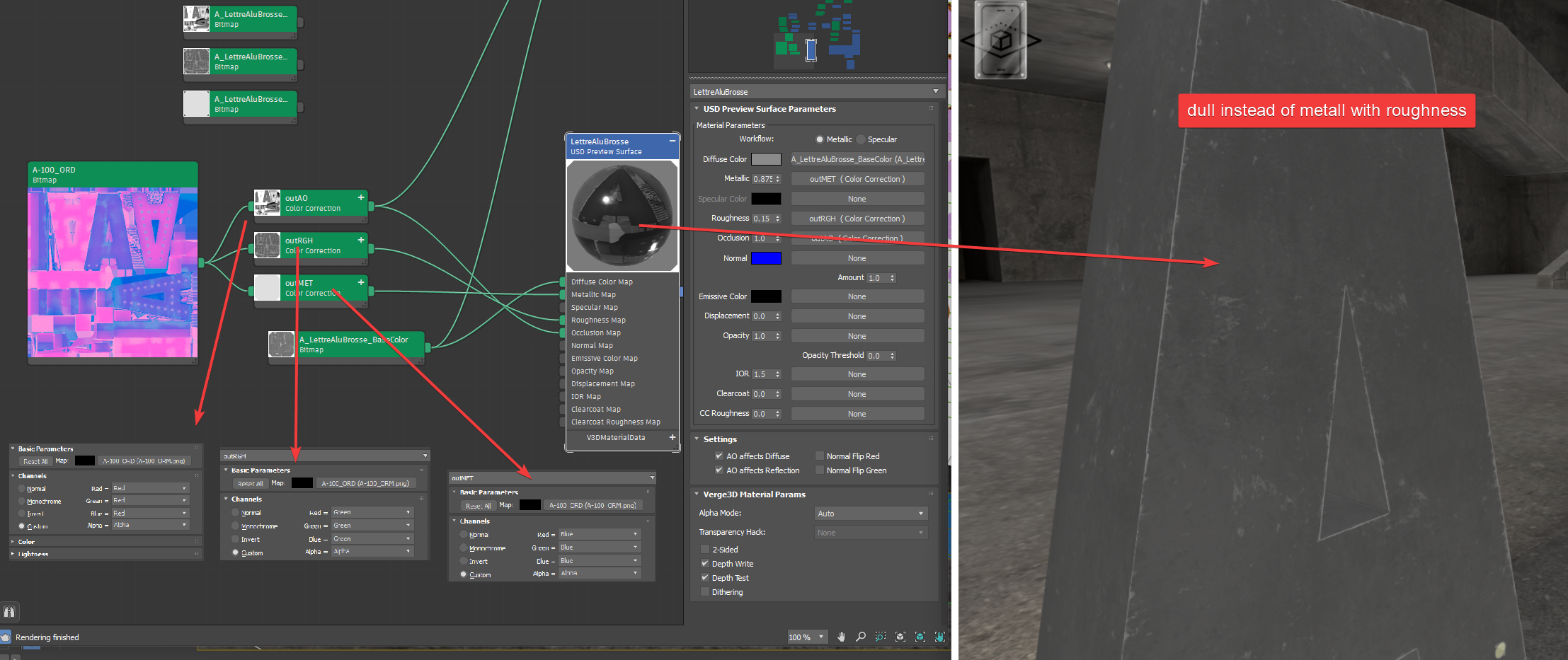
I have made one myself with photoshop, and i use a “colorCorrection” to split this bitmap in Occlusion / roughness / metallic, like explained in the manual (red/red/red/alpha, g/g/g/a and b/b/b/a), but when i export the render is not good : roughness is dull, like if it was full white.
So i tried to put grey-8b bitmaps separatelly, but then verge3D exporter creates a ORM map, looking exactly like the one i made myself but with a fancy name (occlusion_roughness_metallic_60985a40610fab44.png)…So question is : how to :
– or prevent generation of this map and use my grey-8b bitmaps ?
– or generate this ORM bitmap but with a choosen name ?
– use my own ORM bitmap with roughness working ?See screenshots…
-
This topic was modified 7 months, 1 week ago by NaxosCG.
Attachments:
"1+1=3... for large values of 1"
2026-02-10 at 4:24 pm #86202 Alexander KovelenovStaff
Hi,
USD (usdPreviewSurface) materials from 3ds Max are kinda special since they are converted to glTF 2.0-conformant PBR model upon exporting to Verge3D. This is intentional to keep greater level of compatibility between exported assets. The downside of this is that you can’t really use the conventional material system of 3ds Max. For more advanced texture control and a complete lookdev workflow, switch to Physical or OpenPBR materials.2026-02-10 at 4:29 pm #86203NaxosCGCustomerHi,
For more advanced texture control and a complete lookdev workflow, switch to Physical or OpenPBR materials.Ok, i used to use USD matgerial as for long the iOS AR system only accepts USD shader…
Not sure, but i think it is not a limitation anymore, as the new Verge3d can convert to iOS AR from Physical / OpenPBR now ? Right ?
"1+1=3... for large values of 1"
2026-02-10 at 6:48 pm #86204NaxosCGCustomerTested Physical materials : it works well on desktop :
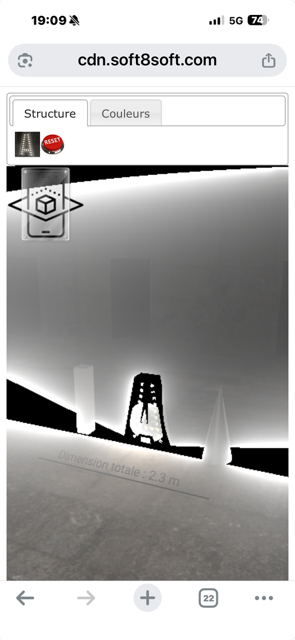
https://v3d.net/1dscBut if you test on iPhone, i have strange renders… (see attached)… And no letter in the AR…
Any idea ?
Attachments:
"1+1=3... for large values of 1"
2026-02-11 at 6:35 am #86206Alexander KovelenovStaffI see!
Indeed, for iOS-based AR, the USD approach looks better, even with all of its limitations. Conversion of complicated node trees to USD in runtime is more difficult and might cause various issues with the material (as in your example).2026-02-12 at 12:58 pm #86210NaxosCGCustomeri’ll try also PBR and OpenPBR, just in case…
But USD works for sure, only it does convert my maps into auto-named maps…
Annoying, but not blocking."1+1=3... for large values of 1"
2026-02-18 at 1:13 pm #86266NaxosCGCustomerHello again.
So i’ve tested several materials…
Physical is best for now on destop, ios and android.
But, iOS AR is still not showing the letter (please test) :
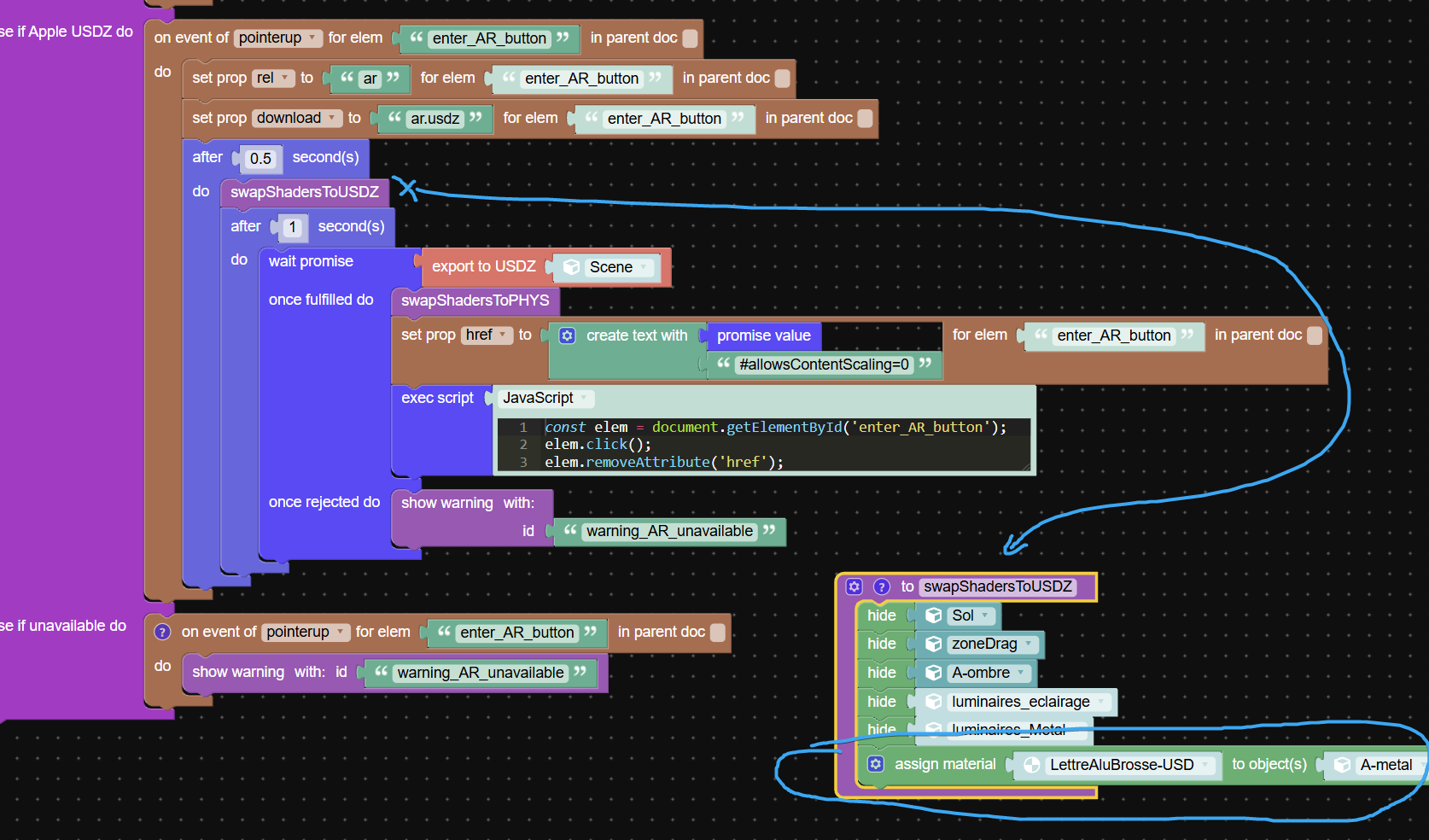
v3d.net/1dscWhen i enter AR on ios, i can see the 0.5s, then 1s wait (to let time for mtl change with maps)
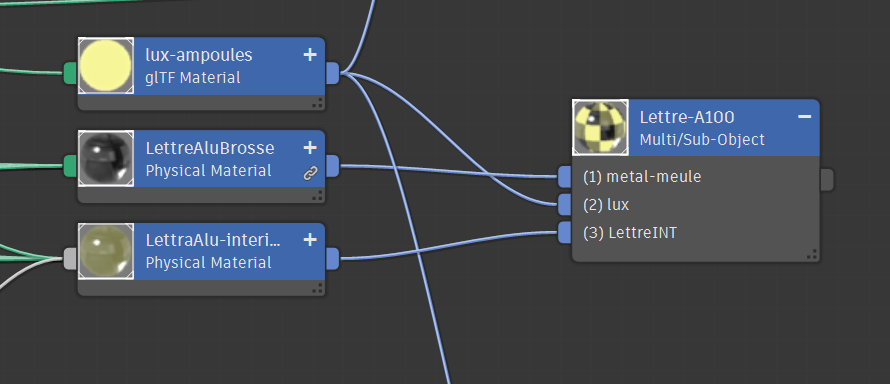
but it seams that the material does not change, as it stays yellowish inside and should not.Thing is that the letter as a multiSub mtl, with interior and exterior 2 different materials, mayb it is the issue here :
When i ask to assign an USD mtl to this object, not sure how verge3D manages the multiSub mtl and maybe it does not want to change it.Attachments:
"1+1=3... for large values of 1"
-
This topic was modified 7 months, 1 week ago by
-
AuthorPosts
- You must be logged in to reply to this topic.