
Home › Forums › General Questions › Animating transparency in 3ds Max for Verge
Tagged: animation, texture, transparency
- This topic has 9 replies, 6 voices, and was last updated 4 years, 11 months ago by
 Mikhail Luzyanin.
-
AuthorPosts
-
2020-08-24 at 3:54 pm #31939
loxstokk
ParticipantHi guys,
Apologies if this has already been covered in the forum (I cant seem to successfully search this thing) but I’ve got a question for something I’m convinced should be simple.
I’ve created this communication tower model and animated a simple ‘pulse’ emanating from the top. I’m trying to get it to fade out as it expands. I’ve tried keyframing the transparency, the cut out and I’ve tried animating a controller. Nothing seems to work. If anyone is able to explain the process for doing this I would be really grateful.
I’ve attached the scene for reference.
Cheers,
JamesP.S. Mods – please can you move this to the relevant section as I forgot to post this in the Max forum

Attachments:
2020-08-25 at 9:41 am #31947 Alexander KovelenovStaff2020-08-25 at 9:47 am #31948Participant
Apologies, see attached
2020-08-25 at 12:02 pm #31950Alexander KovelenovStaffYou can multiply your opacity using keyframed controller, something like that:
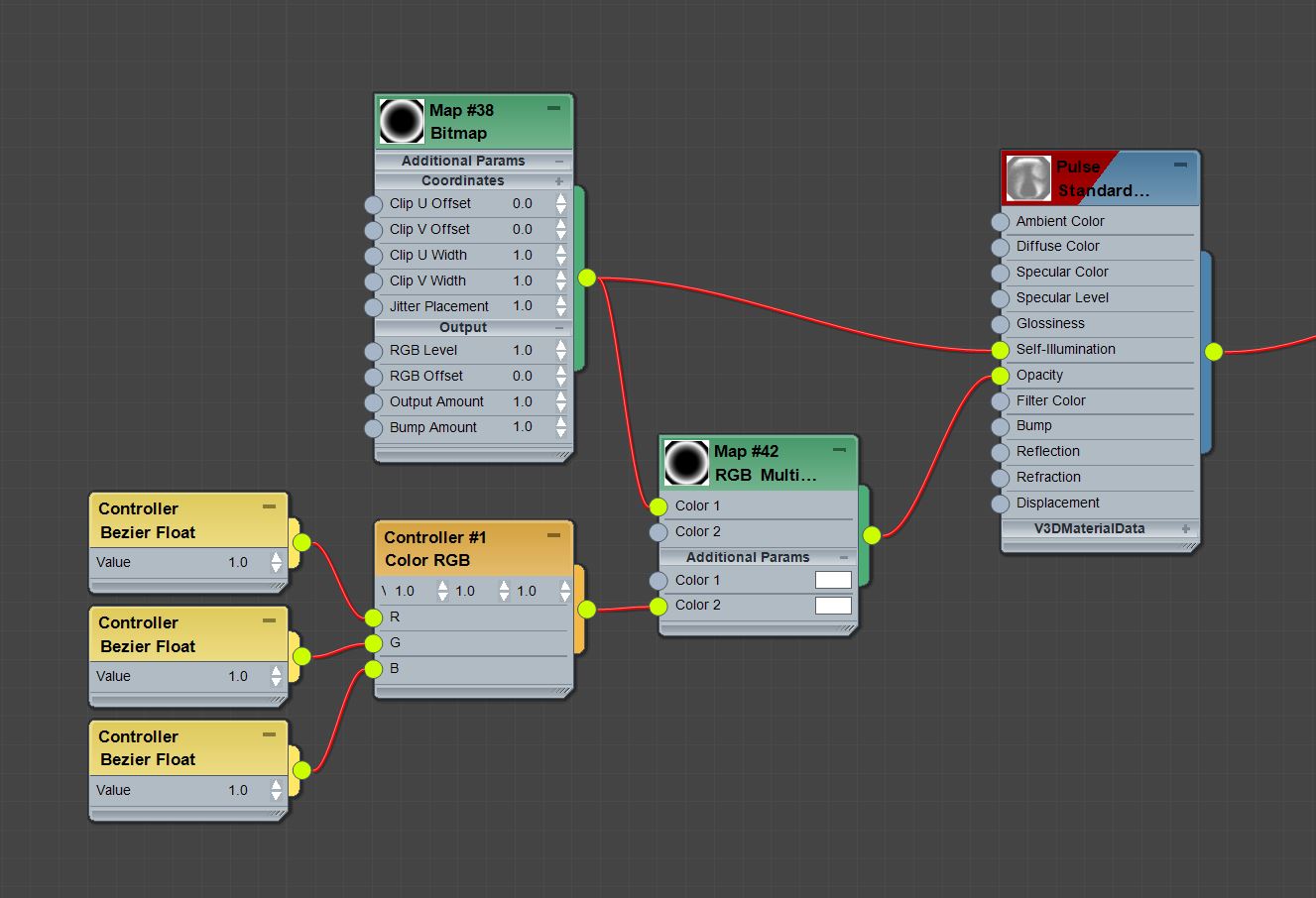
Attachments:
2020-08-26 at 11:19 am #32004ParticipantUnfortunately that still isn’t working. I have actually tried animating controllers before which worked fine in the viewport. Just didnt reproduce in the sneak peak.
I’ve tried your suggestion and attached the file.
Attachments:
2020-08-27 at 2:07 pm #32085 Ivan LyubovnikovStaff
Hi, it appears that animation via the Color RGB controller is not supported. We added this task to our TODO list. Nevertheless, you can use Bezier Point3 instead, which should work as expected:
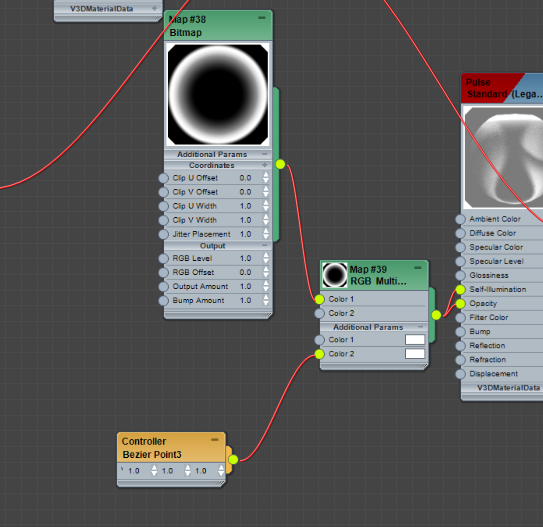
Attachments:
Co-founder and lead developer at Soft8Soft.
2020-08-27 at 2:48 pm #32092ParticipantBrilliant – that worked!

For future reference, the documentation states that both Float and Point 4 controllers are supported. Should this be Point 3 controllers too?
2020-08-28 at 8:00 am #32114 Yuri KovelenovStaff
Hi,
both Float and Point 4 controllers are supported
yep they should work – please let us know if it’s otherwise!
2021-03-19 at 11:53 pm #39601 Eugene ZosCustomer
Hi, any way of easily fading objects in 3dsmax? None of this works and when it does it takes a lot of time and effort to do in complex scenes.
2021-03-22 at 8:38 am #39633 Mikhail LuzyaninStaff
Hi, any way of easily fading objects in 3dsmax?
Unfortunally, it’s possible only by changing material transparency.
Co-founder and lead graphics specialist at Soft8Soft.
-
AuthorPosts
- You must be logged in to reply to this topic.