
Home › Forums › General Questions › Camera Move along a path
- This topic has 17 replies, 3 voices, and was last updated 1 year ago by
 Alexander Kovelenov.
-
AuthorPosts
-
2025-09-04 at 8:19 am #84422
gf3d
CustomerHi Guys,
Working with 3D Max 2022 and Verge 4.8.0
i´m working on a project where i need to move a camera along a path.
This works fine….of courseBut i need to move it by using the scrolling wheel on the mouse….forewards and backwards
cant find any puzzles to do that…..
Any hints?Thanks in advance
Ger
2025-09-04 at 9:36 am #84435 Alexander KovelenovStaff
Hi Ger,
This is quite easy to implement actually. You just make regular camera animation and control it’s frame based on the scroll delta (you obtain it using the “wheel” event). See a basic example attached: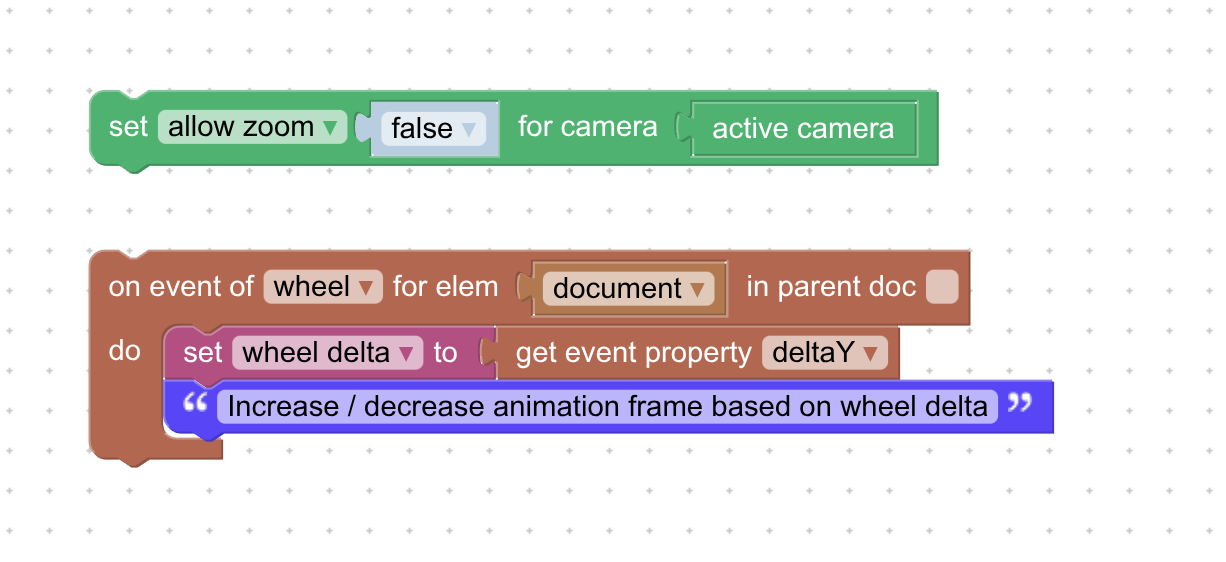
-
This reply was modified 1 year ago by Alexander Kovelenov.
2025-09-04 at 10:04 am #84444CustomerThanks Alexander…….so far so clear…..but i cannot find this “Set to” puzzle
Greets
Ger
2025-09-04 at 10:10 am #84445Customerok found it its variable
2025-09-05 at 11:10 am #84475CustomerHi Alexander,
I´ve set it up like you said……a simple camera movement……stopped the animation of the Camera with a puzzle……but nothing happens when i scroll …
If I dont stop the animation with a puzzle the animation just runs…..
Any hint whats wrong?
Greets
Ger
2025-09-06 at 7:01 am #84482Alexander KovelenovStaffHi,
I think you can disable “Auto Start” animation in object settings. Regarding frame set, the idea is to increase / decrease current frame based on “wheel delta” (multiplied by some value). If in trouble, use print to console to debug.-
This reply was modified 1 year ago by Alexander Kovelenov.
2025-09-06 at 1:50 pm #84491 QiangGeParticipant
Using path animations exported from 3D software is super convenient, but when you try to control everything frame by frame it gets kinda awkward — especially with the camera, since it’s also tied to the orbit controls. Think of something like a VR roller coaster scene.
So I hacked together a mini JavaScript demo to show the idea ,the camera runs along the path, but you can still use WASD to move the view and mouse wheel control to move forward. Just to provide ideas.2025-09-07 at 8:27 am #84494CustomerThank You QiangGE for yor effort but thats not what i need…
Greets
Ger
2025-09-07 at 8:33 am #84495CustomerHi Alexander,
I´ve send you some Data throungh your info@ Mail account…
The print to console command doesn´t show any mistakes…
What i don´t understand is what you mean by” based on “wheel delta” (multiplied by some value)”…..where do i define this multiply value?
Maybe you could just have a look at the date i send you
Greets
Ger
2025-09-08 at 6:51 am #84504Alexander KovelenovStaffHi Ger,
Here is the short puzzle snippet that moves the camera forwards/backwards:
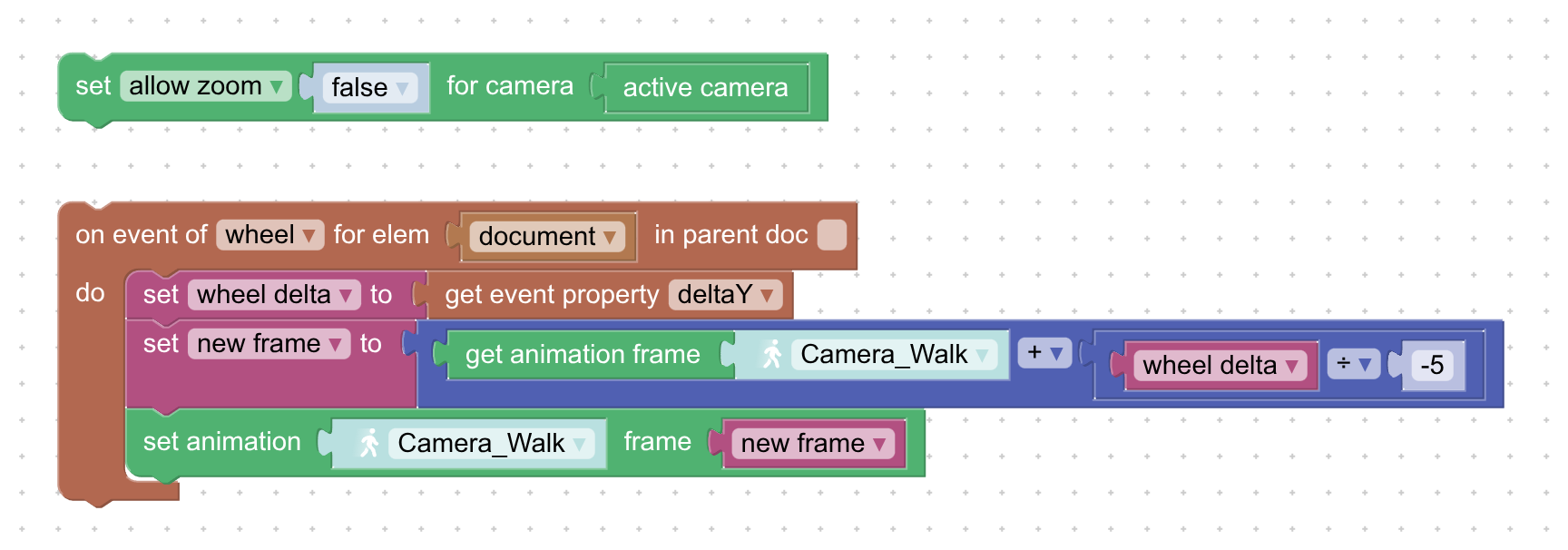
Hope it helps!
-
This reply was modified 1 year ago by Alexander Kovelenov.
2025-09-08 at 7:33 am #84507CustomerHi Alexander,
No changes…..even with a new Camera…..Did you have a look at the data i send you….
If so …does it work at your site…..If so pls. send me the data so i keep working on that one….
Thanks
Greets
Ger
2025-09-08 at 8:18 am #84508Alexander KovelenovStaffYep, I’ve applied the scenario above to your scene and it worked for me. Could you give it another shot?
-
This reply was modified 1 year ago by Alexander Kovelenov.
2025-09-08 at 8:29 am #84510Customerwhat do you mean with another shot?………Did you change anything in the max file?
As i mentioned its a Verge 4.8.0 version created with max 2022…..
in what version of verge did you do it?
2025-09-08 at 8:48 am #84511Alexander KovelenovStaffNo, I use the glTF you provided in Verge3D 4.11. It appears to be fully compatible and does not require reexporting. So you could give it a try in a trial version (stable 4.10 or pre 4.11) just to confirm that we’re on the same foot here.
2025-09-08 at 8:56 am #84512CustomerOk….for some reason it seems to work now…although i don´t know why…
Just needs some fine adjusting…..But another thing….is there a way to control the rotation better…..right now there is no rotation keys on the cam…..it moves as it should scrolling the mouse…when i stop scrolling and i rotate the cam ..so far so good…as soon as i start scrolling again it flips back to its origional position…..which i can understand why….but is there a way to avoid this….so the rotation angle doesn´t flip back?
And another thing which is a bit anoing….the direction of the scrolling…..when i scrol the wheel backwards the cam moves foreward and the other way around……i´v seen this in other apps as well ….is there a way to change theis?
Greets
Ger
-
This reply was modified 1 year ago by
-
AuthorPosts
- You must be logged in to reply to this topic.