
Home › Forums › Graphics / Blender › Click through/click beyond a transparent image
- This topic has 8 replies, 4 voices, and was last updated 4 years, 7 months ago by
 Артём.
-
AuthorPosts
-
2020-12-16 at 3:37 pm #36611
 JohnsonCustomer
Hi Soft8Soft!
I have a transparent image attached to the camera in my scene so that it’s visible no matter where the user turns, and wanted to click beyond that transparent image– to be able to click on to textures, on to planes, geometry, etc.
How would I do that?
2020-12-16 at 5:10 pm #36614 GLiFTeKCustomer
Use a. Call JS puzzle.
MAKING OBJECTS “UNCLICKABLE”
many times you need to click “through” an object.
This is how:"app.ExternalInterface.setUnclickable = function (unclickable) { var myObj = app.scene.getObjectByName(unclickable); myObj.raycast = function() {}; console.log("UNCLICKABLE: ", unclickable); };" And make it selectable again like this: var myObj = app.scene.getObjectByName('clickable'); delete myObj.raycast;where “unclickable” is where you plug in your object selector or variable that has that as it’s value.
You can also use the execute js puzzle

Visit the GLIFTEK Verge3D Plugins Store!
GLIFTEK.com for Plugin Documentation & LIVE DEMOS!
LIKE The GLIFTEK Facebook Page for updates!
Join the Verge 3D Discord Server!
plz share Discord link & on your signature!2020-12-17 at 1:02 pm #36629JohnsonCustomerUse a. Call JS puzzle. MAKING OBJECTS “UNCLICKABLE” many times you need to click “through” an object. This is how:
<span class=”crayon-title”></span><textarea wrap=”soft” class=”crayon-plain print-no” data-settings=”dblclick” readonly=”” style=”tab-size: 4; font-size: 12px !important; line-height: 15px !important; z-index: 0; opacity: 0; overflow: hidden;”>
“app.ExternalInterface.setUnclickable = function (unclickable) {
var myObj = app.scene.getObjectByName(unclickable);
myObj.raycast = function() {};
console.log(“UNCLICKABLE: “, unclickable);
};”And make it selectable again like this:
var myObj = app.scene.getObjectByName(‘clickable’);
delete myObj.raycast;</textarea><table class=”crayon-table” style=””><tbody><tr class=”crayon-row”><td class=”crayon-nums ” data-settings=”show”>12345678910</td><td class=”crayon-code”>
<span class=”crayon-s”>”app.ExternalInterface.setUnclickable = function (unclickable) { </span><span class=”crayon-s”> var myObj = app.scene.getObjectByName(unclickable);</span><span class=”crayon-s”> myObj.raycast = function() {};</span><span class=”crayon-s”> console.log(“</span><span class=”crayon-v”>UNCLICKABLE</span><span class=”crayon-o”>:</span><span class=”crayon-h”> </span><span class=”crayon-s”>”, unclickable);</span><span class=”crayon-s”> };”</span><span class=”crayon-st”>And</span><span class=”crayon-h”> </span><span class=”crayon-e”>make </span><span class=”crayon-e”>it </span><span class=”crayon-e”>selectable </span><span class=”crayon-e”>again </span><span class=”crayon-e”>like </span><span class=”crayon-r”>this</span><span class=”crayon-o”>:</span><span class=”crayon-h”> </span><span class=”crayon-t”>var</span><span class=”crayon-h”> </span><span class=”crayon-v”>myObj</span><span class=”crayon-h”> </span><span class=”crayon-o”>=</span><span class=”crayon-h”> </span><span class=”crayon-v”>app</span><span class=”crayon-sy”>.</span><span class=”crayon-v”>scene</span><span class=”crayon-sy”>.</span><span class=”crayon-e”>getObjectByName</span><span class=”crayon-sy”>(</span><span class=”crayon-s”>’clickable'</span><span class=”crayon-sy”>)</span><span class=”crayon-sy”>;</span><span class=”crayon-h”> </span><span class=”crayon-e”>delete </span><span class=”crayon-v”>myObj</span><span class=”crayon-sy”>.</span><span class=”crayon-v”>raycast</span><span class=”crayon-sy”>;</span></td></tr></tbody></table>
where “unclickable” is where you plug in your object selector or variable that has that as it’s value.
You can also use the execute js puzzleThank you Gliftek! Really appreciate your clarification.
Only problem is, I really don’t know what I’m doing when it comes to javascript and placing it into puzzles (still trying to learn!), is there anyway you could show me exactly what the code is that I’m putting in the execute js puzzle or upload a puzzle with that code in when my object is called “lens1”?
2020-12-17 at 1:23 pm #36630 Yuri KovelenovStaff2020-12-17 at 4:53 pm #36635GLiFTeKCustomer
O dayum.. I’m old school. Hahaha.
Totally forgot about this new feature.
Super cool. Visit the GLIFTEK Verge3D Plugins Store!
GLIFTEK.com for Plugin Documentation & LIVE DEMOS!
LIKE The GLIFTEK Facebook Page for updates!
Join the Verge 3D Discord Server!
plz share Discord link & on your signature!2020-12-17 at 7:43 pm #36638JohnsonCustomerThank you Gliftek for the previous insight.
Thank you for that example in 3.5 Yuri, that worked perfectly! Appreciate the answer, thank you!
But now I can’t use the “when hovered” puzzle to change the cursor on other elements for some reason, do you know the cause of that?
2020-12-18 at 7:11 am #36649Yuri KovelenovStaffplease see this answer https://www.soft8soft.com/topic/change-cursor-in-hover/
2020-12-18 at 1:36 pm #36659JohnsonCustomerThank you Yuri!
2022-02-10 at 10:57 pm #49342 АртёмCustomer
In version 3.5, Verge3D’s when clicked puzzle obtain the option x-ray. If enabled, it allows to interact with objects overlapped by other objects.
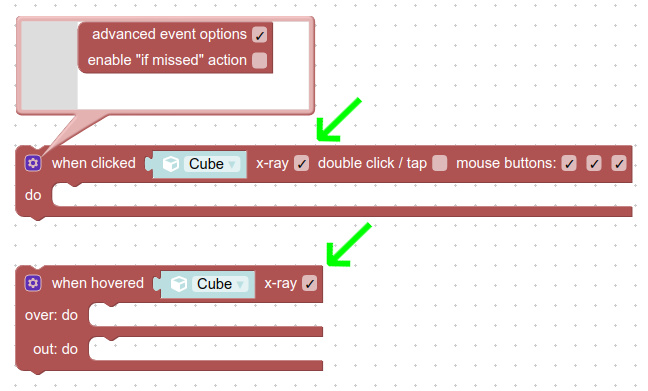
thanks! It helped with the case when the UI from the blender used and when the object was as close to the camera as possible, the buttons lost their functionality. The x-ray checkbox helped!
-
AuthorPosts
- You must be logged in to reply to this topic.