
Home › Forums › Bug Reports and Feature Requests › Export error 3dsMax Verge 3.4
- This topic has 3 replies, 3 voices, and was last updated 5 years, 9 months ago by
 Yuri Kovelenov.
Viewing 4 posts - 1 through 4 (of 4 total)
-
AuthorPosts
-
2020-10-02 at 2:12 pm #33746
web
CustomerJust updated to the newest version and got this error message:
-- Error occurred in anonymous codeblock; filename: C:\Users\XXX\verge3d_max\max_plugin\verge3d.ms; position: 20069; line: 513
-- MAXScript MacroScript Error Exception:
-- Runtime error:
Traceback (most recent call last):
  File "C:\Users\XXX\verge3d_max\max_plugin\__init__.py", line 99, in <exportGLTF>
  File "C:\Users\XXX\verge3d_max\max_plugin\__init__.py", line 146, in <exportGLTFPath>
  File "C:\Users\XXX\verge3d_max\max_plugin\generate.py", line 1545, in <generate>
  File "C:\Users\XXX\verge3d_max\max_plugin\generate.py", line 236, in <generateAnimations>
  File "C:\Users\XXX\verge3d_max\max_plugin\..\python\pluginUtils\gltf.py", line 485, in <mergeAnimations>
KeyError: u'extensions'

-- MAXScript callstack:
--	thread data: threadID:4916
--	------------------------------------------------------
--	[stack level: 0]
--	In exportGLTF(); filename: C:\Users\XXX\verge3d_max\max_plugin\verge3d.ms; position: 20070; line: 513
--	member of: StructDef:V3DManagerStruct
--		Locals:
--		Externals:
--			owner: (V3DManagerStruct V3D_MENU_CONTEXT:1905594901 autoAssignAttrs:false settingsFile:"$userscripts/Verge3D/settings.ini" debug:false hasInitiated:true smeClock:dotNetObject:System.Windows.Forms.Timer)
--			importPython: Struct member:importPython : V3DManagerStruct.importPython()
--	------------------------------------------------------
--	[stack level: 1]
--	called from codeblock macroScript: Verge3D_exportGLTF; filename: C:\Users\XXX\verge3d_max\max_plugin\verge3d.ms; position: 277; line: 11
--		Locals:
--		Externals:
--	------------------------------------------------------
--	[stack level: 2]
--	called from top-level
2020-10-02 at 4:03 pm #33759 Alexander KovelenovStaff
Hi,
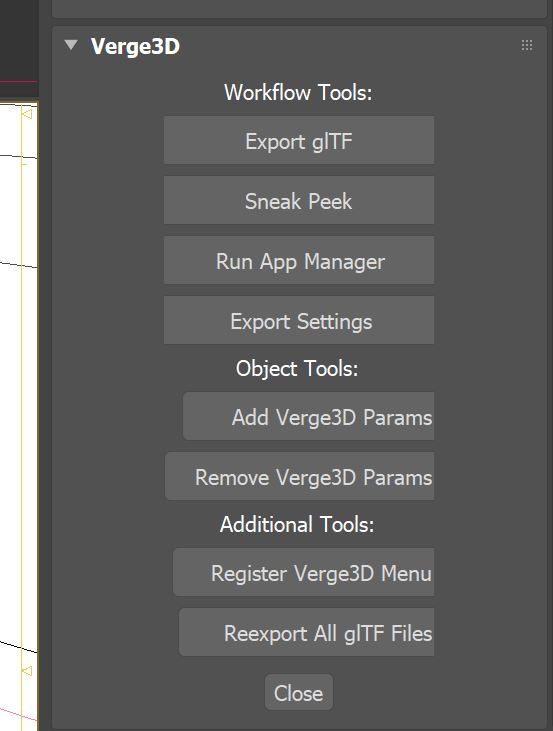
Looks like the issue occurs only for animated objects with no Verge3D params. We’re going to fix it in the next Verge3D update, meanwhile, you can easily fix this crash by adding custom params to your objects. Simply select them all and use the “Add Verge3D Params” button on the Utilities panel.
Attachments:
2020-10-05 at 10:08 am #33818CustomerYour mentioned workaround fixes the issue. Thx.
2020-10-06 at 5:26 am #33850 Yuri KovelenovStaff
 -
AuthorPosts

Viewing 4 posts - 1 through 4 (of 4 total)
- You must be logged in to reply to this topic.