
Home › Forums › Bug Reports and Feature Requests › I may have found a material-oriented bug… using Booleans
- This topic has 6 replies, 3 voices, and was last updated 2 years, 2 months ago by
 Alexander Kovelenov.
-
AuthorPosts
-
2024-01-08 at 9:43 pm #69543
 NaxosCGCustomer
Hello there, i may have found some weird meterial bug, using Booleans :
Please have a look there : https://v3d.net/rv7
You can see a test for a swimming pool configurator (after 8-pool tables, i’m going to swimming pools

The arrows are to enlarge the tiles zone, and you can grab the tiles to offset the placement (limited to 50cm X & Y)To make things doable, i’ve used booleans : i have a large plane that is booleanes / intersect with an hollowed cube, driven with morpehrs in X, -X, Y and -Y.
It works well in USD…Problem is i would like to use Physical shaders to get AO, and – for no logical reason – the shader is weird : instead of my texture, i get sort of inverted Roughness as diffuse / color texture.
When you move arrows or drag the plane, the texture si changed into a technical bleu squares with small triangles one, then back to the real one, that should look like the one around the water (grey stone)
I’ve double checked quite everything :
– The Physical shader is working, as if i show the plane with it, it shows ok.
– The code is ok as if i use another shader / the same shader in USD material : it works (but the AO, of course)
– The object is ok, juste not showing the right color
– The object does not exists in 3dsmax, it is created using BooleanAnd another strange thing : if i deactive AO, then the booleaned object is shown differently.
As if booleans does not work with AO, with Phisucal shader or both…Here you can find the project / app :
https://e.pcloud.link/publink/show?code=XZsdJeZfK4DoC3TRg4XCd5I90KeommrOK47Please someone help me.
PS : you can see that when i enter AR (iOS only for now), i swap PHY shaders into USD ones, then back PHY on exit.
"1+1=3... for large values of 1"
2024-01-10 at 5:54 am #69577 Yuri KovelenovStaff2024-01-10 at 8:28 pm #69595NaxosCGCustomer
Hi Yuri,
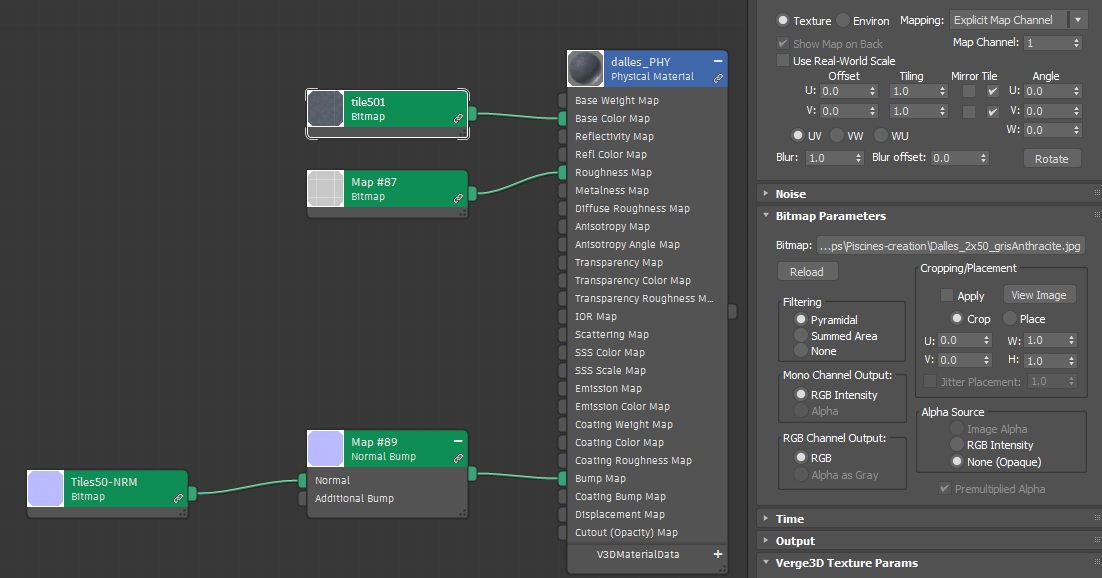
The boolean is made from a simple plane + UVmap (channel 1) and one hollow cubic mesh, with no shader + morpher.
Maybe i should put the same shader on both objects ?Only one mUVmap channel is used, and here is the shader :
https://e.pcloud.link/publink/show?code=XZW9zeZu0acT61tXepcjRT7FbDAOjkf8rEk
Attachments:
"1+1=3... for large values of 1"
2024-01-10 at 8:31 pm #69599NaxosCGCustomerMaybe i should put the same shader on both objects ?
Did not solved it.
"1+1=3... for large values of 1"
2024-01-11 at 8:25 am #69606 Alexander KovelenovStaff
Hi Claudio,
Checked the similar setup and found the cause of this issue. It’s actually normal map which requires additional attributes which are not supported by the boolean puzzle. You might remove the normal map in your material to see if it helps.
2024-01-11 at 8:31 am #69607NaxosCGCustomerYou might remove the normal map in your material to see if it helps
Many thanks, Alexander : it works now !
I guess you should add a small line in the manual : “Does not work with normalMap yet” "1+1=3... for large values of 1"
2024-01-11 at 9:22 am #69608Alexander KovelenovStaff -
AuthorPosts

- You must be logged in to reply to this topic.