
Home › Forums › General Questions › Dynamic Texture Loading Based on Device Memory
Tagged: Dynamique, Optimisation, performance, texture
- This topic has 6 replies, 4 voices, and was last updated 7 months, 1 week ago by
 xeon.
xeon.
-
AuthorPosts
-
2025-08-04 at 7:03 pm #83499
Nathan Arditti
CustomerHello everyone,
I’m trying to optimize my Verge3D application by dynamically loading different texture resolutions based on the user’s device memory. The goal is to improve performance on low-end devices while providing a high-quality experience on more powerful machines.
My approach is to:
1. Use arun scriptpuzzle to get the value ofnavigator.deviceMemory.
2. Store this value in a variable using thesetpuzzle.
3. Use anif/elsepuzzle to check if the value is greater than or equal to a specific threshold (e.g., 4 GB).
4. Load the appropriate texture resolution (e.g., 4K or 2K) based on the condition.I’ve tried using the following JavaScript code in the
run scriptpuzzle:return navigator.deviceMemory;and then assigning its output to a variable with thesetpuzzle. However, I am consistently running into the following error:TypeError: Cannot set properties of undefined (setting 'deviceMemory')It seems there might be a problem with how the
run scriptpuzzle interacts with puzzle variables, or an issue with the timing of the variable creation.What is the correct way to implement this logic? I would appreciate any guidance on how to get the
deviceMemoryvalue via a script and use it reliably within the puzzle system.Thank you !
2025-08-05 at 2:08 am #83501 QiangGeParticipant
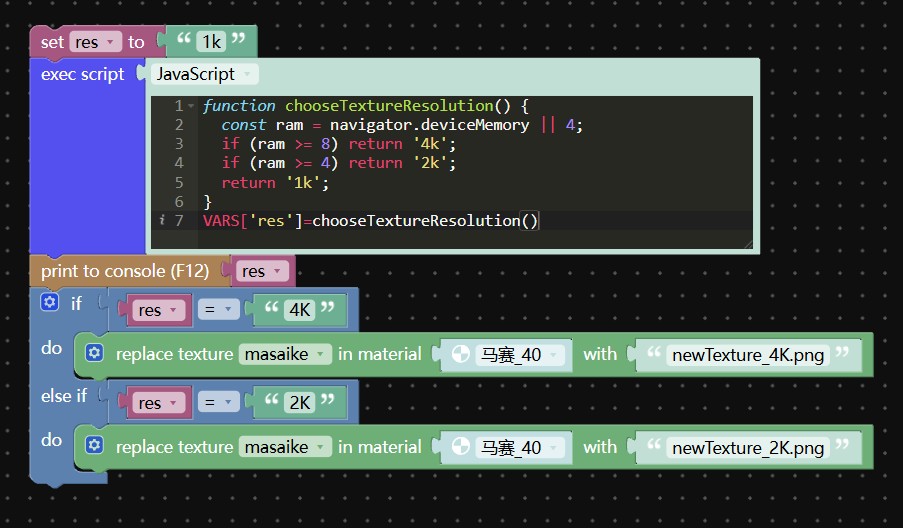
@Nathan, Here is a simple implementation for your reference: it initially uses 1K textures, and then replaces them with higher-resolution textures based on the device conditions.
 2025-08-05 at 11:02 am #83517Customer
Hi qiangge thanks for your help.
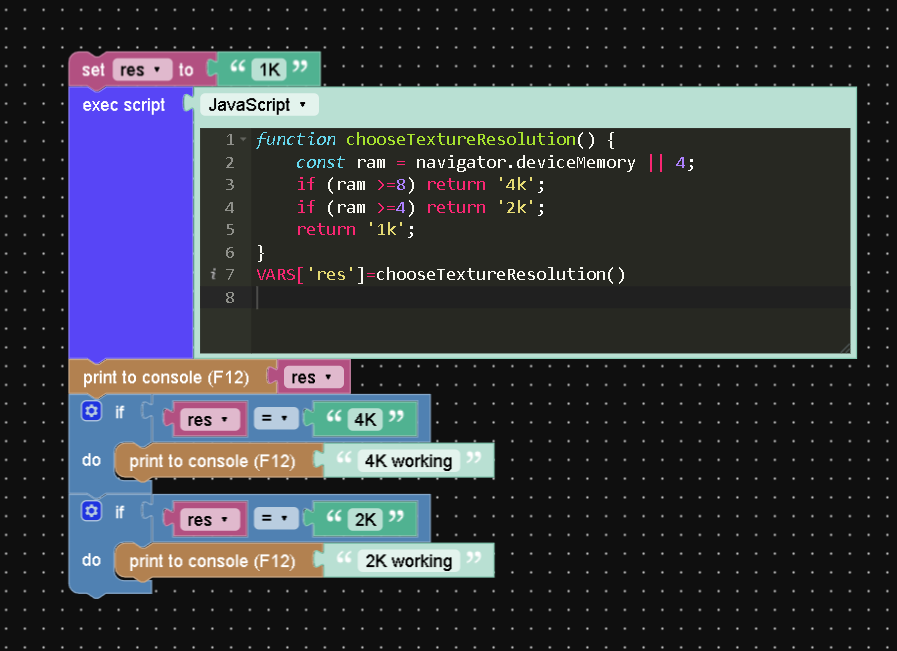
I tried it but it doesn’t seem to work. This is the puzzle and nothing prints in the console.Attachments:
2025-08-05 at 3:45 pm #83523 Alexander KovelenovStaff
Hi,
Unfortunately, navigator.deviceMemory is quite unreliable (returning random results to prevent user fingerprinting) and has quite limited browser support (e.g. not supported in Safari and Firefox). So for now, there is no way to tell how much memory the target system has.
As an alternative, I’d suggest making an app which work on as many systems as possible. You can use the texture compression to reduce GPU memory consumption by a large magnitude.
2025-08-05 at 4:28 pm #83525CustomerThank you very much for this explanation. I already use texture compression to optimize as much as possible.
Could I ask you if the following method would be a good alternative ?
I would use the puzzle check performance and, if the performance is deemed “good”, I would load 4K textures. If it’s “poor”, I’d load 2K textures. Is this a valid way of optimizing the user experience while taking advantage of higher-performance systems ?
2025-08-05 at 6:04 pm #83526Alexander KovelenovStaffI would use the puzzle check performance and, if the performance is deemed “good”, I would load 4K textures. If it’s “poor”, I’d load 2K textures. Is this a valid way of optimizing the user experience while taking advantage of higher-performance systems ?
In general yes, this would be a more effective approach.
2025-08-05 at 6:50 pm #83527 xeonCustomer
A work around is to create an app that loads a responsive menu system and GLTF with low res textures. Then once loaded you can use standard puzzles to determine if the system is capable of higher res textures and swap them out based on system performance. Not ideal but it will work and the swapping of textures would occur in the background while the users is interacting with your app.
Xeon
Route 66 Digital
Interactive Solutions - https://www.r66d.com
Tutorials - https://www.xeons3dlab.com -
AuthorPosts
- You must be logged in to reply to this topic.