
Home › Forums › General Questions › Configure ANY colour ?
- This topic has 41 replies, 7 voices, and was last updated 5 years, 7 months ago by
 Mikhail Luzyanin.
-
AuthorPosts
-
2019-10-02 at 3:55 pm #19732
jezuk
CustomerHi Yuri,
Thank you for your email – I’ll get back to you :)
https://3dvisuals.co.uk/work/verge/th/0010-v04i.html

But, I now have one other problem – I can’t see my bitmaps ?
I see them in 3DS Max, in Sneek Peek, when I’m playing with Puzzles, etc, but when I upload, I don’t see any of my texture bitmaps. I’ve checked the paths, made sure the files are there, etc etc… Any idea why this could be happening ?
2019-10-02 at 5:04 pm #19734CustomerBitmaps been fixed :)
2019-10-03 at 6:21 am #19744 Yuri KovelenovStaff2019-11-03 at 2:24 pm #20958
 NaxosCGCustomer
First, you need to set up a color picker. Then, you can find (from its docs or by reviewing the code) in what exactly form does it provide colors. You must convert them to RGB values ranged from 0 to 1 before using with puzzles.
Is there any example available for such a html / JS colorpicker, then passing color code (Hexa . RGBa) to Verge3D puzzle ?
"1+1=3... for large values of 1"
2019-11-04 at 9:55 am #20959Yuri KovelenovStaffThere is no such an example unfortunately – however this thing can easily be implemented by using the get attribute and set color puzzles. The only difficulty here is to convert HEX code to RGB values, which at the moment should be done with JavaScript.
2019-11-04 at 1:48 pm #20960NaxosCGCustomerThere is no such an example unfortunately – however this thing can easily be implemented by using the get attribute and set color puzzles. The only difficulty here is to convert HEX code to RGB values, which at the moment should be done with JavaScript.
Ok, so Verge3D tutorials makers, here is a subject

"1+1=3... for large values of 1"
2020-06-08 at 5:32 pm #28540marinourso
Participantsorry I need help, I can’t change the color of a blender object. the drop-down menu of the set color puzzle gives me no option. in blender what should I activate or how should I apply a material to make it editable. thanks and sorry for my ignorance
2020-06-09 at 6:10 am #28555 Mikhail LuzyaninStaff
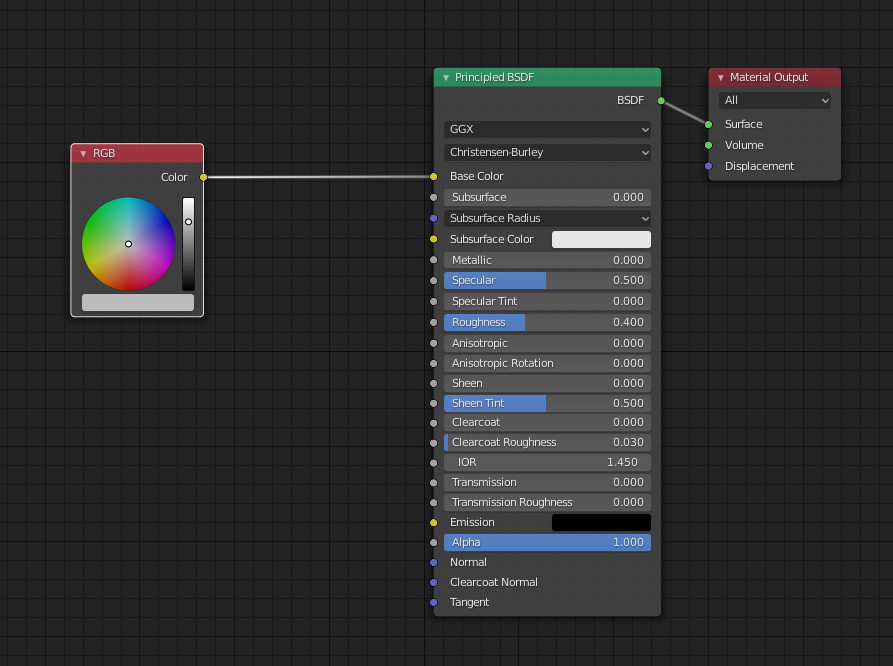
You need to add RGBolor node into your material and then change it with Set Color puzzle.
Co-founder and lead graphics specialist at Soft8Soft.
2020-06-09 at 7:08 am #28558ParticipantThank you for your answer. I think my problem is that I can’t understand how to do this. could you give me an example please? thank you so much
2020-06-09 at 11:33 am #28574Mikhail LuzyaninStaffLike this. This will allow you to change Base Color of the Principled BSDF.
Attachments:
Co-founder and lead graphics specialist at Soft8Soft.
2020-06-09 at 8:49 pm #28591Participantthank you for your answers, I am happy to be part of this community. I discovered that the label of the node did not correspond to me, I had used the upper case. thank you very much
2020-06-10 at 5:46 am #28605Mikhail LuzyaninStaff
Co-founder and lead graphics specialist at Soft8Soft.
-
AuthorPosts
- You must be logged in to reply to this topic.