
Home › Forums › General Questions › Multiple actions for one armature – Blender
- This topic has 4 replies, 3 voices, and was last updated 1 year, 1 month ago by
adamabr.
-
AuthorPosts
-
2025-08-12 at 8:10 pm #84149
adamabr
CustomerIs it possible to have two separate actions for the same armature? Like in Blender I can assign two separate actions to the armature. It would be sweet if I could access these in Verge3D.
The reason I want this functionality is to be able to combine multiple objects into one (reducing draw calls with combined material), but still being able to control each object’s animation separately.
Placing the animations on separate parts of the timeline in the same action might work okay for some actions, but I think that limits them from playing at the same time.
Thoughts?
Adam's Verge3D Tools:
GitHub2025-08-12 at 8:16 pm #84151 Alexander KovelenovStaff
Placing the animations on separate parts of the timeline in the same action might work okay for some actions, but I think that limits them from playing at the same time.
Hi,
Unfortunately, this would be the limitation even if you’d have a method to play different actions. This is because the armature object is the same. So cloning the armature is the only solution.2025-08-12 at 8:58 pm #84154CustomerI guess I just figured out one potential workaround for simple animations. Say you have many 3d buttons in an app. These all have a simple push animation when you click on them. The high number of buttons would benefit from being combined to reduce the draw calls.
By assigning each button to a bone in the armature we can then control the armature bones directly in verge3d. This enables combining mesh objects and still retaining control over the separate parts. This is practically limited to simple animations though.
Adam's Verge3D Tools:
GitHub2025-08-13 at 12:38 am #84155 QiangGeParticipant
Is it possible to have two separate actions for the same armature? Like in Blender I can assign two separate actions to the armature. It would be sweet if I could access these in
Hi,maybe try this demo
tip:Characters with multiple actions can be exported to glb files using Blender’s built-in export function.
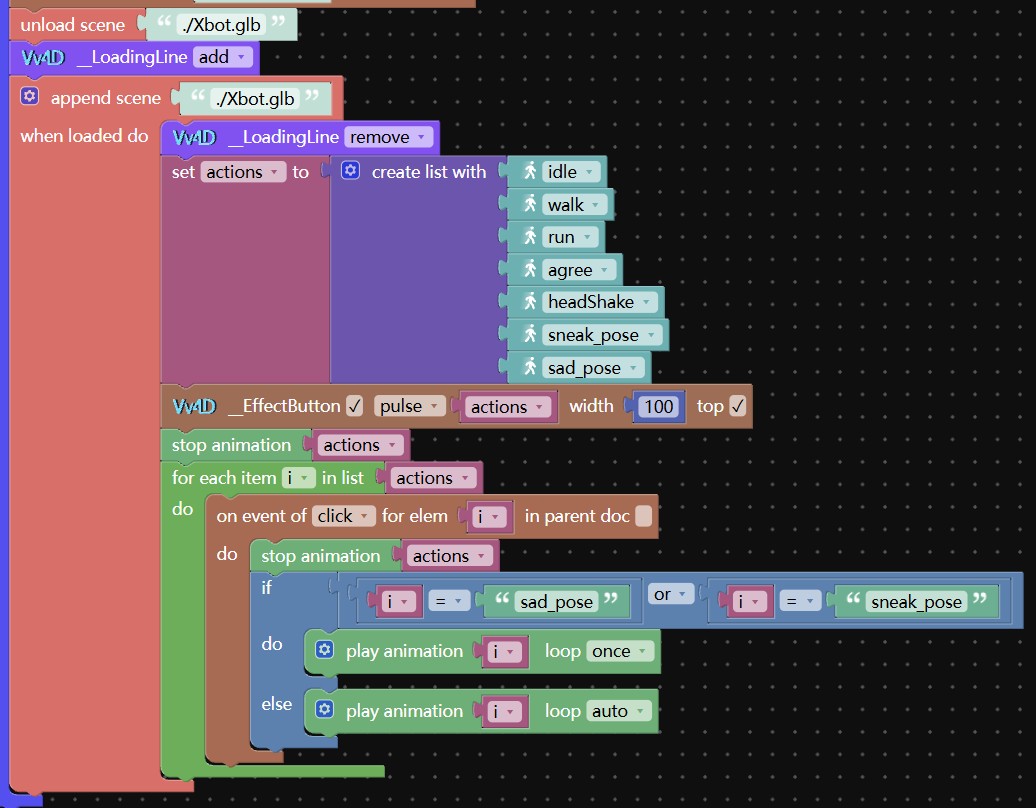
If you need to control character movements, achieve natural transitions between multiple actions, enable physical collisions with the scene, switch between first-person and third-person perspectives, etc., you can try this demo.2025-08-13 at 9:24 pm #84169CustomerThanks for the suggestion Qiangge! I got it to work which is awesome! I can play specific actions independent of each other.

However, looking at the performance log I can see that the draw calls increase with the number of bones. It almost seems like the built in glb exporter separates the object into one object per armature bone. This is a bummer, as my main use for this was to combine objects and materials to reduce the number of draw calls in the scene. If I get the same amount of draw calls with this method, as if I had separate object I don’t see the point in using it in my case.
I really appreciate the input though, thanks again!

Adam's Verge3D Tools:
GitHub -
AuthorPosts
- You must be logged in to reply to this topic.