
Home › Forums › General Questions › Google Web Designer
Tagged: UI
- This topic has 10 replies, 5 voices, and was last updated 6 years, 3 months ago by
lee20.
-
AuthorPosts
-
2019-01-16 at 3:31 pm #10615
dhayes
ParticipantHi,
In the tutorial in the docs, there is a section about using google web designer for creating UI. After follwing the tutorial I get this when I click on the new button beside my project in the app manager.(fig.1)
If I highlight behind the button and copy and paste, I get “404 not found”.
Attached you will find my project.
Thank you for any help provided.
2019-01-16 at 3:41 pm #10619 Yuri KovelenovStaff2019-01-16 at 3:46 pm #10621Participant
I am doing that here right?
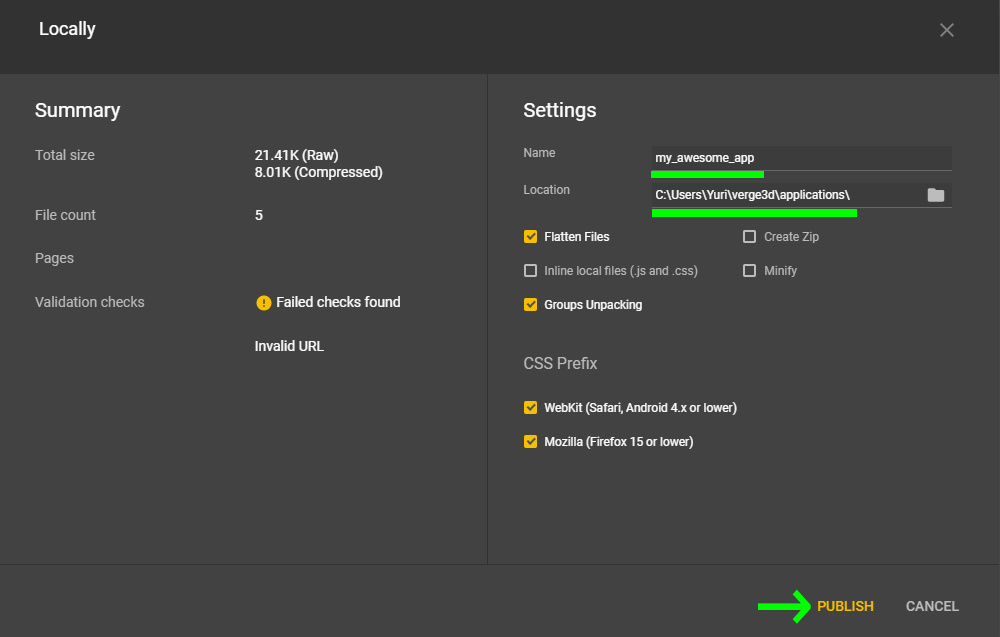
Edit: Images arn’t showing. When I click publish it has the location set to the root of my app’s folder. Is this what you mean ?2019-01-16 at 3:53 pm #10623Yuri KovelenovStaff2019-01-16 at 4:12 pm #10625ParticipantI just did that on a new project and I’m still getting 404 not found.
2019-01-16 at 4:20 pm #10626Yuri KovelenovStaffThat’s strange. Can you just move the files from the internal directory shoeUI one level upper and see if it works?
The reason for the 404 error is that the iframe in your index.html file assumes that the app .html file resides near index.html. But this is not the case with your current setup.
2019-01-16 at 4:23 pm #10627ParticipantThat worked!
Thanks very much for your help!2019-05-24 at 12:00 pm #15012Kani
ParticipantHi,
I have the same problem and I followed this answer as well but Looks like I have followed correctly, But I get 404: Not Found error.
File attached.
Appreciate any help.
Thanks,
Kani2020-06-13 at 2:42 pm #28809lee20
ParticipantHi:
I am using google web designer 8.0.3 . Some of the steps in you video tutorial does not working anymore.1.The publish function does not allow you have empty the name in the filed. The publish button will gray out.
2. How to get the default html file that verge 3D create back. It get over write by the google designer? My puzzle also no longer on the application interface.
Thank you.
2020-06-13 at 6:29 pm #28816 GLiFTeKCustomer
I stopped using Google Web Designer because of that same “greying out” problem. Blah.
Plus,look at your code, just becomes a huge mess with their custom tags and all.
Go get visual studio code or seamonkey
Visit the GLIFTEK Verge3D Plugins Store!
GLIFTEK.com for Plugin Documentation & LIVE DEMOS!
LIKE The GLIFTEK Facebook Page for updates!
Join the Verge 3D Discord Server!
plz share Discord link & on your signature!2020-06-13 at 7:38 pm #28818Participantthanks.
-
AuthorPosts


- You must be logged in to reply to this topic.