
- This topic has 6 replies, 4 voices, and was last updated 2 years, 10 months ago by
 Ivan Lyubovnikov.
-
AuthorPosts
-
2021-11-22 at 2:48 pm #47115
sireon
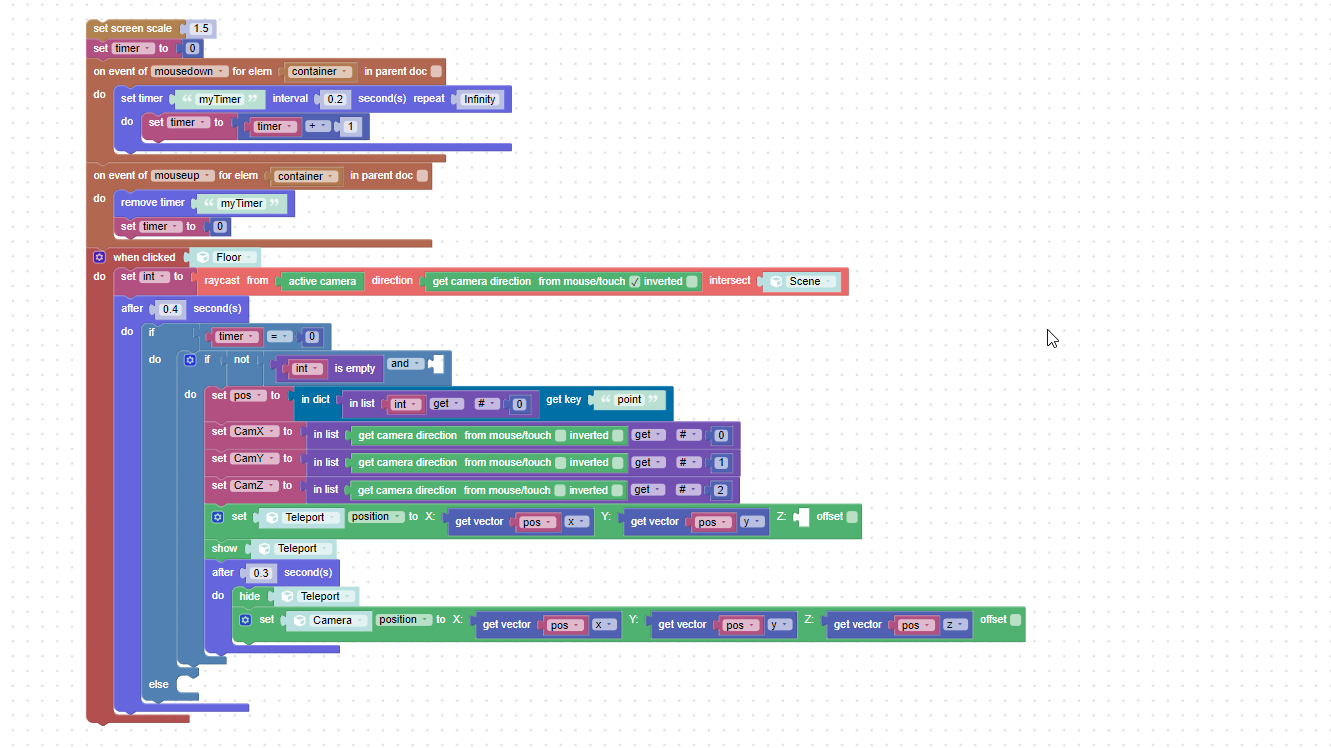
ParticipantHello. How to implement camera movement by click in First-Person mode? On the computer by default – WASD, I would like the character to move by mouse click or tap (on touch-screen devices). I would also like the camera to keep looking where it was looking before it was moved.
2021-11-23 at 10:51 am #47154ParticipantImplemented as follows. The only thing I could not implement a smooth movement of the camera from point A to click point. There is a node “tween camera to”. But I don’t understand what to put in “look at” input.
Attachments:
2021-11-23 at 1:43 pm #47162 Ivan LyubovnikovStaff
Hi,
The “look at” parameter specifies a 3d point where the camera should look at after the movement is done. If you want to keep the camera’s orientation the same then you can calculate the “look at” parameter by adding together the camera’s current direction/orientation vector and the new position to move to.
I attached a test demo, where you can look around via the left mouse button and move by clicking the plane with the right mouse button.
Hope this helps!Attachments:
Co-founder and lead developer at Soft8Soft.
2021-11-24 at 12:33 pm #47197ParticipantHi,
The “look at” parameter specifies a 3d point where the camera should look at after the movement is done. If you want to keep the camera’s orientation the same then you can calculate the “look at” parameter by adding together the camera’s current direction/orientation vector and the new position to move to.
I attached a test demo, where you can look around via the left mouse button and move by clicking the plane with the right mouse button.
Hope this helps!Thank you!
2022-01-09 at 1:39 am #48562 AVerge3DerParticipant
This is great. Thank you for sharing Ivan.
(Future self->See the example project in the above post)
(Mouse right-click and move the camera to that spot sample code) 2023-05-11 at 9:38 am #63692
niklasber
ParticipantHow can I open your attached zip file in verge3d? So I can have a look on the code blocks.
2023-05-18 at 8:21 am #63856Ivan LyubovnikovStaffHow can I open your attached zip file in verge3d? So I can have a look on the code blocks.
Hi, you can unpack it manually into Verge3D’s
applicationsdirectory. After that it should appear in the project list in the App Manager. Then you can open it in the Puzzles Editor and check the code blocks.Co-founder and lead developer at Soft8Soft.
-
AuthorPosts
- You must be logged in to reply to this topic.